> ## Documentation Index
> Fetch the complete documentation index at: https://docs.ntop.com/llms.txt
> Use this file to discover all available pages before exploring further.
# Cylindrical Cell Map
***
## About this Block
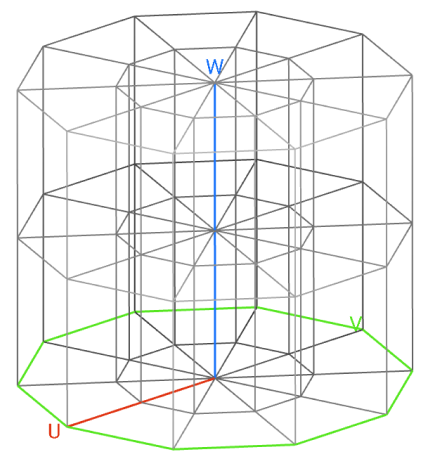
**What it does:** Generates a Cell Map with a cylindrical coordinate system that covers the entire input Volume with cells using the specified Cell radius, Cell height, and Arc count. This map serves as a layout for the lattice Unit Cells.
**Common uses:**
* Used as an input for the **Periodic Lattice** block.
**Tips:**
* The Cell radius, Cell height, and Arc count inputs follow the U, V, W guides displayed once the block has run.
* The default Cell Map's starting point is auto-computed based on the Volume's principal axes about the center of mass.
* A face of a cell will degenerate into an edge if it is incident on the Frame's Z-axis. Degenerate cells may be removed with the **Trim Cell Map** block if desired.
* The Frame input controls the orientation and position of the Cell Map.
* By default, the Cell Map edges will be curved to the cylindrical coordinate system. Check the Linear input to generate straight edges only. As a general rule, check the Linear input when using a Graph Unit Cell and uncheck the Linear input when using a TPMS Unit Cell in the **Periodic Lattice** block, although this will vary depending on your application and design goals.
* If the cells extend beyond the input Volume, you can try the following options to meet your design goals.
* Use the Cell Map in its too-large form to construct a lattice with the **Periodic Lattice** block, and then trim the lattice back down to the Volume using the **Trim Lattice** block.
* Use the **Trim Cell Map** block to reduce the cell count. Note that depending on the Fill type you select, some cells may still be outside the Volume.
* Adjust the Cell radius, Cell height, or Arc count.
* Adjust the size of the Volume input.
***
Implicit Body, Scalar, Scalar, Integer, Bool, Frame
Creates a cylindrical Cell Map within an Implicit Body. By default, the Cell Map's starting point is auto-computed based on the body's principal axes about the center of mass. To customize the map's orientation and position, use the optional Frame input.
### Inputs
| Name | Type | Description |
| ----------- | -------------------------------------------------------------------- | -------------------------------------------------------------------------------------------------------------------------------------------------------------------------------------------------------------------------------------- |
| Volume | [Implicit Body](../../../../block-documentation/types/implicit-body) | Implicit Body volume to define the minimum extent of the cell map. The volume must be 3 dimensional and closed. |
| Cell radius | [Scalar](../../../../block-documentation/types/scalar) | Cell size in the radial direction. |
| Cell height | [Scalar](../../../../block-documentation/types/scalar) | Cell size in the height direction. |
| Arc count | [Integer](../../../../block-documentation/types/integer) | Number of cells in circumferential direction. |
| Linear | [Bool](../../../../block-documentation/types/bool) | Option to create a linear or curved cell map. As a general rule, check this option to create a linear map when using a Graph Unit Cell, and uncheck when using a TPMS Unit Cell, although this will vary depending on the application. |
| Frame | [Frame](../../../../block-documentation/types/frame) | Frame that defines the starting point and orientation of the cell map. |
### Outputs
| Type |
| ---------------------------------------------------------- |
| [Cell Map](../../../../block-documentation/types/cell-map) |
***
Implicit Body, Scalar, Scalar, Integer, Bool, Frame, 1.1.0
Creates a cylindrical Cell Map within an Implicit Body. By default, the Cell Map's starting point is auto-computed based on the body's principal axes about the center of mass. To customize the map's orientation and position, use the optional Frame input.
### Inputs
| Name | Type | Description |
| ----------- | -------------------------------------------------------------------- | -------------------------------------------------------------------------------------------------------------------------------------------------------------------------------------------------------------------------------------- |
| Volume | [Implicit Body](../../../../block-documentation/types/implicit-body) | Implicit Body volume to define the minimum extent of the cell map. The volume must be 3 dimensional and closed. |
| Cell radius | [Scalar](../../../../block-documentation/types/scalar) | Cell size in the radial direction. |
| Cell height | [Scalar](../../../../block-documentation/types/scalar) | Cell size in the height direction. |
| Arc count | [Integer](../../../../block-documentation/types/integer) | Number of cells in circumferential direction. |
| Linear | [Bool](../../../../block-documentation/types/bool) | Option to create a linear or curved cell map. As a general rule, check this option to create a linear map when using a Graph Unit Cell, and uncheck when using a TPMS Unit Cell, although this will vary depending on the application. |
| Frame | [Frame](../../../../block-documentation/types/frame) | Frame that defines the starting point and orientation of the cell map. |
### Outputs
| Type |
| ---------------------------------------------------------- |
| [Cell Map](../../../../block-documentation/types/cell-map) |
***
Implicit Body, Scalar, Scalar, Integer, Bool, Frame, 1.2.0
Creates a cylindrical Cell Map within an Implicit Body. By default, the Cell Map's starting point is auto-computed based on the body's principal axes about the center of mass. To customize the map's orientation and position, use the optional Frame input.
### Inputs
| Name | Type | Description |
| ----------- | -------------------------------------------------------------------- | -------------------------------------------------------------------------------------------------------------------------------------------------------------------------------------------------------------------------------------- |
| Volume | [Implicit Body](../../../../block-documentation/types/implicit-body) | Implicit Body volume to define the minimum extent of the cell map. The volume must be 3 dimensional and closed. |
| Cell radius | [Scalar](../../../../block-documentation/types/scalar) | Cell size in the radial direction. |
| Cell height | [Scalar](../../../../block-documentation/types/scalar) | Cell size in the height direction. |
| Arc count | [Integer](../../../../block-documentation/types/integer) | Number of cells in circumferential direction. |
| Linear | [Bool](../../../../block-documentation/types/bool) | Option to create a linear or curved cell map. As a general rule, check this option to create a linear map when using a Graph Unit Cell, and uncheck when using a TPMS Unit Cell, although this will vary depending on the application. |
| Frame | [Frame](../../../../block-documentation/types/frame) | Frame that defines the starting point and orientation of the cell map. |
### Outputs
| Type |
| ---------------------------------------------------------- |
| [Cell Map](../../../../block-documentation/types/cell-map) |
***
Implicit Body, Scalar, Scalar, Integer, Bool, Frame, 1.3.0
Creates a cylindrical Cell Map within an Implicit Body. By default, the Cell Map's starting point is auto-computed based on the body's principal axes about the center of mass. To customize the map's orientation and position, use the optional Frame input.
### Inputs
| Name | Type | Description |
| ----------- | -------------------------------------------------------------------- | -------------------------------------------------------------------------------------------------------------------------------------------------------------------------------------------------------------------------------------- |
| Volume | [Implicit Body](../../../../block-documentation/types/implicit-body) | Implicit Body volume to define the minimum extent of the cell map. The volume must be 3 dimensional and closed. |
| Cell radius | [Scalar](../../../../block-documentation/types/scalar) | Cell size in the radial direction. |
| Cell height | [Scalar](../../../../block-documentation/types/scalar) | Cell size in the height direction. |
| Arc count | [Integer](../../../../block-documentation/types/integer) | Number of cells in circumferential direction. |
| Linear | [Bool](../../../../block-documentation/types/bool) | Option to create a linear or curved cell map. As a general rule, check this option to create a linear map when using a Graph Unit Cell, and uncheck when using a TPMS Unit Cell, although this will vary depending on the application. |
| Frame | [Frame](../../../../block-documentation/types/frame) | Frame that defines the starting point and orientation of the cell map. |
### Outputs
| Type |
| ---------------------------------------------------------- |
| [Cell Map](../../../../block-documentation/types/cell-map) |