> ## Documentation Index
> Fetch the complete documentation index at: https://docs.ntop.com/llms.txt
> Use this file to discover all available pages before exploring further.
# Commonly Used Custom Blocks
Below are some of our most common, easy-to-use custom blocks to get started in a workflow. Feel free to download these and add them to your “My Blocks Folder” to always have them available in nTop.
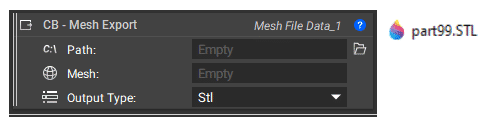
**CB Mesh Export:** This block will export mesh files with a randomly generated number at the end of the name so it does not overwrite the previous exported mesh when changing the workflow.
 **Example File:**
[230\_7\_1 CB – Mesh Export.ntop](https://files.learn.ntop.com/Courses/230%20Intro%20to%20Automation/nTop%20Files/230_7_1%20CB%20-%20Mesh%20Export.ntop)
*This file was last updated in nTop 3.38.4*
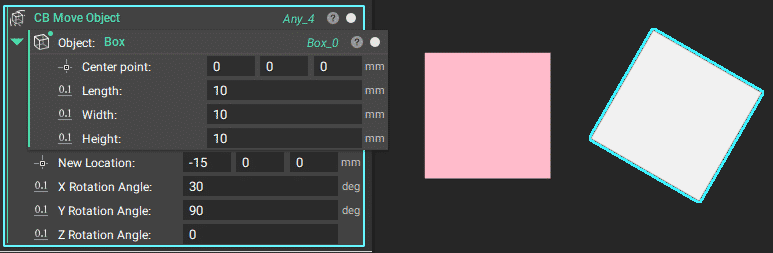
**CB Move Object:** This block moves the object's center to the new location provided and can rotate the object.
**Example File:**
[230\_7\_1 CB – Mesh Export.ntop](https://files.learn.ntop.com/Courses/230%20Intro%20to%20Automation/nTop%20Files/230_7_1%20CB%20-%20Mesh%20Export.ntop)
*This file was last updated in nTop 3.38.4*
**CB Move Object:** This block moves the object's center to the new location provided and can rotate the object.
 **Example File:**
[230\_7\_2 CB – Move Object.ntop](https://files.learn.ntop.com/Courses/230%20Intro%20to%20Automation/nTop%20Files/230_7_2%20CB%20-%20Move%20Object.ntop)
*This file was last updated in nTop 3.38.4*
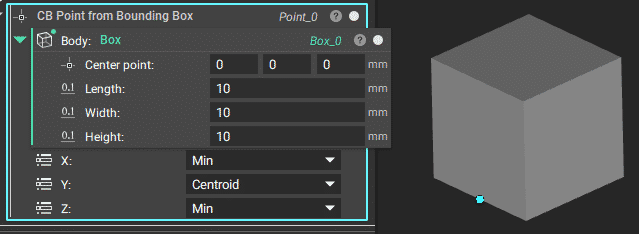
**CB Point from Bounding Box:** Input an implicit body and extract a point on the bounding box based on the min, max, or centroid values of the bounding box in x, y, and z.
**Example File:**
[230\_7\_2 CB – Move Object.ntop](https://files.learn.ntop.com/Courses/230%20Intro%20to%20Automation/nTop%20Files/230_7_2%20CB%20-%20Move%20Object.ntop)
*This file was last updated in nTop 3.38.4*
**CB Point from Bounding Box:** Input an implicit body and extract a point on the bounding box based on the min, max, or centroid values of the bounding box in x, y, and z.
 **Example File:**
[230\_7\_3 CB – Point from Bounding Box.ntop](https://files.learn.ntop.com/Courses/230%20Intro%20to%20Automation/nTop%20Files/230_7_3%20CB%20-%20Point%20from%20Bounding%20Box.ntop)
*This file was last updated in nTop 3.38.4*
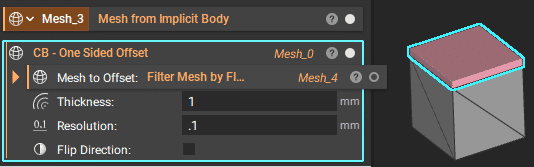
\*\*CB One Sided Offset:\*\*Creates a one-sided offset based on a given mesh.
**Example File:**
[230\_7\_3 CB – Point from Bounding Box.ntop](https://files.learn.ntop.com/Courses/230%20Intro%20to%20Automation/nTop%20Files/230_7_3%20CB%20-%20Point%20from%20Bounding%20Box.ntop)
*This file was last updated in nTop 3.38.4*
\*\*CB One Sided Offset:\*\*Creates a one-sided offset based on a given mesh.
 **Example File:**
[230\_7\_4 CB – One Sided Offset.ntop](https://files.learn.ntop.com/Courses/230%20Intro%20to%20Automation/nTop%20Files/230_7_4%20CB%20-%20One%20Sided%20Offset.ntop)
\*This file was last updated in nTop 5.20.\*2
**CB Implicit Body from CAD Faces:** This custom block allows a user to select a list of CAD faces, add thickness to them, and trim them to the original bounding geometry. The result will be an implicit body with thickness.
**Example File:**
[230\_7\_4 CB – One Sided Offset.ntop](https://files.learn.ntop.com/Courses/230%20Intro%20to%20Automation/nTop%20Files/230_7_4%20CB%20-%20One%20Sided%20Offset.ntop)
\*This file was last updated in nTop 5.20.\*2
**CB Implicit Body from CAD Faces:** This custom block allows a user to select a list of CAD faces, add thickness to them, and trim them to the original bounding geometry. The result will be an implicit body with thickness.
 **Example File:**
[230\_7\_5 CB – Implicit Body from CAD Faces.ntop](https://files.learn.ntop.com/Courses/230%20Intro%20to%20Automation/nTop%20Files/230_7_5%20CB%20-%20Implicit%20Body%20from%20CAD%20Faces.ntop)
*This file was last updated in nTop 4.2.3*
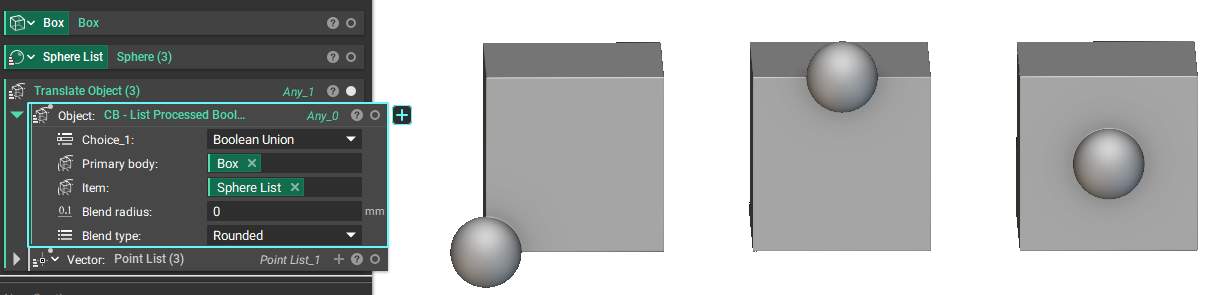
**CB List Processed Booleans:** This custom block creates a list of implicit bodies that applied each item individually to the primary body. The default boolean operations would instead apply all items at once on the primary body and produce one body.
**Example File:**
[230\_7\_5 CB – Implicit Body from CAD Faces.ntop](https://files.learn.ntop.com/Courses/230%20Intro%20to%20Automation/nTop%20Files/230_7_5%20CB%20-%20Implicit%20Body%20from%20CAD%20Faces.ntop)
*This file was last updated in nTop 4.2.3*
**CB List Processed Booleans:** This custom block creates a list of implicit bodies that applied each item individually to the primary body. The default boolean operations would instead apply all items at once on the primary body and produce one body.
 **Example File:**
[230\_7\_6 & 21\_2 CB – List Processed Booleans.ntop](https://files.learn.ntop.com/Courses/230%20Intro%20to%20Automation/nTop%20Files/230_7_6%20%26%2021_2%20CB%20-%20List%20Processed%20Booleans.ntop)
*This file was last updated in nTop 4.2.3*
**Example File:**
[230\_7\_6 & 21\_2 CB – List Processed Booleans.ntop](https://files.learn.ntop.com/Courses/230%20Intro%20to%20Automation/nTop%20Files/230_7_6%20%26%2021_2%20CB%20-%20List%20Processed%20Booleans.ntop)
*This file was last updated in nTop 4.2.3*