> ## Documentation Index
> Fetch the complete documentation index at: https://docs.ntop.com/llms.txt
> Use this file to discover all available pages before exploring further.
# Lists
All blocks in nTop can exist as singular entities or as a list. A ***list***contains multiple items of the same type in a single block, like a list of points. When a process runs on a list block, it runs the process on every list item. Working with list blocks is called ***List Processing***.
 Lists can be used in the input of CBs, so customized functions can be performed on multiple listed inputs at once.
**Want to List Process and don't know where to start?**
* Determine the input you want to iterate
* Open up the info panel and find the input type
* Search for that type of list in the notebook search bar (ex. Scalar List, Point List, Vector List…)
## List Properties
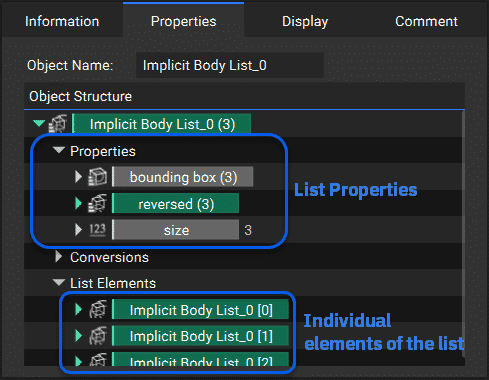
Each list contains a set of List properties at the top and individual properties for each item within that list grouped under List Elements. You can drag an individual property from a List to create an item in the notebook. You can expand the dropdown arrow next to the individual entities to reveal more information on that individual list entity.
Lists can be used in the input of CBs, so customized functions can be performed on multiple listed inputs at once.
**Want to List Process and don't know where to start?**
* Determine the input you want to iterate
* Open up the info panel and find the input type
* Search for that type of list in the notebook search bar (ex. Scalar List, Point List, Vector List…)
## List Properties
Each list contains a set of List properties at the top and individual properties for each item within that list grouped under List Elements. You can drag an individual property from a List to create an item in the notebook. You can expand the dropdown arrow next to the individual entities to reveal more information on that individual list entity.