> ## Documentation Index
> Fetch the complete documentation index at: https://docs.ntop.com/llms.txt
> Use this file to discover all available pages before exploring further.

# Overview

> This course will take you through the basics of meshing in nTop used alongside our implicit bodies. We recommend this course, nTop Essentials, as it provides vital recommendations for when you are importing a mesh, creating a surface lattice, running a simulation, or planning to export.  After completing the course, you will understand when and how to mesh in nTop.  You will also gain familiarity with some of the operations and properties of meshes and best practices for working with a mesh.
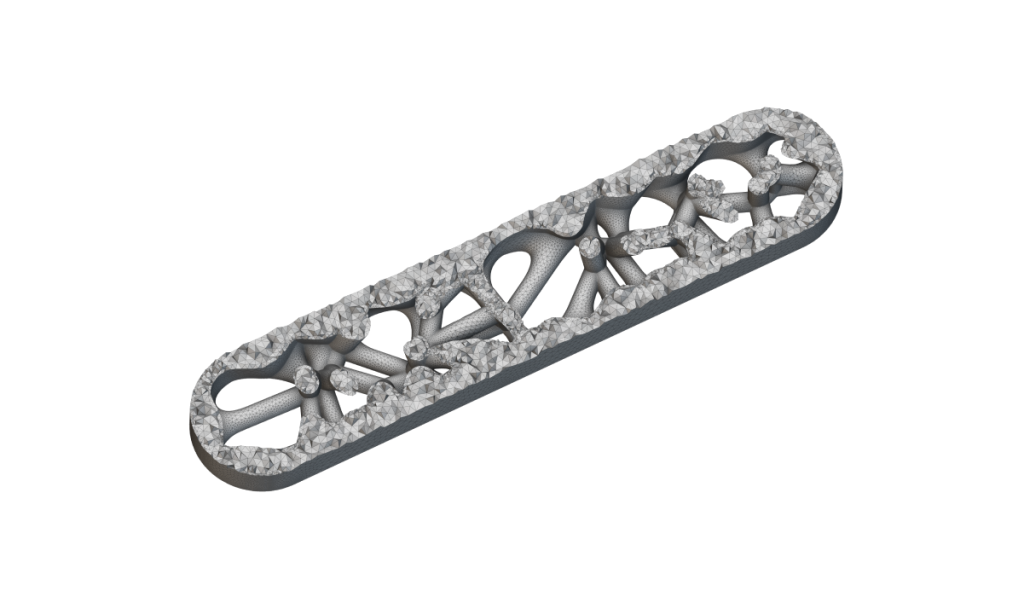
<Frame>
  <img src="https://storage.googleapis.com/files-learn/lessons/intro-to-meshing/intro-to-meshing.webp" alt="intro to meshing" />
</Frame>

**Prerequisites:**
[101: nTop Essentials](/lessons/ntop-essentials/overview)

**What will be covered:**

* Converting to a mesh and CAD body
* Cleaning a mesh
* Selecting portions of a mesh
* Creating a volume mesh and FE mesh

<CardGroup cols={2}>
  <Card title="Before We Begin" href="/lessons/intro-to-meshing/before-we-begin-meshing" cta="Open" />

  <Card title="Meshing in nTop" href="/lessons/intro-to-meshing/meshing-in-ntop" cta="Open" />

  <Card title="Meshing Properties and Terminology" href="/lessons/intro-to-meshing/meshing-properties-and-terminology" cta="Open" />
</CardGroup>

### Converting and Exporting to a Mesh and CAD Body

<CardGroup cols={2}>
  <Card title="Converting to a Mesh" href="/lessons/intro-to-meshing/converting-to-a-mesh" cta="Open" />

  <Card title="Conversion to CAD with Quadrangulate Mesh" href="/lessons/intro-to-meshing/conversion-to-cad-with-quadrangulate-mesh" cta="Open" />

  <Card title="Follow Along: CAD and Mesh Export" href="/lessons/intro-to-meshing/follow-along-cad-and-mesh-export" cta="Open" />

  <Card title="Download: CAD and Mesh Export" href="/lessons/intro-to-meshing/download-cad-and-mesh-export" cta="Open" />

  <Card title="Knowledge Check: Converting to a Mesh or CAD Body" href="/lessons/intro-to-meshing/knowledge-check-converting-to-a-mesh-or-cad-body" cta="Open" />
</CardGroup>

### Refining/Cleaning Meshes

<CardGroup cols={2}>
  <Card title="Remesh Surface" href="/lessons/intro-to-meshing/remesh-surface" cta="Open" />

  <Card title="Split and Filter Mesh" href="/lessons/intro-to-meshing/split-and-filter-mesh" cta="Open" />

  <Card title="Refine and Simplify" href="/lessons/intro-to-meshing/refine-and-simplify" cta="Open" />

  <Card title="Cleaning Meshes with a Voxel Grid" href="/lessons/intro-to-meshing/cleaning-meshes-with-a-voxel-grid" cta="Open" />

  <Card title="Download: Cleaning and Simplifying a Mesh" href="/lessons/intro-to-meshing/download-cleaning-and-simplifying-a-mesh" cta="Open" />

  <Card title="Knowledge Check: Refining and Cleaning Meshes" href="/lessons/intro-to-meshing/knowledge-check-refining-cleaning-meshes" cta="Open" />
</CardGroup>

### Tips and Tricks for Export

<CardGroup cols={2}>
  <Card title="Best Practices for Exporting Summary" href="/lessons/intro-to-meshing/best-practices-for-exporting-summary" cta="Open" />

  <Card title="Meshing Tradeoffs" href="/lessons/intro-to-meshing/meshing-tradeoffs" cta="Open" />
</CardGroup>

### Optional Mesh Export Test Problem

<CardGroup cols={2}>
  <Card title="Optional: Export Meshing Test Problem" href="/lessons/intro-to-meshing/optional-export-meshing-test-problem" cta="Open" />

  <Card title="Answer to Optional Export Mesh Problem" href="/lessons/intro-to-meshing/answer-to-optional-export-mesh-problem" cta="Open" />
</CardGroup>

### FE and Volume Meshes

<CardGroup cols={2}>
  <Card title="Solid/Volume Meshes" href="/lessons/intro-to-meshing/solid-volume-meshes" cta="Open" />

  <Card title="FE Meshes" href="/lessons/intro-to-meshing/fe-meshes" cta="Open" />

  <Card title="Follow Along: Creating an FE Mesh" href="/lessons/intro-to-meshing/follow-along-creating-an-fe-mesh" cta="Open" />

  <Card title="Download: Creating an FE Mesh" href="/lessons/intro-to-meshing/download-creating-an-fe-mesh" cta="Open" />

  <Card title="Knowledge Check: FE and Volume Meshes" href="/lessons/intro-to-meshing/knowledge-check-fe-and-volume-meshes" cta="Open" />
</CardGroup>

### Optional Volume Mesh Problem

<CardGroup cols={2}>
  <Card title="Optional: FE Volume Mesh Test Problem" href="/lessons/intro-to-meshing/optional-fe-volume-mesh-test-problem" cta="Open" />

  <Card title="Answer to Optional FE Volume Mesh Test Problem" href="/lessons/intro-to-meshing/answer-to-optional-fe-volume-mesh-test-problem" cta="Open" />
</CardGroup>

### Selecting Sections of a Mesh or FE Mesh

<CardGroup cols={2}>
  <Card title="Selecting by Flood Fill" href="/lessons/intro-to-meshing/selecting-by-flood-fill" cta="Open" />

  <Card title="Selecting FE Mesh with CAD Faces" href="/lessons/intro-to-meshing/selecting-fe-mesh-with-cad-faces" cta="Open" />

  <Card title="Follow Along: Selecting Portions of a Mesh" href="/lessons/intro-to-meshing/follow-along-selecting-portions-of-a-mesh" cta="Open" />

  <Card title="Download: Selecting Portions of a Mesh" href="/lessons/intro-to-meshing/download-selecting-portions-of-a-mesh" cta="Open" />

  <Card title="Knowledge Check: Selecting Portions of Meshes" href="/lessons/intro-to-meshing/knowledge-check-selecting-portions-of-meshes" cta="Open" />
</CardGroup>

### Optional Portions of a Mesh Test Problem

<CardGroup cols={2}>
  <Card title="Optional: Mesh Portions Test Problem" href="/lessons/intro-to-meshing/optional-mesh-portions-test-problem" cta="Open" />

  <Card title="Answer to Mesh Portions Optional Test Problem" href="/lessons/intro-to-meshing/answer-to-mesh-portions-optional-test-problem" cta="Open" />

  <Card title="Resources" href="/lessons/intro-to-meshing/resources" cta="Open" />
</CardGroup>

### What's Next

<CardGroup cols={1} />
