> ## Documentation Index
> Fetch the complete documentation index at: https://docs.ntop.com/llms.txt
> Use this file to discover all available pages before exploring further.
# Overview
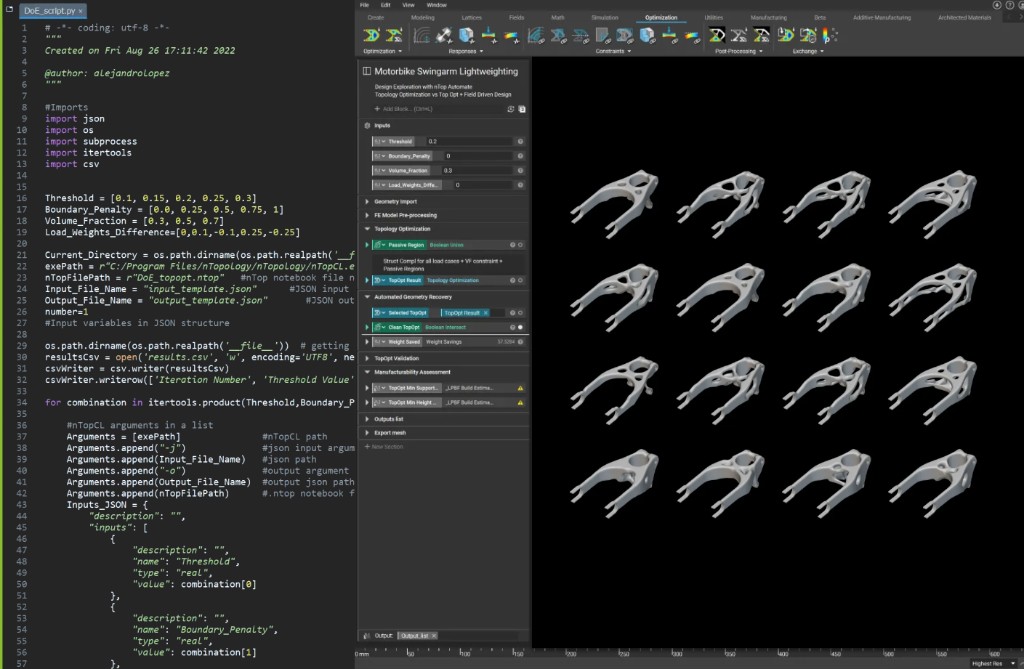 This course walks you through the basics of nTop's Command Line interface (nTop Automate). You will learn how to set up and execute your reusable workflows to automate repetitive work and headlessly generate multiple design variations.
**Prerequisites:** [101: nTop Essentials](/lessons/ntop-essentials/overview), [230: Intro to Automation](/lessons/intro-to-custom-blocks/before-we-begin-custom-blocks)
**What will be covered:**
* Understanding nTop Automate and how it can be applied to achieve automation and time savings
* Preparing the nTop Notebook, setting up, and executing commands using different scripting languages
* Our recommended best practices, as well as some tips and tricks to help kickstart your nTop Automate execution
### Introduction
### nTop Command Line (nTop Automate)
### Setting Up And Running nTop Automate
### Optional nTop Automate Test Problem
### What's Next
This course walks you through the basics of nTop's Command Line interface (nTop Automate). You will learn how to set up and execute your reusable workflows to automate repetitive work and headlessly generate multiple design variations.
**Prerequisites:** [101: nTop Essentials](/lessons/ntop-essentials/overview), [230: Intro to Automation](/lessons/intro-to-custom-blocks/before-we-begin-custom-blocks)
**What will be covered:**
* Understanding nTop Automate and how it can be applied to achieve automation and time savings
* Preparing the nTop Notebook, setting up, and executing commands using different scripting languages
* Our recommended best practices, as well as some tips and tricks to help kickstart your nTop Automate execution
### Introduction
### nTop Command Line (nTop Automate)
### Setting Up And Running nTop Automate
### Optional nTop Automate Test Problem
### What's Next