> ## Documentation Index
> Fetch the complete documentation index at: https://docs.ntop.com/llms.txt
> Use this file to discover all available pages before exploring further.
# Optional: Simulation Problem Statement
Now that you have learned how to run a Static Analysis in nTop, feel free to try this optional problem with a review of the answer in the following lesson. We will use this completed file in running a Modal Analysis.
## Problem Statement
Run a static analysis on the CAD bracket, shown and downloadable below. The loaded faces is shown in purple and has a 2N bearing force downwards in the y-direction, and the restrained faces are highlighted in green. When creating a mesh, use an edge length of 3mm, and assume the bracket material is AL 6061-T6.
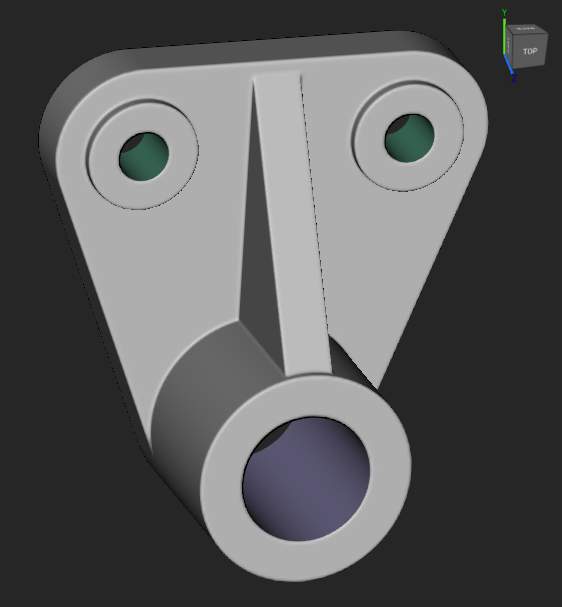 [240\_19\_1 Bracket for Simulation.x\_t](https://files.learn.ntop.com/Courses/240%20Intro%20to%20Simulation/Models/240_19_1%20Bracket%20for%20Simulation.x_t)
\*\*Estimated Time to Complete:\*\*30 minutes
[240\_19\_1 Bracket for Simulation.x\_t](https://files.learn.ntop.com/Courses/240%20Intro%20to%20Simulation/Models/240_19_1%20Bracket%20for%20Simulation.x_t)
\*\*Estimated Time to Complete:\*\*30 minutes