> ## Documentation Index
> Fetch the complete documentation index at: https://docs.ntop.com/llms.txt
> Use this file to discover all available pages before exploring further.
# Import/Export Options
## Import Options
It is possible to import static thermal and time-dependent thermal results into nTop.
Valid file types for import:
1. \*.rth (ANSYS Thermal Results File)
2. \*.op2 (Nastran Output File)
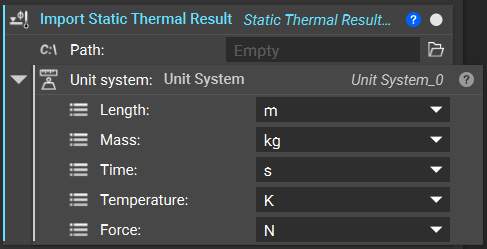
With the **Import Static Thermal Result** block, it is possible to directly import a static thermal analysis result. The import's Path and the Unit System must be defined.
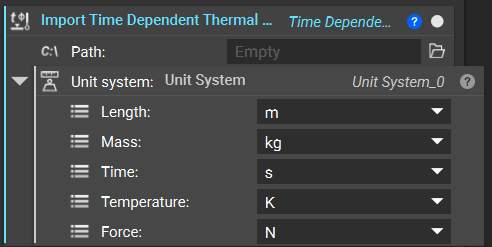
 With the**Import Time Dependent Thermal Result**block, it is possible to directly import a time-dependent (transient) thermal analysis result. The import's Path and the Unit System must be defined.
 ***
## Export Options
We can also export thermal analyses (FE Model + Load Case).
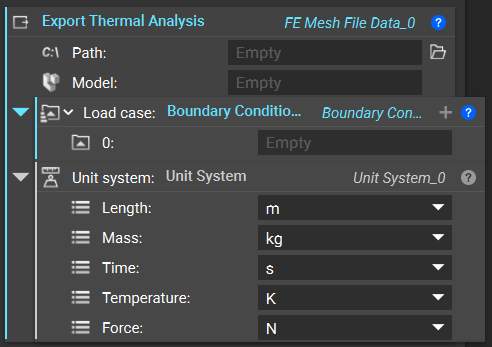
With the **Export Thermal Analysis** block, it is possible to directly export a thermal analysis. The export *Path*, *Model*, *Load case* and a *Unit System* must be defined.
Valid file types for export:
1. \*.inp (Abaqus Input File)
2. \*.cdb (ANSYS Mechanical Input File)
3. \*.bdf, \*.dat, \*.nas (Nastran Bulk Data File)
4. \*.k (LS-DYNA Input File)
5. \*.unv (Universal File Format)
6. \*.pat (Patran Neutral File)
7. \*.msh (ANSYS Fluent Mesh)
***
## Export Options
We can also export thermal analyses (FE Model + Load Case).
With the **Export Thermal Analysis** block, it is possible to directly export a thermal analysis. The export *Path*, *Model*, *Load case* and a *Unit System* must be defined.
Valid file types for export:
1. \*.inp (Abaqus Input File)
2. \*.cdb (ANSYS Mechanical Input File)
3. \*.bdf, \*.dat, \*.nas (Nastran Bulk Data File)
4. \*.k (LS-DYNA Input File)
5. \*.unv (Universal File Format)
6. \*.pat (Patran Neutral File)
7. \*.msh (ANSYS Fluent Mesh)