> ## Documentation Index
> Fetch the complete documentation index at: https://docs.ntop.com/llms.txt
> Use this file to discover all available pages before exploring further.
# Running a Nonlinear Thermal Analysis [BETA]
**Note**: The **Nonlinear Thermal Analysis** block is a BETA block.
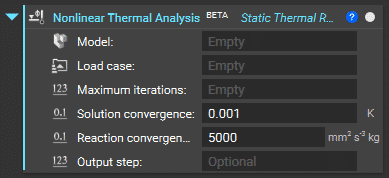 The inputs for the block include:
* ***FE Model***
* ***Boundary Condition List***with the restraints and applied thermal loads
* ***Maximum iterations***to run the analysis
* ***Solution convergence*** as a tolerance value to stop the analysis where there is a converged result based on a comparison of the Euclidean norm of the solution updated vector of the temperature *(K)* with the specified tolerance value. The default value is 0.001 *K*
* ***Reaction Convergence***as a tolerance value to stop the analysis where there is a converged result based on a comparison of the Euclidean norm of the solution updated vector of the power *(W)* with the specified tolerance value. The default value is 5000 *mm2s-3kg*
* ***Output step***to output the results at every *nth* output step (optional input)
The block automatically runs when the necessary inputs are complete.
Before running the Nonlinear Thermal Analysis, you must correctly define the nonlinear material property as discussed in the lesson on Thermal Material Properties.
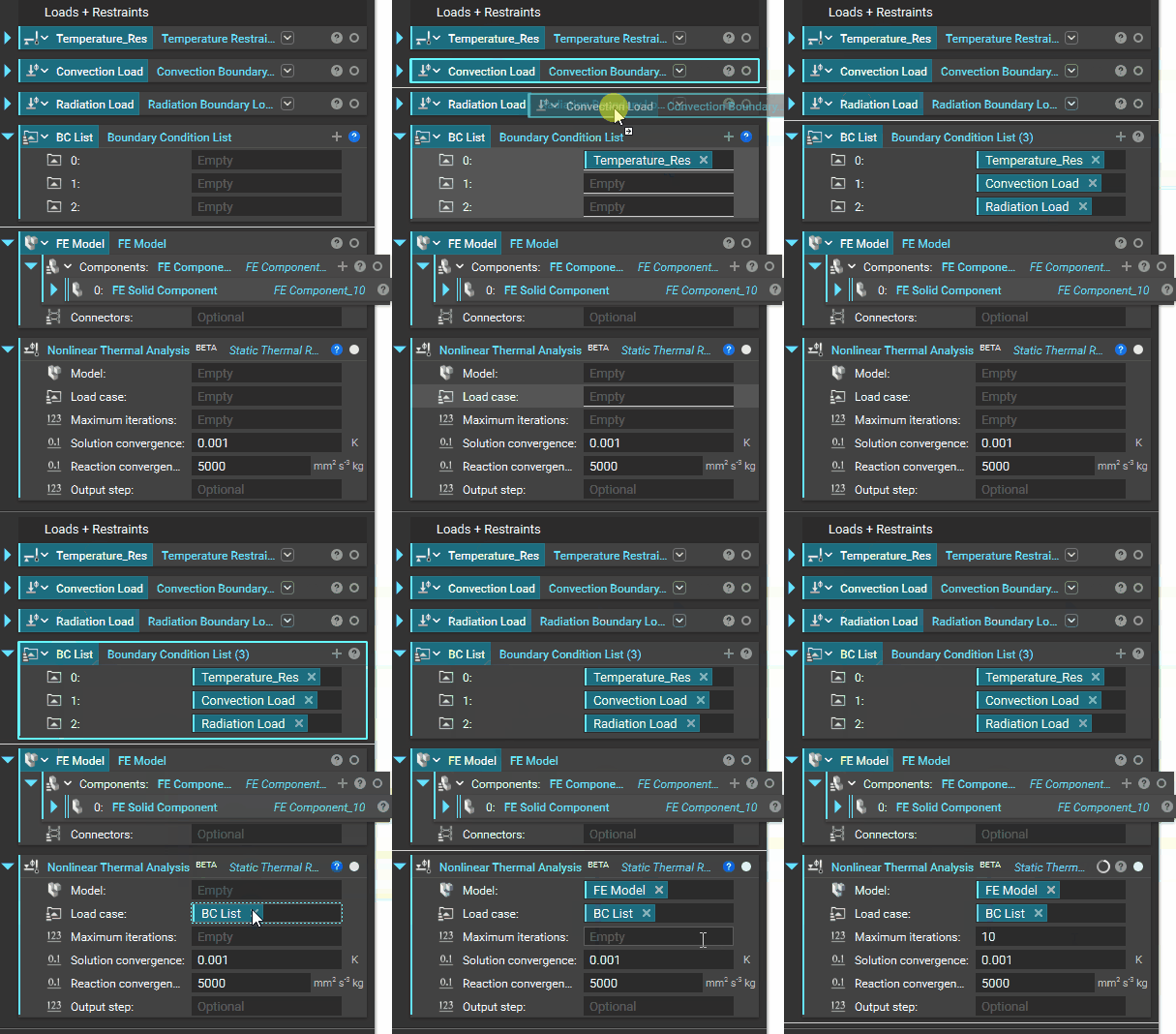
After defining the material property correctly in the **FE Model** (as was shown for a Thermal Analysis), and defining the boundary conditions, a **Nonlinear Thermal Analysis**is run as shown below.
The inputs for the block include:
* ***FE Model***
* ***Boundary Condition List***with the restraints and applied thermal loads
* ***Maximum iterations***to run the analysis
* ***Solution convergence*** as a tolerance value to stop the analysis where there is a converged result based on a comparison of the Euclidean norm of the solution updated vector of the temperature *(K)* with the specified tolerance value. The default value is 0.001 *K*
* ***Reaction Convergence***as a tolerance value to stop the analysis where there is a converged result based on a comparison of the Euclidean norm of the solution updated vector of the power *(W)* with the specified tolerance value. The default value is 5000 *mm2s-3kg*
* ***Output step***to output the results at every *nth* output step (optional input)
The block automatically runs when the necessary inputs are complete.
Before running the Nonlinear Thermal Analysis, you must correctly define the nonlinear material property as discussed in the lesson on Thermal Material Properties.
After defining the material property correctly in the **FE Model** (as was shown for a Thermal Analysis), and defining the boundary conditions, a **Nonlinear Thermal Analysis**is run as shown below.