> ## Documentation Index
> Fetch the complete documentation index at: https://docs.ntop.com/llms.txt
> Use this file to discover all available pages before exploring further.
# Distorting Signed Distance Fields
## Introduction
In the previous lesson, you built fields directly from equations using the **Scalar Field Variable** block to represent the X, Y, and Z coordinates. You also learned to recognize a well-behaved signed distance field (SDF) in the Field Viewer: its isolines remain parallel to the surface and are evenly spaced because moving 1 mm through space changes the field value by exactly 1 mm.
This lesson explains what can cause a field to lose these characteristics and how to address the resulting behavior. It focuses on one of the blocks most commonly associated with this change: **Remap Field**.
## When an Implicit Field is Not an SDF
Any scalar field that is negative inside a shape and positive outside can correctly define the shape's boundary at the zero-value surface. However, accurately defining the boundary does not mean the field accurately represents distance everywhere else.
For a field to be a signed distance field (SDF), the magnitude of its rate of change must equal 1. In other words, moving 1 mm through space in every direction should produce a 1 mm change in the field value—no more and no less. This rate of change is described by the field's gradient, and a true SDF has a unit gradient.
Consider the sphere, with a radius of 3 and its center at the origin:
*F(x, y, z) = √(x² + y² + z²) − 3*
This equation produces an exact SDF because its gradient magnitude is 1 throughout the field.
Now compare the sphere with an ellipsoid that is compressed along one axis. The ellipsoid's implicit equation remains negative inside the shape and positive outside, so its zero-value surface correctly defines the ellipsoid's boundary. However, the gradient magnitude varies with position and direction. As a result, field values away from the zero-value surface no longer represent true distances.
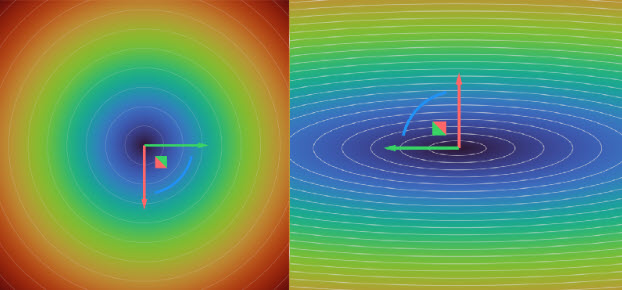 *A sphere's isolines are evenly spaced and parallel to its surface, while an ellipsoid's isolines crowd near the poles and spread out near the equator*
Triply periodic minimal surface (TPMS) lattices provide another common example. Their zero-value surfaces are well defined, but the surrounding fields do not necessarily represent distance.
*A sphere's isolines are evenly spaced and parallel to its surface, while an ellipsoid's isolines crowd near the poles and spread out near the equator*
Triply periodic minimal surface (TPMS) lattices provide another common example. Their zero-value surfaces are well defined, but the surrounding fields do not necessarily represent distance.
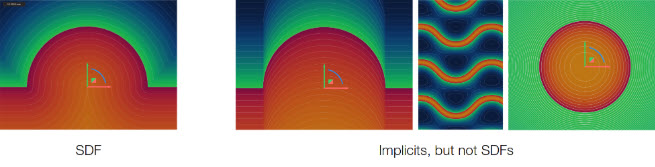 *A Signed Distance Field (left) and three examples of implicit fields (right)*
Therefore, implicit field and signed distance field are not interchangeable terms: every SDF is an implicit field, but not every implicit field is an SDF.
### When an Implicit Field is Not an SDF and Why it Matters
A distorted field may still appear correct in the Viewport because the Viewport displays only the zero-value surface. Problems become apparent when the field is used for operations that depend on values beyond that surface, which includes many common implicit-modeling operations:
* Offsets and shells locate a new surface at a specified field value rather than at a geometrically measured distance. If the field does not have a unit gradient, a 2 mm offset will not necessarily be positioned 2 mm from the original surface. The resulting wall thickness may differ from the specified value, becoming thinner where isolines are closely spaced and thicker where they are farther apart.
* Blend Radii on boolean operations control how two fields transition near their shared zero-value surfaces. If either input field is distorted, the resulting blend may be inconsistent or unpredictable.
Note: This lesson covers distortion caused by shapes and operations like **Remap** that produce a non-unit gradient. A different category of field problem — false zeros and discontinuities caused by coincident Booleans — is covered in the next lesson, Field Quality.
*A Signed Distance Field (left) and three examples of implicit fields (right)*
Therefore, implicit field and signed distance field are not interchangeable terms: every SDF is an implicit field, but not every implicit field is an SDF.
### When an Implicit Field is Not an SDF and Why it Matters
A distorted field may still appear correct in the Viewport because the Viewport displays only the zero-value surface. Problems become apparent when the field is used for operations that depend on values beyond that surface, which includes many common implicit-modeling operations:
* Offsets and shells locate a new surface at a specified field value rather than at a geometrically measured distance. If the field does not have a unit gradient, a 2 mm offset will not necessarily be positioned 2 mm from the original surface. The resulting wall thickness may differ from the specified value, becoming thinner where isolines are closely spaced and thicker where they are farther apart.
* Blend Radii on boolean operations control how two fields transition near their shared zero-value surfaces. If either input field is distorted, the resulting blend may be inconsistent or unpredictable.
Note: This lesson covers distortion caused by shapes and operations like **Remap** that produce a non-unit gradient. A different category of field problem — false zeros and discontinuities caused by coincident Booleans — is covered in the next lesson, Field Quality.
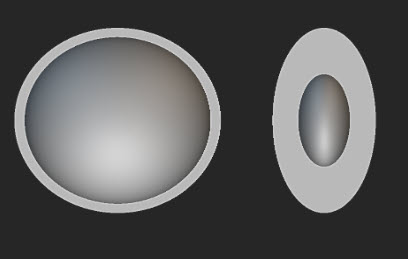 *Shelling a sphere and an ellipsoid using the same offset value results in uniform wall thickness for the sphere and nonuniform wall thickness for the ellipsoid*
## Remap
### Why Use Remap?
The following examples use the **Remap Field** block to translate or scale a simple geometry. Although these examples clearly demonstrate the block's behavior, its primary value is transforming geometry that cannot be easily described using standard X, Y, and Z coordinates. **Remap Field** is one of nTop's most powerful and versatile blocks.
For example, a repeating pattern of holes can be created on a flat rectangular domain and then wrapped around a cylinder, much like a label around a can, without individually positioning each hole on the curved surface. The same principle can bend a beam along a curved centerline or project a bitmap image onto a part as a surface texture. In each case, the geometry or pattern is created once in a simple coordinate space, and **Remap Field** transforms that space to produce the more complex result.
### Coordinate Substitution with Remap Field
You can think of transforming a field as changing the coordinates at which you evaluate it. For example, replacing x with (x−2) in a sphere equation shifts its zero-value surface by 2 units in the positive X direction. Rather than moving the geometry directly, the transformation changes how points in space are mapped to the source field. This coordinate substitution is the principle behind the **Remap Field** block.
The **Remap Field** block is located under Fields > Remap. It accepts a *Scalar Field* input, which may also be an Implicit Body because an implicit body contains an underlying scalar field. The block also provides X, Y, and Z inputs, each of which accepts any scalar field.
*Shelling a sphere and an ellipsoid using the same offset value results in uniform wall thickness for the sphere and nonuniform wall thickness for the ellipsoid*
## Remap
### Why Use Remap?
The following examples use the **Remap Field** block to translate or scale a simple geometry. Although these examples clearly demonstrate the block's behavior, its primary value is transforming geometry that cannot be easily described using standard X, Y, and Z coordinates. **Remap Field** is one of nTop's most powerful and versatile blocks.
For example, a repeating pattern of holes can be created on a flat rectangular domain and then wrapped around a cylinder, much like a label around a can, without individually positioning each hole on the curved surface. The same principle can bend a beam along a curved centerline or project a bitmap image onto a part as a surface texture. In each case, the geometry or pattern is created once in a simple coordinate space, and **Remap Field** transforms that space to produce the more complex result.
### Coordinate Substitution with Remap Field
You can think of transforming a field as changing the coordinates at which you evaluate it. For example, replacing x with (x−2) in a sphere equation shifts its zero-value surface by 2 units in the positive X direction. Rather than moving the geometry directly, the transformation changes how points in space are mapped to the source field. This coordinate substitution is the principle behind the **Remap Field** block.
The **Remap Field** block is located under Fields > Remap. It accepts a *Scalar Field* input, which may also be an Implicit Body because an implicit body contains an underlying scalar field. The block also provides X, Y, and Z inputs, each of which accepts any scalar field.
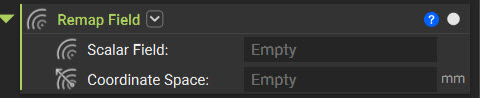 *The **Remap Field** block*
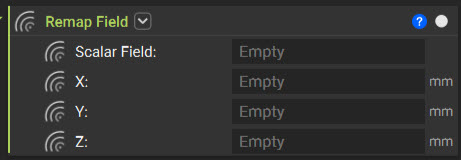 *Overload of the **Remap Field** block*
By default, these inputs represent their corresponding coordinates. Connecting a different field to an input replaces that coordinate wherever the source field is evaluated. For example, the field connected to X is evaluated in place of the default X coordinate, and the same principle applies to Y and Z. This allows the coordinate space to be transformed without modifying the source field or its original equation.
*Overload of the **Remap Field** block*
By default, these inputs represent their corresponding coordinates. Connecting a different field to an input replaces that coordinate wherever the source field is evaluated. For example, the field connected to X is evaluated in place of the default X coordinate, and the same principle applies to Y and Z. This allows the coordinate space to be transformed without modifying the source field or its original equation.
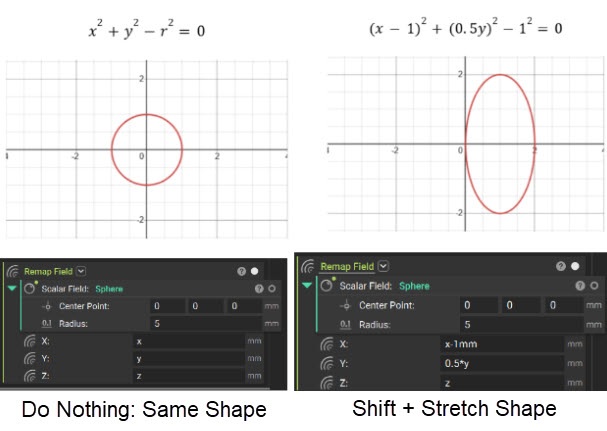 *The **Sphere** is unmodified by the **Remap Field** block so it doesn't change (left) versus applying the **Remap Field** modifications to stretch the **Sphere** into an ellipsoid (right)*
### Translation: An SDF-Preserving Remap
Take the same sphere, and set the **Remap Field** block's X input to x − 2 mm, leaving Y and Z as they are. The sphere shifts 2 mm in the positive X direction.
*The **Sphere** is unmodified by the **Remap Field** block so it doesn't change (left) versus applying the **Remap Field** modifications to stretch the **Sphere** into an ellipsoid (right)*
### Translation: An SDF-Preserving Remap
Take the same sphere, and set the **Remap Field** block's X input to x − 2 mm, leaving Y and Z as they are. The sphere shifts 2 mm in the positive X direction.
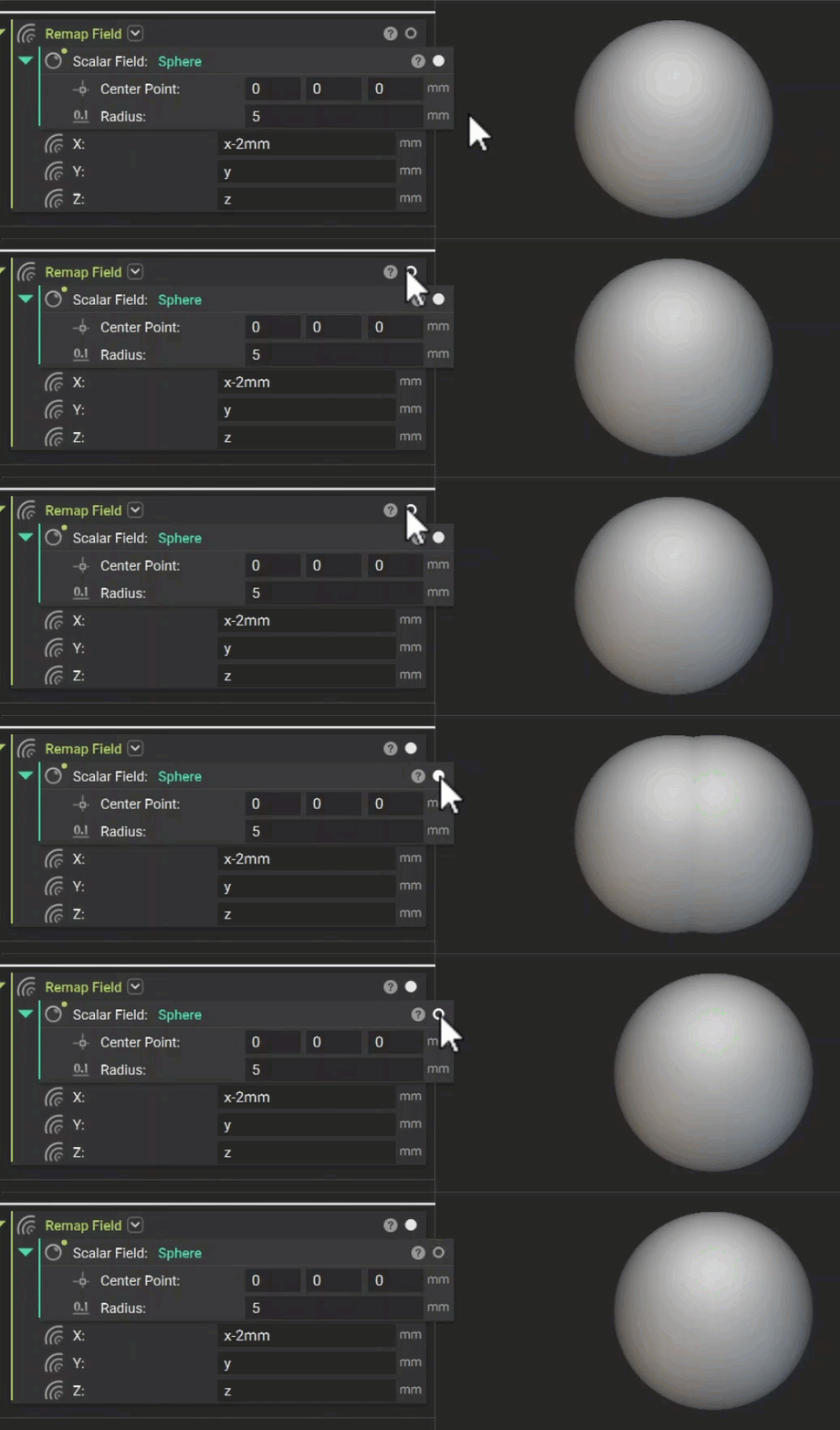 *An example of using the **Remap Field** block to translate a **Sphere** along the X-axis*
Check the Field Viewer, and the isolines are still evenly spaced and parallel. A pure shift doesn't change how quickly the field changes as you move — it just relocates where that change happens. Translation through the Remap Field preserves the SDF.
*An example of using the **Remap Field** block to translate a **Sphere** along the X-axis*
Check the Field Viewer, and the isolines are still evenly spaced and parallel. A pure shift doesn't change how quickly the field changes as you move — it just relocates where that change happens. Translation through the Remap Field preserves the SDF.
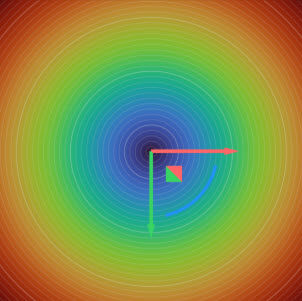 *The field of the translated **Sphere** along the x-axis*
### Mirroring
Mirroring is another transformation that preserves the SDF when you perform it with a **Remap Field**. To reflect geometry across the YZ-plane at x=0, drag the *Negative* property of the X component block representing −x to the X input while leaving the Y and Z inputs unchanged.
*The field of the translated **Sphere** along the x-axis*
### Mirroring
Mirroring is another transformation that preserves the SDF when you perform it with a **Remap Field**. To reflect geometry across the YZ-plane at x=0, drag the *Negative* property of the X component block representing −x to the X input while leaving the Y and Z inputs unchanged.
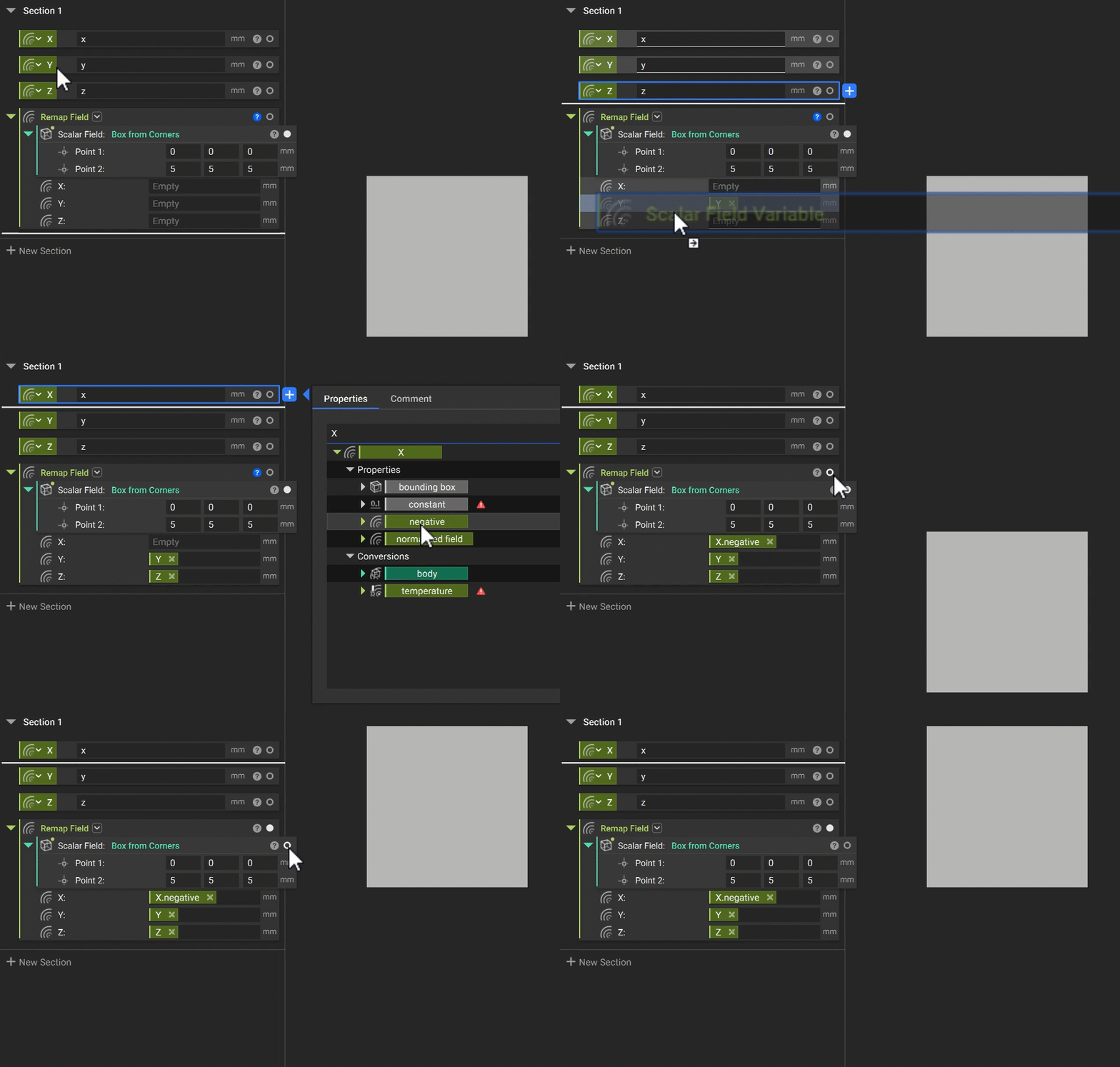 *An example of mirroring a box using the **Remap Field** block*
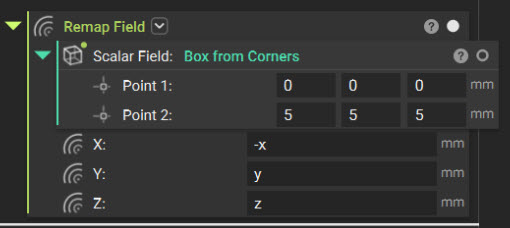 *Another representation of this same Mirror operation without variables in the XYZ components*
Like translation, mirroring does not stretch or compress the geometry. It is an isometric transformation, meaning distances are preserved, and the field values continue to change at the same rate throughout space. Therefore, the gradient magnitude remains equal to 1, and the remapped field remains a valid SDF.
However, when viewing the fields of the original and mirrored bodies, you may notice a region where their boundaries coincide. This overlapping boundary can produce unintended results during Boolean operations. You will explore this behavior, an Implicit Artifact, in the next lesson.
*Another representation of this same Mirror operation without variables in the XYZ components*
Like translation, mirroring does not stretch or compress the geometry. It is an isometric transformation, meaning distances are preserved, and the field values continue to change at the same rate throughout space. Therefore, the gradient magnitude remains equal to 1, and the remapped field remains a valid SDF.
However, when viewing the fields of the original and mirrored bodies, you may notice a region where their boundaries coincide. This overlapping boundary can produce unintended results during Boolean operations. You will explore this behavior, an Implicit Artifact, in the next lesson.
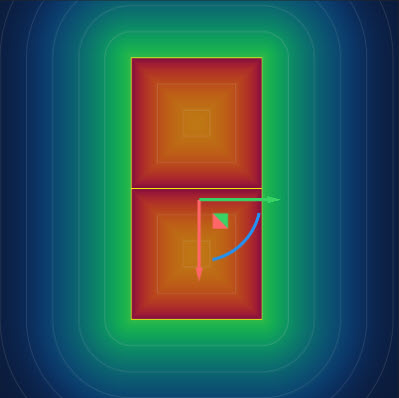 *Field view of the original and mirrored bodies, highlighting the region where their boundaries coincide.*
For straightforward reflections of an entire body, use the dedicated **Mirror Body** block. Use **Remap Field** when the mirror must be applied directly to a field, combined with other coordinate substitutions, or defined relative to a plane that is not aligned with a global axis.
*Field view of the original and mirrored bodies, highlighting the region where their boundaries coincide.*
For straightforward reflections of an entire body, use the dedicated **Mirror Body** block. Use **Remap Field** when the mirror must be applied directly to a field, combined with other coordinate substitutions, or defined relative to a plane that is not aligned with a global axis.
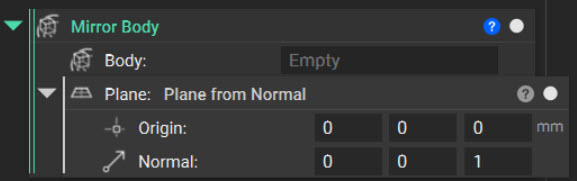 *The **Mirror Body** block with a **Plane from Normal** block in its Plane input*
### Scaling: An SDF-Distorting Remap
Set the X, Y, and Z inputs to their corresponding coordinate fields divided by 2.
*The **Mirror Body** block with a **Plane from Normal** block in its Plane input*
### Scaling: An SDF-Distorting Remap
Set the X, Y, and Z inputs to their corresponding coordinate fields divided by 2.
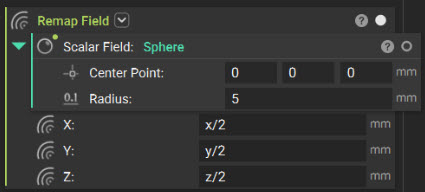 *Dividing each of the X, Y, Z inputs by two results in the **Sphere** doubling in size*
The sphere doubles in size, but the **Field Viewer** reveals a different effect from the earlier translation. The isolines remain evenly spaced and parallel, but the distance between them doubles.
The resulting field remains SDF-like throughout the domain; however, its gradient magnitude is now a constant 0.5 rather than 1. Moving 1 mm through space changes the field value by only 0.5 mm.
Although the zero-value surface, and therefore the visible sphere, remains unchanged, the field values no longer represent true physical distance. As a result, downstream operations that rely on these values, such as offsetting or shelling, may produce incorrect dimensions. For example, a requested 1 mm offset will produce a 2 mm geometric offset.
*Dividing each of the X, Y, Z inputs by two results in the **Sphere** doubling in size*
The sphere doubles in size, but the **Field Viewer** reveals a different effect from the earlier translation. The isolines remain evenly spaced and parallel, but the distance between them doubles.
The resulting field remains SDF-like throughout the domain; however, its gradient magnitude is now a constant 0.5 rather than 1. Moving 1 mm through space changes the field value by only 0.5 mm.
Although the zero-value surface, and therefore the visible sphere, remains unchanged, the field values no longer represent true physical distance. As a result, downstream operations that rely on these values, such as offsetting or shelling, may produce incorrect dimensions. For example, a requested 1 mm offset will produce a 2 mm geometric offset.
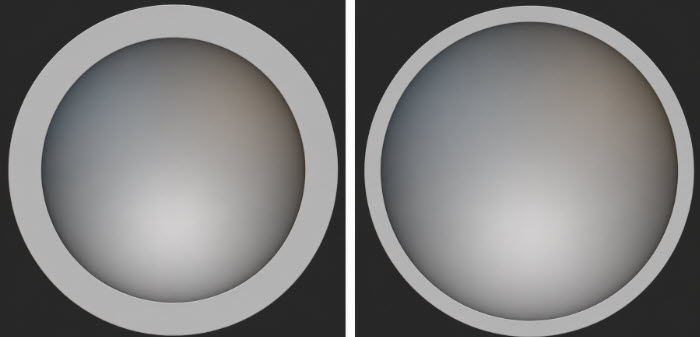 *A 1 mm offset applied to the uncorrected scaled sphere produces a 2 mm shell thickness (left), while the same offset applied after restoring the signed distance field produces the intended 1 mm shell thickness (right)*
Because this distortion is uniform, you can correct it by multiplying the output field by 2, restoring a gradient magnitude of 1 and ensuring dimensionally accurate downstream behavior.
*A 1 mm offset applied to the uncorrected scaled sphere produces a 2 mm shell thickness (left), while the same offset applied after restoring the signed distance field produces the intended 1 mm shell thickness (right)*
Because this distortion is uniform, you can correct it by multiplying the output field by 2, restoring a gradient magnitude of 1 and ensuring dimensionally accurate downstream behavior.
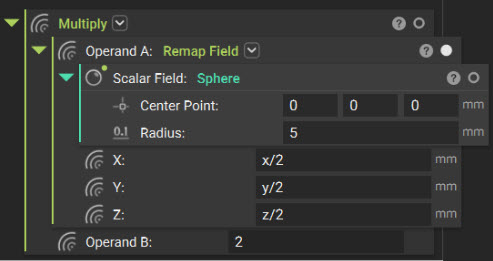 *The scaled **Sphere**'s field is multiplied by 2 to restore the signed distance field.*
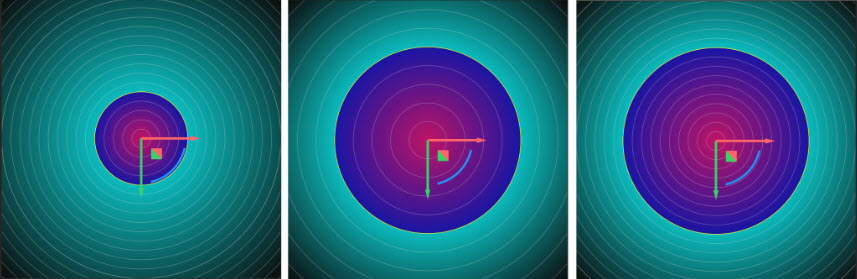 *Distance fields for the original sphere (left), the scaled sphere before correction (center), and the scaled sphere with its distance field restored (right)*
Change only the X input to X/2 while leaving Y and Z unchanged. The sphere becomes an ellipsoid, and the resulting field distortion is no longer uniform. Its magnitude varies with direction and position, as demonstrated in the earlier ellipsoid example. Because the geometry is stretched differently across the field, no single multiplier can restore the signed distance property everywhere.
*Distance fields for the original sphere (left), the scaled sphere before correction (center), and the scaled sphere with its distance field restored (right)*
Change only the X input to X/2 while leaving Y and Z unchanged. The sphere becomes an ellipsoid, and the resulting field distortion is no longer uniform. Its magnitude varies with direction and position, as demonstrated in the earlier ellipsoid example. Because the geometry is stretched differently across the field, no single multiplier can restore the signed distance property everywhere.
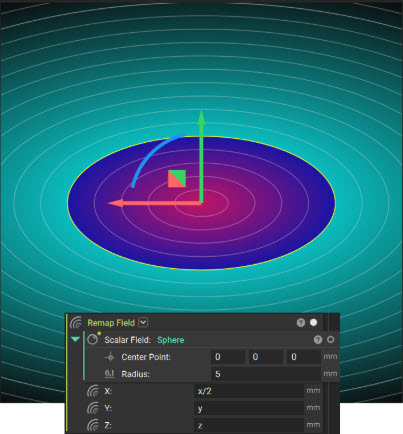 *Changing X to X/2 changes the **Sphere** into an ellipsoid*
For this reason, the **Remap Field** block is a common source of field distortion. Any coordinate substitution other than a simple translation alters the field gradient. Many useful transformations, including scaling and the cylindrical and spherical remaps introduced later in this lesson, therefore require careful evaluation of field quality.
nTop also provides remapping blocks designed specifically for implicit bodies, such as **Remap Scale Body**. These blocks will attempt to compensate for distortion by scaling the field values to better preserve the signed distance property.
*Changing X to X/2 changes the **Sphere** into an ellipsoid*
For this reason, the **Remap Field** block is a common source of field distortion. Any coordinate substitution other than a simple translation alters the field gradient. Many useful transformations, including scaling and the cylindrical and spherical remaps introduced later in this lesson, therefore require careful evaluation of field quality.
nTop also provides remapping blocks designed specifically for implicit bodies, such as **Remap Scale Body**. These blocks will attempt to compensate for distortion by scaling the field values to better preserve the signed distance property.
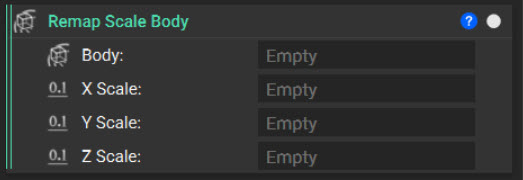 *The **Remap Scale Body** block*
### Arraying
Repetition uses a different form of coordinate substitution. Rather than relocating a single copy, it creates an infinite sequence of copies. The **Mod** block, located in the Math tab, returns the remainder of a division. Inputting **Mod** (x, spacing) to the *X* input of **Remap Field** maps every interval of length spacing back to the same base interval. As a result, any geometry within that interval repeats every *n* spacing units along the X-axis.
Because the resulting field extends infinitely, use **Set Bounding Box** to define a finite region in which to visualize it.
*The **Remap Scale Body** block*
### Arraying
Repetition uses a different form of coordinate substitution. Rather than relocating a single copy, it creates an infinite sequence of copies. The **Mod** block, located in the Math tab, returns the remainder of a division. Inputting **Mod** (x, spacing) to the *X* input of **Remap Field** maps every interval of length spacing back to the same base interval. As a result, any geometry within that interval repeats every *n* spacing units along the X-axis.
Because the resulting field extends infinitely, use **Set Bounding Box** to define a finite region in which to visualize it.
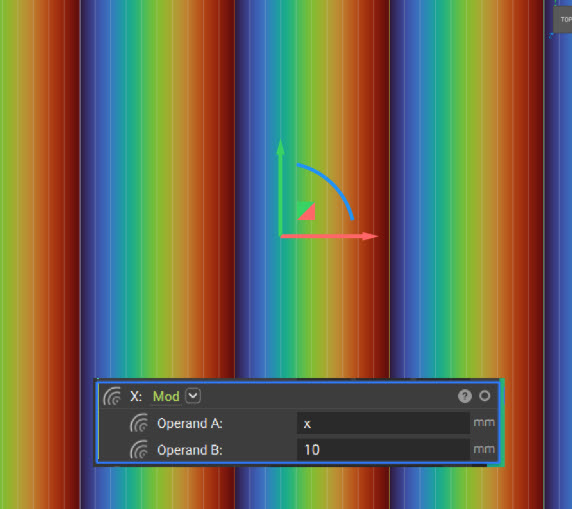 *Field view of **Mod** applied to the X-axis with a spacing of 10 mm. The field spans from 0 to 10 mm and repeats infinitely along the X-axis.*
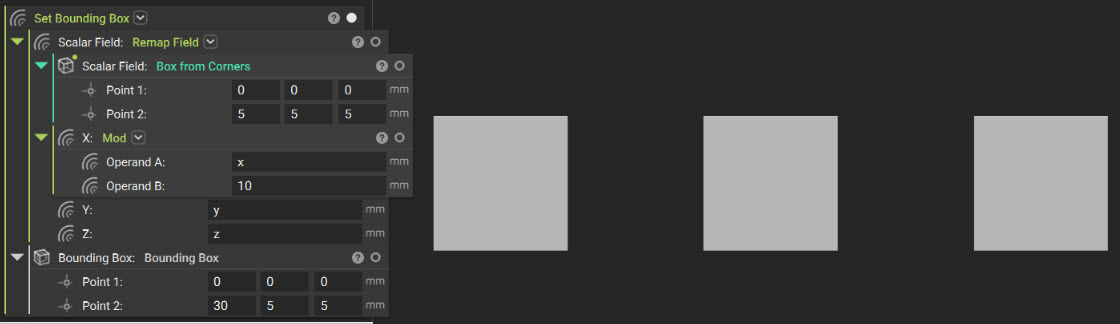 *An example of using the **Mod** and **Remap Field** blocks to array a **Box from Corners***
### Cylindrical and Spherical Remap
The **Remap Cylindrical Field** and **Remap Spherical Field** blocks, located under Fields > Remap, transform planar geometry by wrapping it around an axis or point—like wrapping a flat label around a cylinder.
*An example of using the **Mod** and **Remap Field** blocks to array a **Box from Corners***
### Cylindrical and Spherical Remap
The **Remap Cylindrical Field** and **Remap Spherical Field** blocks, located under Fields > Remap, transform planar geometry by wrapping it around an axis or point—like wrapping a flat label around a cylinder.
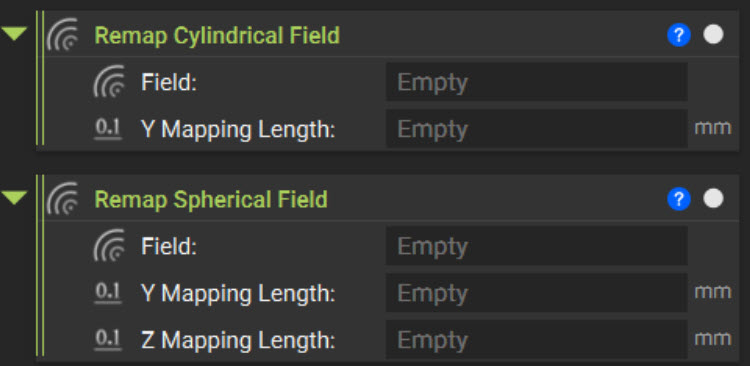 *The **Remap Cylindrical Field** and **Remap Spherical Field** blocks*
Both blocks evaluate the input field within a defined mapping region. For **Remap Cylindrical Field**, only values along the positive X-axis and within the Y-axis interval from −*Y Mapping Length*/2 to +*Y Mapping Length*/2 are mapped. The positive X-direction maps to the radial direction, while the *Y Mapping Length* maps to one complete revolution, from −180° to 180°. As a result, features at opposite ends of the defined Y-range appear on opposite sides of the remapped cylinder.
*The **Remap Cylindrical Field** and **Remap Spherical Field** blocks*
Both blocks evaluate the input field within a defined mapping region. For **Remap Cylindrical Field**, only values along the positive X-axis and within the Y-axis interval from −*Y Mapping Length*/2 to +*Y Mapping Length*/2 are mapped. The positive X-direction maps to the radial direction, while the *Y Mapping Length* maps to one complete revolution, from −180° to 180°. As a result, features at opposite ends of the defined Y-range appear on opposite sides of the remapped cylinder.
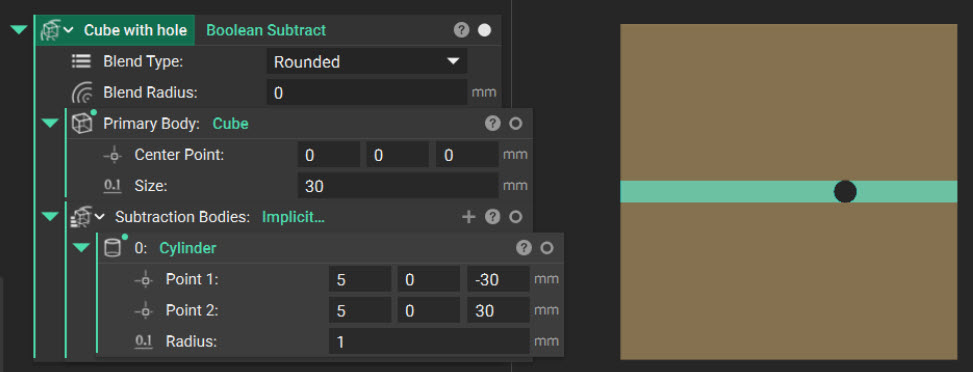 *Original body with the green region indicating the portion to be remapped based on the specified Y Mapping Length of 1mm*
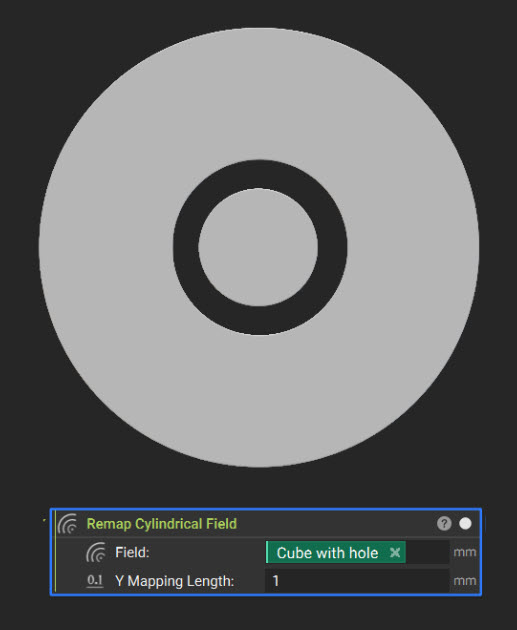 *Resulting body after applying* ***Remap Cylindrical Field*** *to the Cube with Hole geometry shown above, using a Y Mapping Length of 1 mm.*
**Remap Spherical Field** applies an additional angular transformation. Only values along the positive X- and Z-axes and within the Y-axis interval from −*Y Mapping Length*/2 to +*Y Mapping Length*/2 are mapped. *Y Mapping Length* controls the mapping around the sphere's longitude, while *Z Mapping Length* controls the mapping across its latitude.
*Resulting body after applying* ***Remap Cylindrical Field*** *to the Cube with Hole geometry shown above, using a Y Mapping Length of 1 mm.*
**Remap Spherical Field** applies an additional angular transformation. Only values along the positive X- and Z-axes and within the Y-axis interval from −*Y Mapping Length*/2 to +*Y Mapping Length*/2 are mapped. *Y Mapping Length* controls the mapping around the sphere's longitude, while *Z Mapping Length* controls the mapping across its latitude.
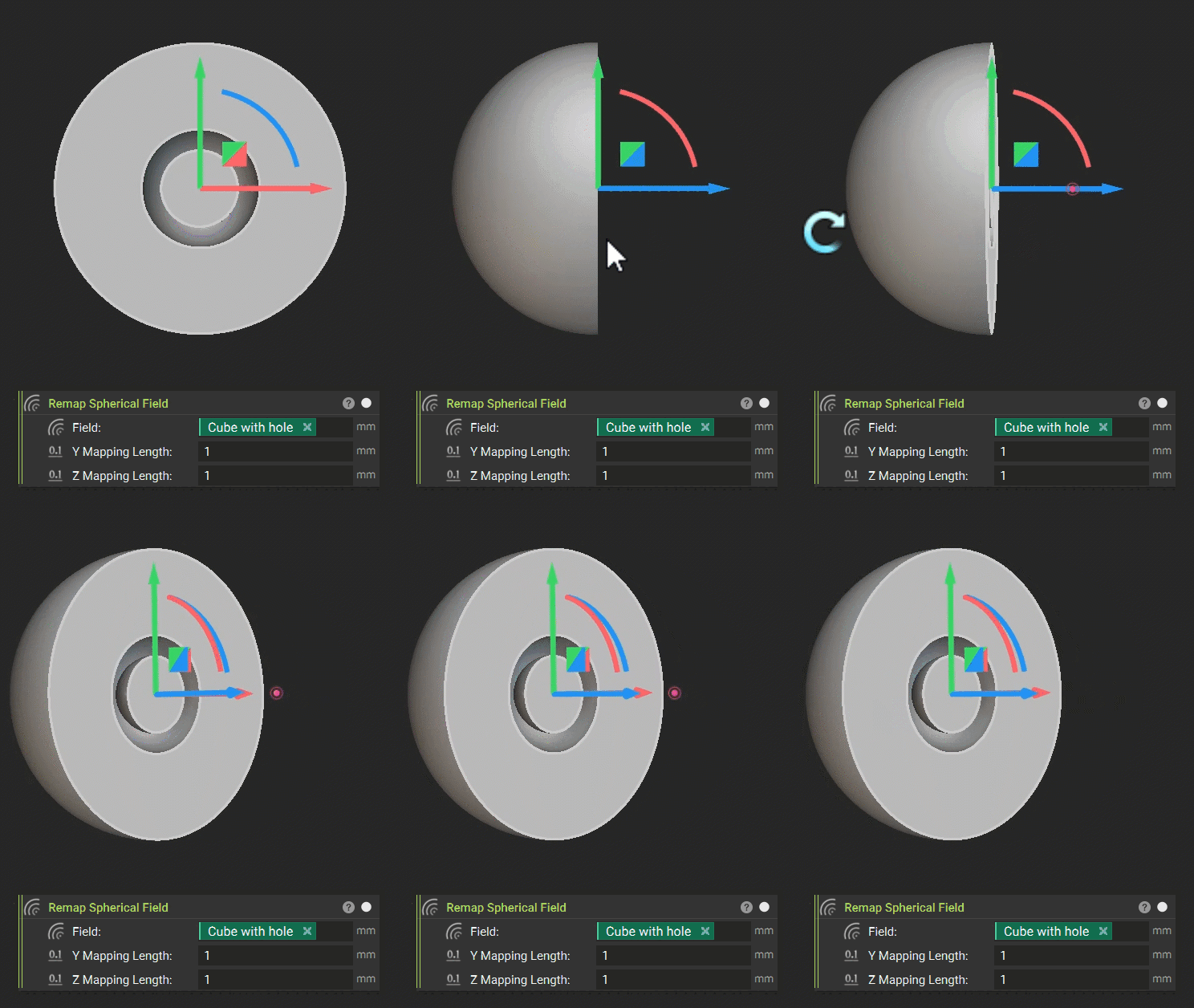 *Section view of the resulting geometry after applying* ***Remap Spherical Field*** *to the same Cube with Hole geometry shown above, using Y and Z mapping lengths of 1 mm.*
Cylindrical and spherical remapping can distort a field more significantly and less predictably than uniform scaling. Geometry near the remapping axis is compressed into a smaller circumference, while geometry farther from the axis is stretched across a larger circumference. Because this scale factor varies continuously with radius, no single multiplier can restore a gradient magnitude of 1 throughout the field.
The **Remap Cylindrical Field** and **Remap Spherical Field** blocks do not compensate for this distortion. After using either block, inspect the result in the Field Viewer and expect the isoline spacing to vary across the remapped field.
When the remapped result must preserve the signed distance property—for example, before shelling a cylindrically wrapped body—use the **Remap Cylindrical Body** or **Remap Spherical Body** block, located under Modeling > Remap. Designed specifically for implicit bodies, these blocks will attempt to compensate for geometric distortion by scaling the field values to better preserve accurate distance measurements.
*Section view of the resulting geometry after applying* ***Remap Spherical Field*** *to the same Cube with Hole geometry shown above, using Y and Z mapping lengths of 1 mm.*
Cylindrical and spherical remapping can distort a field more significantly and less predictably than uniform scaling. Geometry near the remapping axis is compressed into a smaller circumference, while geometry farther from the axis is stretched across a larger circumference. Because this scale factor varies continuously with radius, no single multiplier can restore a gradient magnitude of 1 throughout the field.
The **Remap Cylindrical Field** and **Remap Spherical Field** blocks do not compensate for this distortion. After using either block, inspect the result in the Field Viewer and expect the isoline spacing to vary across the remapped field.
When the remapped result must preserve the signed distance property—for example, before shelling a cylindrically wrapped body—use the **Remap Cylindrical Body** or **Remap Spherical Body** block, located under Modeling > Remap. Designed specifically for implicit bodies, these blocks will attempt to compensate for geometric distortion by scaling the field values to better preserve accurate distance measurements.
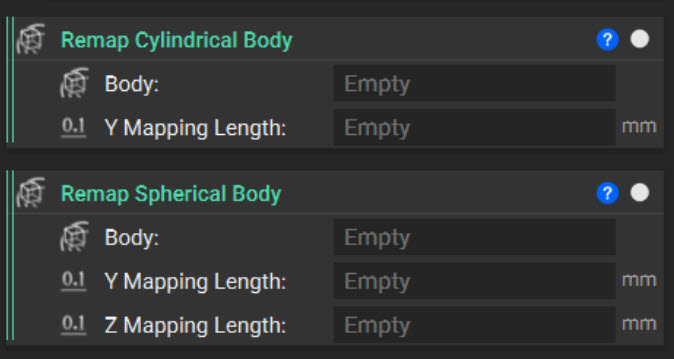 *The **Remap Cylindrical Body** and **Remap Spherical Body** blocks*
## What to Take Away
* Every signed distance field (SDF) is an implicit field, but not every implicit field is an SDF. A true SDF has a gradient magnitude of 1, meaning its values represent physical distance from the zero-value surface.
* A distorted field may appear correct in the Viewport because its zero-value surface remains valid. Use the Field Viewer to inspect isoline spacing and identify field distortion.
* Operations such as offsetting, shelling, and blending depend on field values beyond the zero-value surface. Distorted fields can therefore produce inaccurate dimensions or inconsistent results.
* **Remap Field** transforms geometry through coordinate substitution. Connecting a field to the X, Y, or Z input changes where the source field is evaluated without modifying its original equation.
* Translation and mirroring preserve the SDF because they do not stretch or compress the field. Uniform scaling produces a constant distortion that you can correct with a constant multiplier, while nonuniform scaling cannot.
* Combining **Mod** with **Remap Field** creates an infinitely repeating field. Use **Set Bounding Box** to define a finite visualization region.
* **Remap Cylindrical Field** and **Remap Spherical Field** wrap planar geometry into cylindrical or spherical coordinate spaces, but their distortion varies throughout the field and cannot be corrected with a single multiplier.
* When you must preserve accurate distance values, use body-specific remapping blocks—such as **Remap Scale Body**, **Remap Cylindrical Body**, or **Remap** **Spherical Body**—that attempt to compensate for field distortion.
## What's Next
Now that you have learned the fundamentals of remapping and field distortion, you will apply your knowledge in the following knowledge check.
This documentation is built and hosted on [Mintlify](https://mintlify.com), a developer documentation platform.
*The **Remap Cylindrical Body** and **Remap Spherical Body** blocks*
## What to Take Away
* Every signed distance field (SDF) is an implicit field, but not every implicit field is an SDF. A true SDF has a gradient magnitude of 1, meaning its values represent physical distance from the zero-value surface.
* A distorted field may appear correct in the Viewport because its zero-value surface remains valid. Use the Field Viewer to inspect isoline spacing and identify field distortion.
* Operations such as offsetting, shelling, and blending depend on field values beyond the zero-value surface. Distorted fields can therefore produce inaccurate dimensions or inconsistent results.
* **Remap Field** transforms geometry through coordinate substitution. Connecting a field to the X, Y, or Z input changes where the source field is evaluated without modifying its original equation.
* Translation and mirroring preserve the SDF because they do not stretch or compress the field. Uniform scaling produces a constant distortion that you can correct with a constant multiplier, while nonuniform scaling cannot.
* Combining **Mod** with **Remap Field** creates an infinitely repeating field. Use **Set Bounding Box** to define a finite visualization region.
* **Remap Cylindrical Field** and **Remap Spherical Field** wrap planar geometry into cylindrical or spherical coordinate spaces, but their distortion varies throughout the field and cannot be corrected with a single multiplier.
* When you must preserve accurate distance values, use body-specific remapping blocks—such as **Remap Scale Body**, **Remap Cylindrical Body**, or **Remap** **Spherical Body**—that attempt to compensate for field distortion.
## What's Next
Now that you have learned the fundamentals of remapping and field distortion, you will apply your knowledge in the following knowledge check.
This documentation is built and hosted on [Mintlify](https://mintlify.com), a developer documentation platform.