


Implicit Bodies
The functions in nTop Core let you work with implicit bodies created in nTop. An implicit body is defined by a function F called its field. Given an implicit body S, and a 3D point P, the value F(P) provides a rough measure of the distance from P to the boundary of S, with F(P) < 0 when P is inside the body, and F(P) > 0 for points outside.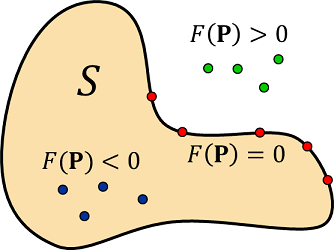
.implicit be sure to convert from your native units.
Why a Library?
A more traditional approach to data interoperability is to have nTop export its models in some standard format that other applications can read. Typical export formats are polygonal meshes, voxel structures, boundary representations (b-reps), and planar slices. nTop has numerous data export functions to support this approach, but it does not work well for certain types of models. Some specific problems are:- Meshes, voxels, and slices are approximations with a “baked-in” error.
- Meshes are extremely large, especially if they are accurate.
- Exported meshes and b-reps are “dumb” and difficult to edit.
The Basic Idea
The basic flow is shown in the following diagram:
- The nTop user exports a
.implicitfile containing a representation of an implicit body. - The functions in nTop Core interact with the
.implicitfile. - Your code calls functions in nTop Core to get information about the implicit body.
Exporting a .implicit file
There is a block in nTop called “Export Implicit Body” that allows you to export a representation of an implicit body from within an nTop notebook. However, for the purpose of developing your application, it is not absolutely necessary to go through this export step, as we provide some simple .implicit files that you can use for initial testing.
Next steps
- See the C++ API for calling nTop Core’s native functions directly, and its dependencies.
- See the Python Package for the Pythonic, NumPy-native wrapper.