

nTop 5.20 is here! This release features our new curve and profile modeling blocks, allowing more nTop modeling and enabling iteration of an entire design space. As with every release, nTop’s dedicated support team is ready to answer your questions. Please visit support.ntop.com to gain access to helpful tutorials and support articles.
Arc by Tangent
- The Arc by Tangent block creates an arc from a start point, tangent vector, and end point input.
- Location: Create > Curves
- Start Point: Start point of the arc.
- Start Tangent: Vector representing the tangent direction of the arc at the start point.
- End Point: End point of the arc.
- Output: Arc

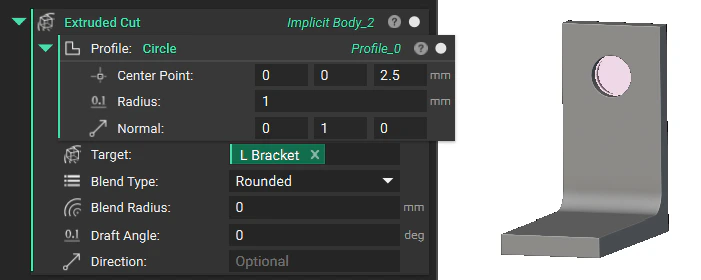
Extruded Cut
- The Extruded Cut block extrudes, and boolean subtracts a profile from a solid. The Profile will be cut through the entire Target Body input.
- Location: Modeling > Operations
- Profile: The profile to extrude and cut into the Target Body.
- Target: The Implicit Body to cut
- Blend Type: The Blend Type where the Profiles are cut from the Target Body.
- Blend Radius: Radius of the blend.
- Draft Angle: Draft angle applied to the extrusion.
- Direction: Direction of extrusion. Uses the normals of the Profiles’ plane by default.
- Output: Implicit Body
Polycurve from Curves
- The Polycurve from Curves block combines a list of curves (connected set of arcs, lines, and splines) and creates a Polycurve. The input curve list should have shared endpoints. The input curves can be open or closed, planar or non-planar, but not disconnected or branching.
- Location: Create > Curves
- Curves: List of curves to join into a single polycurve
- Output: Polycurve

Polyline
- The Polyline block creates a polyline from an input list of points.
- Location: Create > Curves
- Points: List of points to connect with line segments
- Output: Polycurve

Profile from Curves
- The Profile from Curves block creates a single profile from an input list of curves.
- Location: Create > Curves
- Curves: List of Planar curves.
- Normal: Direction to view the curve plane and orient open curves with respect to.
- Output: Profile

Get CAD Faces by Name
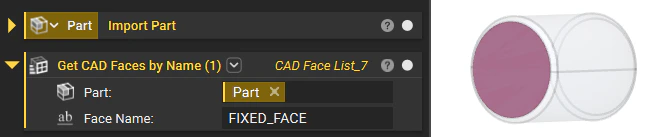
- The Get CAD Faces by Name block extracts the CAD Faces from the CAD Body, Component, or Part based on the Face Name.
- Location: Modeling > Utilities
- Part: Part from which to get Faces.
- Face Name: Name of faces to get.
- Output: CAD Face List
Usage Improvements
- We’ve implemented lazy loading for Toolkit blocks, resulting in faster initial load times. The Toolkit blocks will now load only when added to your nTop notebook. As a result, you may not see the start-up loader with a progress bar when you launch nTop.
Block Updates
- We have updated our curve and profile modeling blocks to allow more modeling in nTop. Many blocks have also been updated with name changes, input/output type changes, or both, but their behavior has not changed. This support article has all the information regarding this update.
| Old Block | Old Output Type | New Block | New Output Type | Change |
|---|---|---|---|---|
| Curve through Points | Curve (old) | Spline through Points | Spline | Updated Block |
| Circle | Circle | Circle | Profile | Updated Block |
| Curve Integral | Scalar | Curve Integral | Scalar | Updated Block (input type change) |
| Equidistant Points on Curve | Point List | Equidistant Points on Curve | Point List | Updated Block (input type change) |
| Extrude Profile | Implicit Body | Extrude Profile | Implicit Body | Updated Block (input type change) |
| Graph by Swept Projection | Graph by Swept Projection | Graph | Updated Block (input type change) | |
| Polygon from Points | Polygon | Profile from Points | Profile | Updated Block |
| Regular Polygon | Polygon | Regular Polygon | Profile | Updated Block |
| Revolve Profile | Implicit Body | Revolve Profile | Implicit Body | Updated Block (input type change) |
| Section Body | Profile (old) | Section Body | Profile | Updated Block |
| Surface Area | Scalar | Surface Area | Scalar | Updated Block (input type change) |
| Sweep Profile | Implicit Body | Sweep Profile | Implicit Body | Updated Block (input type change) |
| Implicit Body from Curve | Implicit Body | Property: Curve.Scalar Field | Scalar Field | Moved to Property |
| Twisted Sweep Profile | Implicit Body | - | - | Deprecated Block (Merged with Sweep Profile) |
| Loft between Profiles | Implicit Body | See support article FAQ | - | Deprecated Block |
| Offset Profile | Profile (old) | - | - | Deprecated Block |
- We have added the Name property to the CAD Face type to allow users to extract CAD Faces based on the Name.
Bug Fix
- We fixed an issue with the Topology Optimization block that errored out when multiple Flexible connectors shared nodes on an FE Boundary.