FE Model, Restraints, Integer, Scalar, Scalar
FE Model, Restraints, Integer, Scalar, Scalar, 1.1.0
FE Model, Restraints, Integer, Scalar, Scalar, 1.2.0
FE Model, Restraints, Integer, Scalar, Scalar, 1.3.0
About this Block
What it does: Runs an analysis on an Simulation Model that calculates its natural frequencies (eigenfrequencies) and their corresponding mode shapes. Common uses:- Understanding the vibrational characteristics of your model.
- Free modes of vibration calculations don’t consider forces. Therefore, we don’t need to use them in the boundary conditions.
- Run free-free modal analysis by not providing any Restraints.
- You can bound the minimum and maximum frequencies, but it will return an error if there are no natural frequencies in that range.
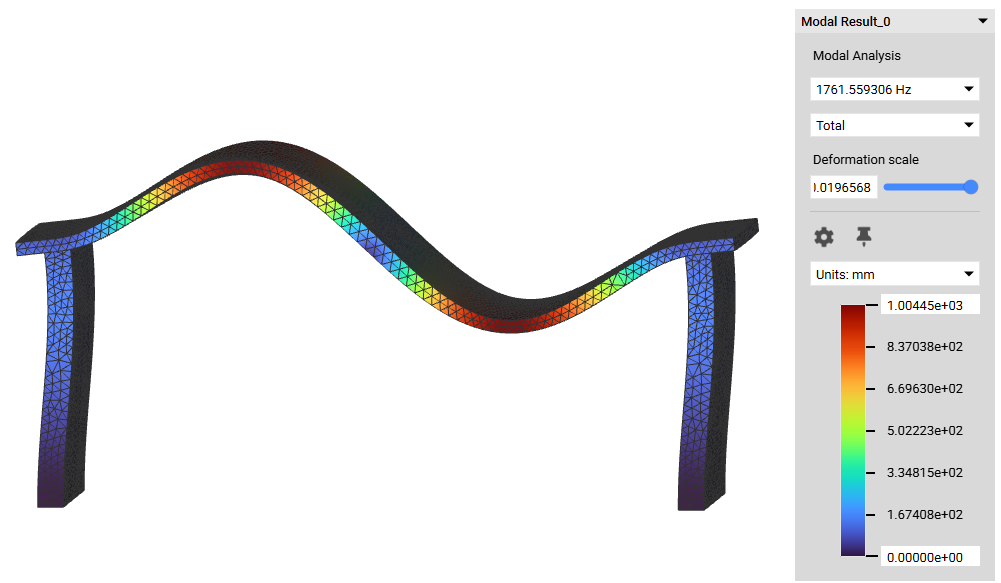
- When the calculation is complete, a Head’s Up Display (HUD) will appear that allows you to visualize the block’s results. The block’s visibility must be on to see the results window.
- You can change the min and max values in the colormap by clicking on their values.
- The “Deformation scale” controls the exaggeration of the displacement for visual inspection.
- To access the eigenfrequencies, open the Info Panel > Properties. Scroll down and expand the eigenfrequencies. Drag these into the Notebook to use the values.
- It is recommended to use a Quadratic Geometric order FE Mesh with any analysis to get the most accurate results.
Example File
Download Example: Modal Analysis