

About this Block
What it does: Creates a Lattice from a Surface Mesh, with a configurable method of latticing and thickness. Tips:- Choose from the following lattice creation methods:
- Mesh edges: Creates lattice beams along the mesh edges.
- Vertex Centroid: Creates a vertex at each mesh face’s centroid and the mesh vertices. Lattice beams connect the vertices.
- Dual: Creates a vertex at the centroid of each mesh face and creates a connecting beam to the next closest mesh centroid.
- Mesh Boundary: Creates lattice beams around the boundary of the mesh. There is no boundary if the mesh is closed, so no lattice is created.
- Mesh Features: Creates lattice beams at the mesh features, like edges.
- You can use triangular and quad meshes.
- The Thickness of the lattice is a Scalar Field type, which allows for a variable Thickness.
- Open up the block’s Properties Panel to view the beam, implicit, and thick graph properties.
- These properties are populated based on the type of Unit Cell you use. An error sign with a tooltip appears next to the property if it is empty.
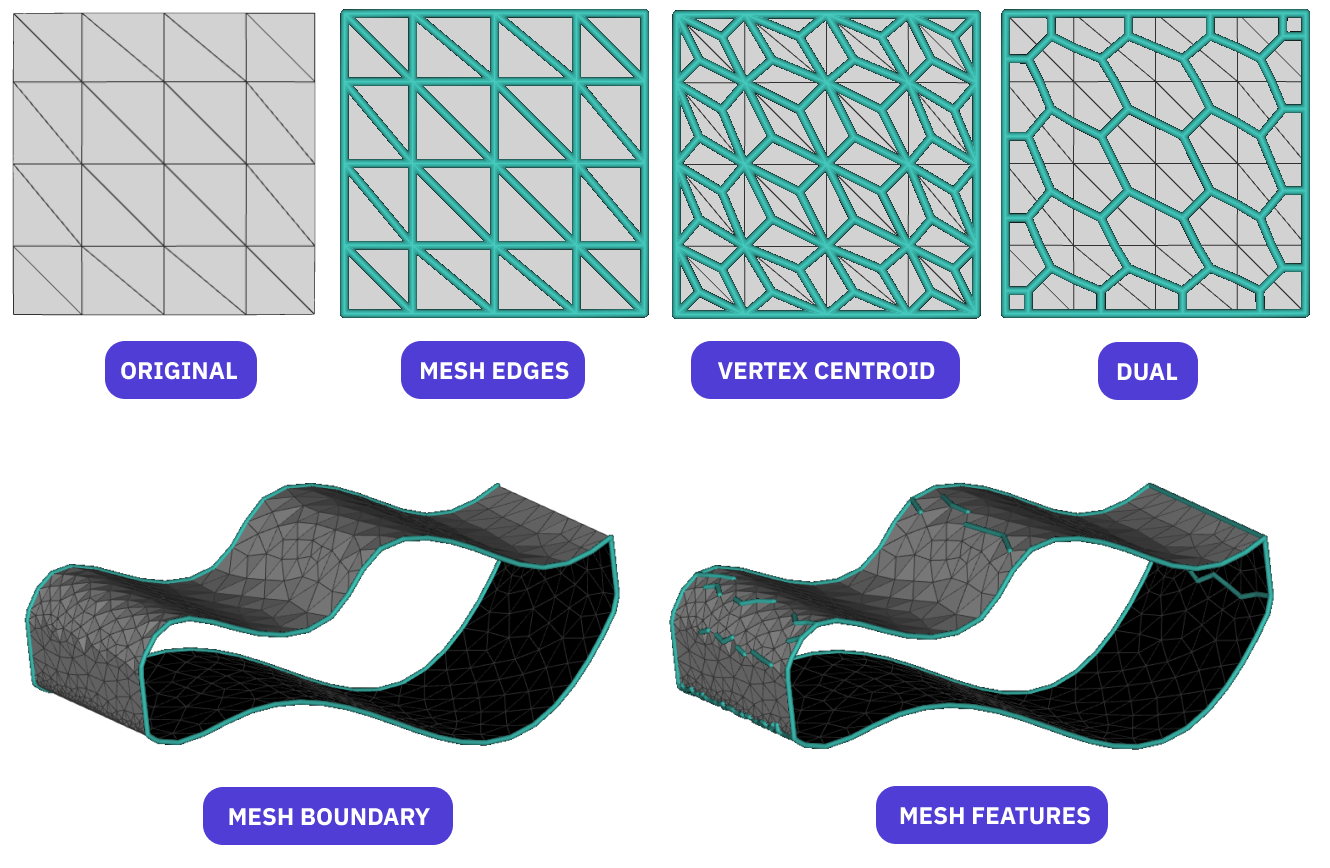
Creates a Lattice from a surface Mesh using the features specified in the method input.