
Implicit Body, Non-Parametric Unit Cell, Vector, Frame, Bool
Implicit Body, Non-Parametric Unit Cell, Vector, Frame, Bool, 1.1.0
Implicit Body, Non-Parametric Unit Cell, Vector, Frame, Bool, 1.2.0
Implicit Body, 1 Parameter Unit Cell, Vector, Frame, Bool, Scalar Field
Implicit Body, 1 Parameter Unit Cell, Vector, Frame, Bool, Scalar Field, 1.1.0
Implicit Body, 1 Parameter Unit Cell, Vector, Frame, Bool, Scalar Field, 1.2.0
Implicit Body, 2 Parameter Unit Cell, Vector, Frame, Bool, Scalar Field, Scalar Field
Implicit Body, 2 Parameter Unit Cell, Vector, Frame, Bool, Scalar Field, Scalar Field, 1.1.0
Implicit Body, 2 Parameter Unit Cell, Vector, Frame, Bool, Scalar Field, Scalar Field, 1.2.0
About this Block
What it does: Creates a periodic lattice with built in Rectangular Cell Map, Trim Lattice, and Trim Cell Map blocks. Common uses:- Quick method of creating a periodic lattice.
Implicit Body, Non-Parametric Unit Cell, Vector, Frame, Bool
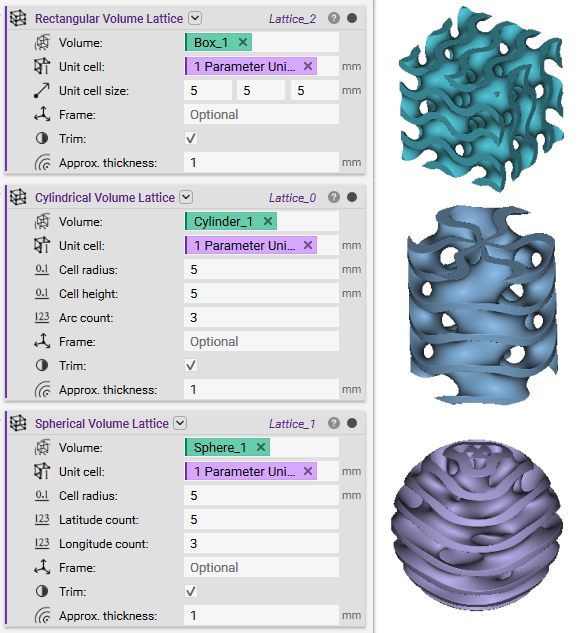
Generates a Lattice that completely fills a Volume by tessellating a Unit Cell along rectangular coordinates. This block accepts a Non-Parametric Unit Cell, with additional overloads for 1 or 2 Parameter Unit Cells. By default, the Lattice’s beams are then trimmed to the surface of the Volume input. Provide an optional Frame input to customize the origin and orientation of the rectangular coordinates.Inputs
| Name | Type | Description |
|---|---|---|
| Volume | Implicit Body | Implicit body in which the lattice will be generated. |
| Unit cell | Non-Parametric Unit Cell | Non-parametric unit cell to tessellate within the volume input. |
| Unit cell size | Vector | Size of the unit cells in the frame’s x, y, and z directions. |
| Frame | Frame | Optional frame that defines the rectangular coordinates used to generate the lattice. By default, the frame’s origin is the “min point” property of the volume input’s bounding box, and the frame’s x and y are the “axis 1” and “axis 2” properties of the volume input’s bounding box. |
| Trim | Bool | Option to trim the lattice’s beams at the volume input’s surface. |
Outputs
| Type |
|---|
| Lattice |
Implicit Body, Non-Parametric Unit Cell, Vector, Frame, Bool, 1.1.0
Generates a Lattice that completely fills a Volume by tessellating a Unit Cell along rectangular coordinates. This block accepts a Non-Parametric Unit Cell, with additional overloads for 1 or 2 Parameter Unit Cells. By default, the Lattice’s beams are then trimmed to the surface of the Volume input. Provide an optional Frame input to customize the origin and orientation of the rectangular coordinates.Inputs
| Name | Type | Description |
|---|---|---|
| Volume | Implicit Body | Implicit body in which the lattice will be generated. |
| Unit cell | Non-Parametric Unit Cell | Non-parametric unit cell to tessellate within the volume input. |
| Unit cell size | Vector | Size of the unit cells in the frame’s x, y, and z directions. |
| Frame | Frame | Optional frame that defines the rectangular coordinates used to generate the lattice. By default, the frame’s origin is the “min point” property of the volume input’s bounding box, and the frame’s x and y are the “axis 1” and “axis 2” properties of the volume input’s bounding box. |
| Trim | Bool | Option to trim the lattice’s beams at the volume input’s surface. |
Outputs
| Type |
|---|
| Lattice |
Implicit Body, Non-Parametric Unit Cell, Vector, Frame, Bool, 1.2.0
Generates a Lattice that completely fills a Volume by tessellating a Unit Cell along rectangular coordinates. This block accepts a Non-Parametric Unit Cell, with additional overloads for 1 or 2 Parameter Unit Cells. By default, the Lattice’s beams are then trimmed to the surface of the Volume input. Provide an optional Frame input to customize the origin and orientation of the rectangular coordinates.Inputs
| Name | Type | Description |
|---|---|---|
| Volume | Implicit Body | Implicit body in which the lattice will be generated. |
| Unit cell | Non-Parametric Unit Cell | Non-parametric unit cell to tessellate within the volume input. |
| Unit cell size | Vector | Size of the unit cells in the frame’s x, y, and z directions. |
| Frame | Frame | Optional frame that defines the rectangular coordinates used to generate the lattice. By default, the frame’s origin is the “min point” property of the volume input’s bounding box, and the frame’s x and y are the “axis 1” and “axis 2” properties of the volume input’s bounding box. |
| Trim | Bool | Option to trim the lattice at the volume input’s surface. Trimming tolerance is 0.1% of the average of the input volume’s bounding box dimensions. |
Outputs
| Type |
|---|
| Lattice |
Implicit Body, 1 Parameter Unit Cell, Vector, Frame, Bool, Scalar Field
Generates a Lattice that completely fills a Volume by tessellating a Unit Cell along rectangular coordinates. This block accepts a 1 Parameter Unit Cell, with additional overloads for 2 or 0 Parameter Unit Cells. By default, the Lattice’s beams are then trimmed to the surface of the Volume input. Provide an optional Frame input to customize the origin and orientation of the rectangular coordinates.Inputs
| Name | Type | Description |
|---|---|---|
| Volume | Implicit Body | Implicit body in which the lattice will be generated. |
| Unit cell | 1 Parameter Unit Cell | One-parameter unit cell to tessellate within the volume input. |
| Unit cell size | Vector | Size of the unit cells in the frame’s x, y, and z directions. |
| Frame | Frame | Optional frame that defines the rectangular coordinates used to generate the lattice. By default, the frame’s origin is the “min point” property of the volume input’s bounding box, and the frame’s x and y are the “axis 1” and “axis 2” properties of the volume input’s bounding box. |
| Trim | Bool | Option to trim the lattice’s beams at the volume input’s surface. |
| Unit cell parameter 1 | Scalar Field | Value of the unit cell’s first parameter. The input name will update based on the selected unit cell. Each unit cell’s parameters can be found in the unit cell’s documentation. |
Outputs
| Type |
|---|
| Lattice |
Implicit Body, 1 Parameter Unit Cell, Vector, Frame, Bool, Scalar Field, 1.1.0
Generates a Lattice that completely fills a Volume by tessellating a Unit Cell along rectangular coordinates. This block accepts a 1 Parameter Unit Cell, with additional overloads for 2 or 0 Parameter Unit Cells. By default, the Lattice’s beams are then trimmed to the surface of the Volume input. Provide an optional Frame input to customize the origin and orientation of the rectangular coordinates.Inputs
| Name | Type | Description |
|---|---|---|
| Volume | Implicit Body | Implicit body in which the lattice will be generated. |
| Unit cell | 1 Parameter Unit Cell | One-parameter unit cell to tessellate within the volume input. |
| Unit cell size | Vector | Size of the unit cells in the frame’s x, y, and z directions. |
| Frame | Frame | Optional frame that defines the rectangular coordinates used to generate the lattice. By default, the frame’s origin is the “min point” property of the volume input’s bounding box, and the frame’s x and y are the “axis 1” and “axis 2” properties of the volume input’s bounding box. |
| Trim | Bool | Option to trim the lattice’s beams at the volume input’s surface. |
| Unit cell parameter 1 | Scalar Field | Value of the unit cell’s first parameter. The input name will update based on the selected unit cell. Each unit cell’s parameters can be found in the unit cell’s documentation. |
Outputs
| Type |
|---|
| Lattice |
Implicit Body, 1 Parameter Unit Cell, Vector, Frame, Bool, Scalar Field, 1.2.0
Generates a Lattice that completely fills a Volume by tessellating a Unit Cell along rectangular coordinates. This block accepts a 1 Parameter Unit Cell, with additional overloads for 2 or 0 Parameter Unit Cells. By default, the Lattice’s beams are then trimmed to the surface of the Volume input. Provide an optional Frame input to customize the origin and orientation of the rectangular coordinates.Inputs
| Name | Type | Description |
|---|---|---|
| Volume | Implicit Body | Implicit body in which the lattice will be generated. |
| Unit cell | 1 Parameter Unit Cell | One-parameter unit cell to tessellate within the volume input. |
| Unit cell size | Vector | Size of the unit cells in the frame’s x, y, and z directions. |
| Frame | Frame | Optional frame that defines the rectangular coordinates used to generate the lattice. By default, the frame’s origin is the “min point” property of the volume input’s bounding box, and the frame’s x and y are the “axis 1” and “axis 2” properties of the volume input’s bounding box. |
| Trim | Bool | Option to trim the lattice at the volume input’s surface. Trimming tolerance is 0.1% of the average of the input volume’s bounding box dimensions. |
| Unit cell parameter 1 | Scalar Field | Value of the unit cell’s first parameter. The input name will update based on the selected unit cell. Each unit cell’s parameters can be found in the unit cell’s documentation. |
Outputs
| Type |
|---|
| Lattice |
Implicit Body, 2 Parameter Unit Cell, Vector, Frame, Bool, Scalar Field, Scalar Field
Generates a Lattice that completely fills a Volume by tessellating a Unit Cell along rectangular coordinates. This block accepts a 2 Parameter Unit Cell, with additional overloads for 0 or 1 Parameter Unit Cells. By default, the Lattice’s beams are then trimmed to the surface of the Volume input. Provide an optional Frame input to customize the origin and orientation of the rectangular coordinates.Inputs
| Name | Type | Description |
|---|---|---|
| Volume | Implicit Body | Implicit body in which the lattice will be generated. |
| Unit cell | 2 Parameter Unit Cell | Two-parameter unit cell to tessellate within the volume input. |
| Unit cell size | Vector | Size of the unit cells in the frame’s x, y, and z directions. |
| Frame | Frame | Optional frame that defines the rectangular coordinates used to generate the lattice. By default, the frame’s origin is the “min point” property of the volume input’s bounding box, and the frame’s x and y are the “axis 1” and “axis 2” properties of the volume input’s bounding box. |
| Trim | Bool | Option to trim the lattice’s beams at the volume input’s surface. |
| Unit cell parameter 1 | Scalar Field | Value of the unit cell’s first parameter. The input name will update based on the selected unit cell. Each unit cell’s parameters can be found in the unit cell’s documentation. |
| Unit cell parameter 2 | Scalar Field | Value of the unit cell’s second parameter. The input name will update based on the selected unit cell. Each unit cell’s parameters can be found in the unit cell’s documentation. |
Outputs
| Type |
|---|
| Lattice |
Implicit Body, 2 Parameter Unit Cell, Vector, Frame, Bool, Scalar Field, Scalar Field, 1.1.0
Generates a Lattice that completely fills a Volume by tessellating a Unit Cell along rectangular coordinates. This block accepts a 2 Parameter Unit Cell, with additional overloads for 0 or 1 Parameter Unit Cells. By default, the Lattice’s beams are then trimmed to the surface of the Volume input. Provide an optional Frame input to customize the origin and orientation of the rectangular coordinates.Inputs
| Name | Type | Description |
|---|---|---|
| Volume | Implicit Body | Implicit body in which the lattice will be generated. |
| Unit cell | 2 Parameter Unit Cell | Two-parameter unit cell to tessellate within the volume input. |
| Unit cell size | Vector | Size of the unit cells in the frame’s x, y, and z directions. |
| Frame | Frame | Optional frame that defines the rectangular coordinates used to generate the lattice. By default, the frame’s origin is the “min point” property of the volume input’s bounding box, and the frame’s x and y are the “axis 1” and “axis 2” properties of the volume input’s bounding box. |
| Trim | Bool | Option to trim the lattice’s beams at the volume input’s surface. |
| Unit cell parameter 1 | Scalar Field | Value of the unit cell’s first parameter. The input name will update based on the selected unit cell. Each unit cell’s parameters can be found in the unit cell’s documentation. |
| Unit cell parameter 2 | Scalar Field | Value of the unit cell’s second parameter. The input name will update based on the selected unit cell. Each unit cell’s parameters can be found in the unit cell’s documentation. |
Outputs
| Type |
|---|
| Lattice |
Implicit Body, 2 Parameter Unit Cell, Vector, Frame, Bool, Scalar Field, Scalar Field, 1.2.0
Generates a Lattice that completely fills a Volume by tessellating a Unit Cell along rectangular coordinates. This block accepts a 2 Parameter Unit Cell, with additional overloads for 0 or 1 Parameter Unit Cells. By default, the Lattice’s beams are then trimmed to the surface of the Volume input. Provide an optional Frame input to customize the origin and orientation of the rectangular coordinates.Inputs
| Name | Type | Description |
|---|---|---|
| Volume | Implicit Body | Implicit body in which the lattice will be generated. |
| Unit cell | 2 Parameter Unit Cell | Two-parameter unit cell to tessellate within the volume input. |
| Unit cell size | Vector | Size of the unit cells in the frame’s x, y, and z directions. |
| Frame | Frame | Optional frame that defines the rectangular coordinates used to generate the lattice. By default, the frame’s origin is the “min point” property of the volume input’s bounding box, and the frame’s x and y are the “axis 1” and “axis 2” properties of the volume input’s bounding box. |
| Trim | Bool | Option to trim the lattice at the volume input’s surface. Trimming tolerance is 0.1% of the average of the input volume’s bounding box dimensions. |
| Unit cell parameter 1 | Scalar Field | Value of the unit cell’s first parameter. The input name will update based on the selected unit cell. Each unit cell’s parameters can be found in the unit cell’s documentation. |
| Unit cell parameter 2 | Scalar Field | Value of the unit cell’s second parameter. The input name will update based on the selected unit cell. Each unit cell’s parameters can be found in the unit cell’s documentation. |
Outputs
| Type |
|---|
| Lattice |

