
Implicit Body, Scalar, Scalar, Bool, Bool, 2.0.0

Implicit Body, Scalar, Scalar, Bool, Bool, 2.1.0

Implicit Body, Scalar, Scalar, Bool, Bool, 2.2.0

Implicit Body, Scalar, Scalar, Bool, Bool, 2.3.0

Implicit Body, Scalar, Scalar, Bool, Bool, 2.4.0

Implicit Body, Scalar, Scalar, Bool, Bool, 2.5.0

Implicit Body, Scalar, Scalar, Integer, Implicit Body, Bool, 2.0.0

Implicit Body, Scalar, Scalar, Integer, Implicit Body, Bool, 2.1.0

Implicit Body, Scalar, Scalar, Integer, Implicit Body, Bool, 2.2.0

Implicit Body, Scalar, Scalar, Integer, Implicit Body, Bool, 2.3.0

Implicit Body, Scalar, Scalar, Integer, Implicit Body, Bool, 2.4.0

Implicit Body, Scalar, Scalar, Integer, Implicit Body, Bool, 2.5.0

Implicit Body, Scalar, Scalar, Bool, Bool, 2.0.0

Creates a Mesh from an Implicit Body. Preserve sharp features by choosing the Sharpen option. Reduce the triangle count of the final result by choosing the Simplify option. Switch to the block overload for more inputs including Sharpening iterations and a region to localize sharpening. This version has a higher computational overhead than Mesh from Implicit by DC, but can handle more complex geometry and produces cleaner meshes.

Inputs

NameTypeDescription
BodyImplicit BodyImplicit body to convert.
ToleranceScalarThe maximum allowable deviation of the mesh from the implicit geometry. as this value gets smaller, the resulting mesh will be more precise, but the block will take longer to compute.
Min. feature sizeScalarOption to specify the approximate size of the smallest feature(s) of the implicit body that should be preserved during the conversion. when provided, features that are smaller than this input will be filtered out and not included in the final result.
SharpenBoolOption to preserve sharp edges and vertices. if you choose this option, the block will take longer to compute.
SimplifyBoolOption to reduce the triangle count as much as possible without violating the given tolerance criteria.

Outputs

Type
Mesh

About this Block V2.00

What it does: Turns an implicit body into a triangular mesh. Common uses:
  • Preparation for analysis
  • Exporting
Tips:
  • Tolerance: Translates to the voxel size. The voxel size is given by half the input tolerance. As a rule of thumb the number of triangles in the unsimplified output mesh quadruples whenever the tolerance input is halved. Keep that in mind to avoid generating unreasonably large meshes. As long as you only use this input, the output mesh is guaranteed to be watertight and manifold. In most cases the output mesh will also be free of self-intersections.
  • Min. feature size: This input is very different from the min feature size of v1 and should not be confused. If you provide a feature size, the block performs a filtering step to remove any features or holes which are smaller than the provided input. Use this input if the output mesh captures small details which are not manufacturable.
    • Apart from the “Min. feature size” input, the block automatically removes meshing artifacts (where an artifact is a connected component which is smaller than 0.1% percent of the surface area of the largest connected component). This step is different from the filtering step in that this cleans up artifacts produced by the meshing step, while the filtering step works directly on the (voxelized) implicit surface.
  • Sharpening option: Enable this to reconstruct sharp features present in the implicit body. Typically, enabling the sharpening option improves the approximation quality of the mesh by a lot. Thus, in practice, it is often possible to decrease the tolerance input and enable sharpening to obtain a given target tolerance between the mesh and the implicit.
    • In most cases the output mesh should not have any defects (i.e. closed, no self-intersections, and manifold). However, in a rare occurrence, the resulting mesh may have self-intersections, be non-manifold, or have pockets (i.e., two triangles with an extremely small dihedral angle). Enabling this option will substantially increase the runtime of the block, typically it will take more than twice as long.
  • Simplification option: The old version provides an “adaptivity” input that can be used to obtain a mesh with fewer elements in areas of low curvature. In a similar spirit, the new version has a “simplify” option that produces a mesh with the least amount of triangles while still conforming to the input tolerance. Similar to the old version, the simplification process can introduce new mesh defects (self-intersections and overfolds). The Simplification option forcibly decimates and combines ~ 90% of the elements which can result in loss of geometry fidelity. Simplifying Mesh By Threshold will allow you to tune the decimation percentage. Enabling this option will substantially increase the runtime of the block.
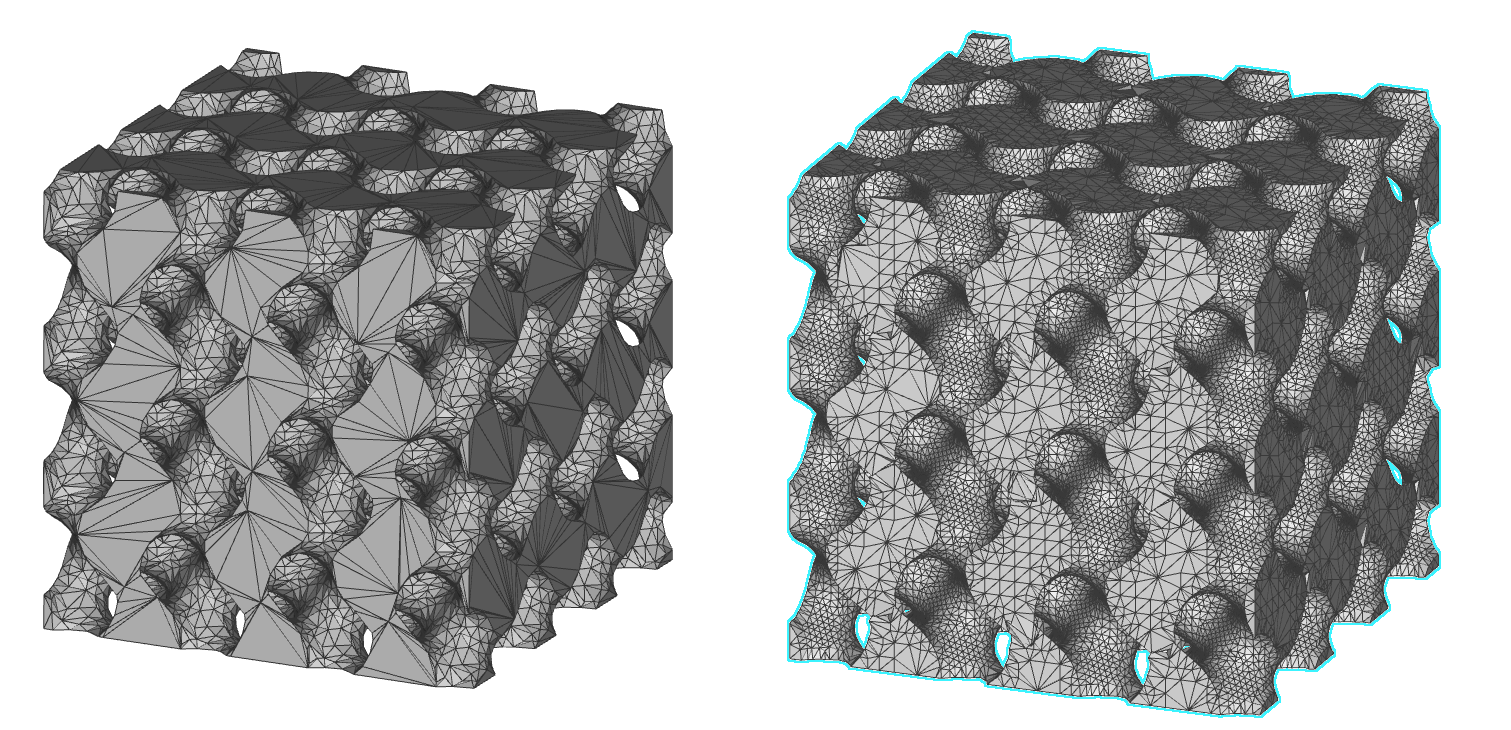
Simplification Left: V2.0.0 Mesh from Implicit Body with sharpening and simplification option enabled. Right: V1.0.0 Mesh from Implicit Body with adaptivity set to 0.5.
  • Overloads: The block has an overload which provides even more inputs. In particular it provides a “Sharpening Extent” input. This can be used to localize the sharpening to certain regions of the mesh. It also provides a “Sharpening iterations” parameter which can be used to run the sharpening algorithm multiple times to potentially increase the quality of the sharp feature reconstruction.
  • Note that while we expect that most users will be happy with the new Mesh from Implicit Body block, you can use the old block by opening the version drop down in the information panel. Select version 1.0.0 to obtain the old block.
Further tips on the Sharpening option:
  • When using the Sharpen feature option, we often don’t need every single edge in our model to remain sharp. Generally, we are concerned with specific regions such as where we apply boundary conditions for analysis, have GD&T requirements for machining, assembly, and various other applications. Therefore it is recommended to use the Overload to expose the Sharpen Extents option and the Sharpen Iterations. This option helps decrease the time spent meshing and reduces the overall element count.
  • When generating the implicit body that encloses the region in which we want to keep edges sharp, we suggest that the implicit body be as localized as possible (i.e., enclose just the region you intend to keep sharp, rather than having an oversize implicit).
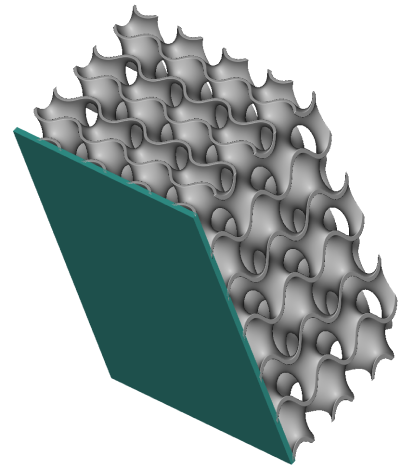
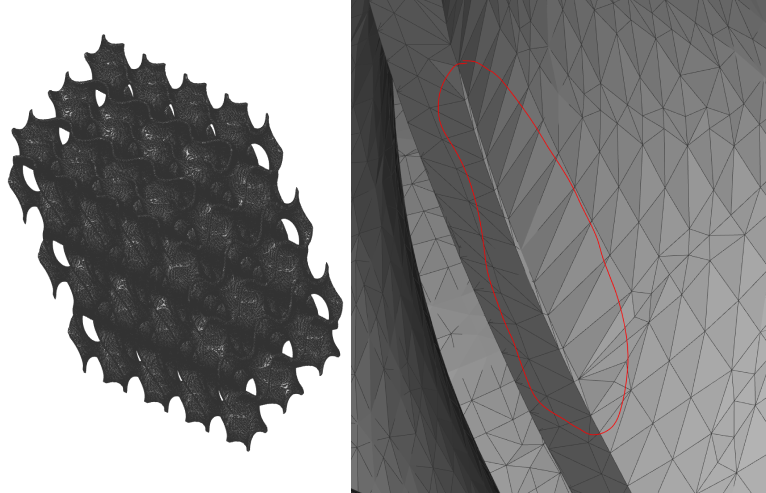
  • When using either the Sharpen or Sharpen Extents options, the mesh near the edges defined to remain sharp can sometimes have very thin triangles. Image #1 below shows a 0.5mm thick walled TPMS with a thin green body used to enclose the edges, which remain sharp. Image #2 below (left) shows the overall mesh of the part, and (right) shows a zoomed-in section at one of the edges. Encircled in red are very thin triangular elements. These small elements can cause a few issues downstream.
Sharpening
Image #1: Body to mesh (grey) and implicit used (green) to enclose the edges where we want to preserve sharpness.
Sharpening
Image #2: Mesh from Implicit Body (with extents). Left: Full mesh. Right: Zoomed in on an edge, encircling thin elements.
  1. If you are satisfied with this mesh and want to export it (and are unaware of thin elements): As this edge is not adequately defined, you might have issues with applying the boundary conditions when preparing for an analysis, final machining if the face/edge was critical to GD&T, or tolerance/alignment issues when assembling the part.
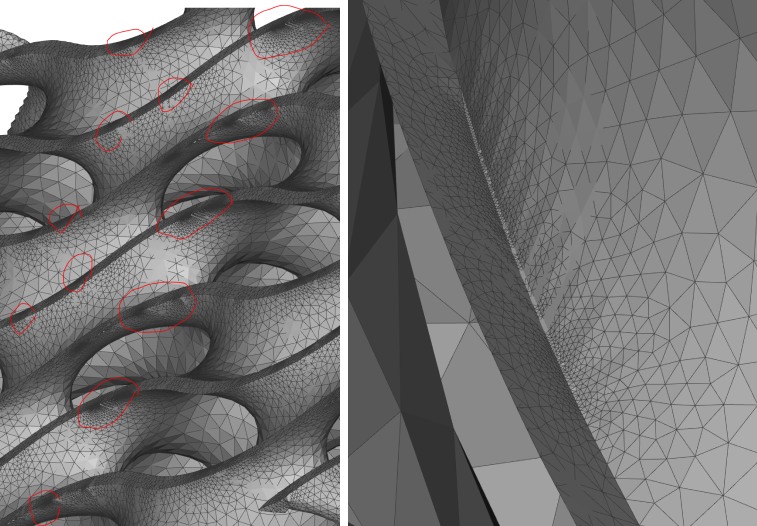
  2. Issues in the Remesh Surface block: When doing a final analysis or generating a mesh/slice stack for manufacturing, it’s common to always use the Remesh Surface block after Mesh from Implicit Body. (For rapid iterations, using real-time simulation, the Mesh from Implicit Body is generally sufficient and not worth waiting for Remesh Surface to complete). Image #3 below (right) shows the mesh after the Remesh Surface block. The thin elements from the Mesh from Implicit Body (i.e., a now assumed feature) are trying to resolve, and in doing so, many small elements are getting generated. If we zoom out on Image #3 (left), we can see that this has occurred in several locations, resulting in a larger mesh and file size. There are a few ways we can work on addressing this, none work 100%, but it will help quite a bit nonetheless.
Sharpening
Image #3: Result of Remesh Surface, without addressing thin mesh. Excess elements generated.
  1. Collapse Mesh Vertices: The Collapse Mesh Vertices block helps eliminate some of the thin elements generated in the Mesh from Implicit Body block. Watching the GIF in Image #4 below, you can see that the slivers resolve in some instances. You have to manually adjust the Distance threshold input to find a value that works best (too small, and you won’t capture the elements, too large, and you will unintentionally deform your part).
    • Sharpen iterations: We suggest using the Overload on the Mesh from Implicit Bod y to expose the number of iterations for sharpening. Increasing the number will take longer for the mesh to generate but will also do a better job of not creating as many thin elements, although they still exist. Without extensive testing, we recommend a suggested iteration value of 3. It is significantly better than 1 and marginally worse than 10 when comparing the total element count in this simple example:
      • Sharpen Iteration 1: 721K
      • Sharpen Iteration 3: 628K
      • Sharpen Iteration 10: 612K
Sharpening
Image #4: The above GIF shows how the Collapse Mesh Vertices block can help address some of the thin elements.
  1. If it is required to have all edges preserved, it is strongly recommended that you use the Overload with an implicit body that captures the entire part to expose the Sharpen Iterations.
    • While neither method fully satisfies or completely resolves edge preservation, utilizing both should significantly help address the issues described above. You should note that the Collapse Mesh Vertices may result in self-intersecting triangles on significantly more complicated parts, causing a need for additional refinement.
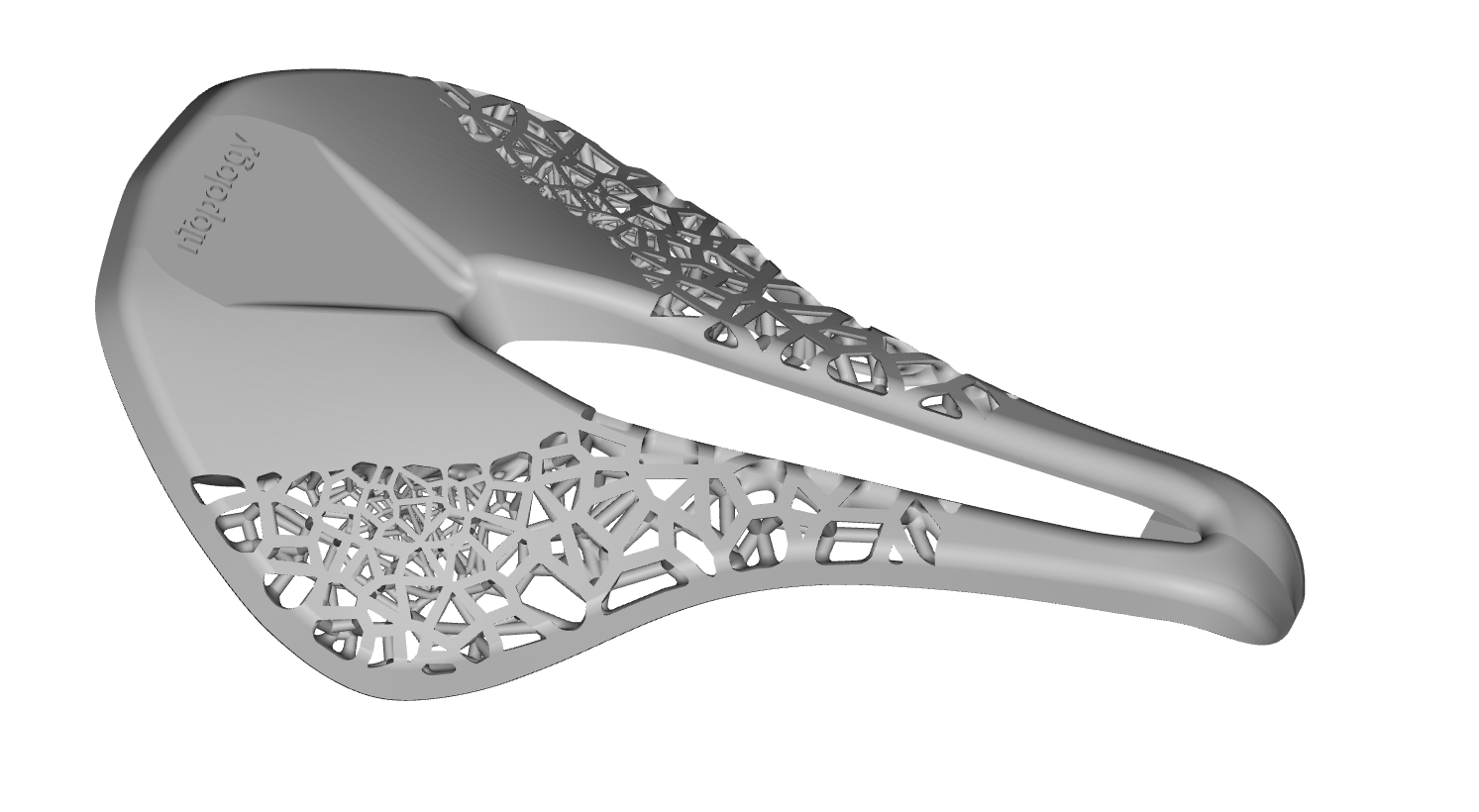
Download Example: Mesh from Implicit Body Mesh from Implicit Body

Implicit Body, Scalar, Scalar, Bool, Bool, 2.1.0

Creates a Mesh from an Implicit Body. Preserve sharp features by choosing the Sharpen option. Reduce the triangle count of the final result by choosing the Simplify option. Switch to the block overload for more inputs including Sharpening iterations and a region to localize sharpening. This version has a higher computational overhead than Mesh from Implicit by DC, but can handle more complex geometry and produces cleaner meshes. Inputs
NameTypeDescription
BodyImplicit BodyImplicit body to convert.
ToleranceScalarThe maximum allowable deviation of the mesh from the implicit geometry. as this value gets smaller, the resulting mesh will be more precise, but the block will take longer to compute.
Min. feature sizeScalarOption to specify the approximate size of the smallest feature(s) of the implicit body that should be preserved during the conversion. when provided, features that are smaller than this input will be filtered out and not included in the final result.
SharpenBoolOption to preserve sharp edges and vertices. if you choose this option, the block will take longer to compute.
SimplifyBoolOption to reduce the triangle count as much as possible without violating the given tolerance criteria.
Outputs
Type
Mesh

Implicit Body, Scalar, Scalar, Bool, Bool, 2.2.0

Creates a Mesh from an Implicit Body. Preserve sharp features by choosing the Sharpen option. Reduce the triangle count of the final result by choosing the Simplify option. Switch to the block overload for more inputs including Sharpening iterations and a region to localize sharpening. This version has a higher computational overhead than Mesh from Implicit by DC, but can handle more complex geometry and produces cleaner meshes. Inputs
NameTypeDescription
BodyImplicit BodyImplicit body to convert.
ToleranceScalarThe maximum allowable deviation of the mesh from the implicit geometry. as this value gets smaller, the resulting mesh will be more precise, but the block will take longer to compute.
Min. feature sizeScalarOption to specify the approximate size of the smallest feature(s) of the implicit body that should be preserved during the conversion. when provided, features that are smaller than this input will be filtered out and not included in the final result.
SharpenBoolOption to preserve sharp edges and vertices. if you choose this option, the block will take longer to compute.
SimplifyBoolOption to reduce the triangle count as much as possible without violating the given tolerance criteria.
Outputs
Type
Mesh

Implicit Body, Scalar, Scalar, Bool, Bool, 2.3.0

Creates a Mesh from an Implicit Body. Preserve sharp features by choosing the Sharpen option. Reduce the triangle count of the final result by choosing the Simplify option. Switch to the block overload for more inputs including Sharpening iterations and a region to localize sharpening. This version has a higher computational overhead than Mesh from Implicit by DC, but can handle more complex geometry and produces cleaner meshes. Inputs
NameTypeDescription
BodyImplicit BodyImplicit body to convert.
ToleranceScalarThe maximum allowable deviation of the mesh from the implicit geometry. as this value gets smaller, the resulting mesh will be more precise, but the block will take longer to compute.
Min. feature sizeScalarOption to specify the approximate size of the smallest feature(s) of the implicit body that should be preserved during the conversion. when provided, features that are smaller than this input will be filtered out and not included in the final result.
SharpenBoolOption to preserve sharp edges and vertices. if you choose this option, the block will take longer to compute.
SimplifyBoolOption to reduce the triangle count as much as possible without violating the given tolerance criteria.
Outputs
Type
Mesh

Implicit Body, Scalar, Scalar, Bool, Bool, 2.4.0

Creates a Mesh from an Implicit Body. Preserve sharp features by choosing the Sharpen option. Reduce the triangle count of the final result by choosing the Simplify option. Switch to the block overload for more inputs including Sharpening iterations and a region to localize sharpening. This version has a higher computational overhead than Mesh from Implicit by DC, but can handle more complex geometry and produces cleaner meshes. Inputs
NameTypeDescription
BodyImplicit BodyImplicit body to convert.
ToleranceScalarThe maximum allowable deviation of the mesh from the implicit geometry. as this value gets smaller, the resulting mesh will be more precise, but the block will take longer to compute.
Min. feature sizeScalarOption to specify the approximate size of the smallest feature(s) of the implicit body that should be preserved during the conversion. when provided, features that are smaller than this input will be filtered out and not included in the final result.
SharpenBoolOption to preserve sharp edges and vertices. if you choose this option, the block will take longer to compute.
SimplifyBoolOption to reduce the triangle count as much as possible without violating the given tolerance criteria.
Outputs
Type
Mesh

Implicit Body, Scalar, Scalar, Bool, Bool, 2.5.0

Creates a Mesh from an Implicit Body. Preserve sharp features by choosing the Sharpen option. Reduce the triangle count of the final result by choosing the Simplify option. Switch to the block overload for more inputs including Sharpening iterations and a region to localize sharpening. This version has a higher computational overhead than Mesh from Implicit by DC, but can handle more complex geometry and produces cleaner meshes. Inputs
NameTypeDescription
BodyImplicit BodyImplicit body to convert.
ToleranceScalarThe maximum allowable deviation of the mesh from the implicit geometry. as this value gets smaller, the resulting mesh will be more precise, but the block will take longer to compute.
Min. feature sizeScalarOption to specify the approximate size of the smallest feature(s) of the implicit body that should be preserved during the conversion. when provided, features that are smaller than this input will be filtered out and not included in the final result.
SharpenBoolOption to preserve sharp edges and vertices. if you choose this option, the block will take longer to compute.
SimplifyBoolOption to reduce the triangle count as much as possible without violating the given tolerance criteria.
Outputs
Type
Mesh

Implicit Body, Scalar, Scalar, Integer, Implicit Body, Bool, 2.0.0

Creates a Mesh from an Implicit Body. Increase the number of iterations to produce a sharper result. Limit sharpening to selected regions by using Sharpen Extents. Reduce the triangle count of the final result by checking the Simplify input Inputs
NameTypeDescription
BodyImplicit BodyImplicit body to convert.
ToleranceScalarThe maximum allowable deviation of the mesh from the implicit geometry. as this value gets smaller, the resulting mesh will be more precise, but the block will take longer to compute.
Min. feature sizeScalarOption to specify the approximate size of the smallest feature(s) of the implicit body that should be preserved during the conversion. when provided, features that are smaller than this input will be filtered out and not included in the final result.
Sharpen iterationsIntegerNumber of sharpening iterations. a higher number will produce a sharper result, but will increase the runtime. we recommend values from 1 to 10.
Sharpen extentsImplicit BodyOptional implicit body defining the extent of sharpening. use this input to limit sharpening to a particular region of the mesh.
SimplifyBoolOption to reduce the triangle count as much as possible without violating the given tolerance criteria.
Outputs
Type
Mesh

Implicit Body, Scalar, Scalar, Integer, Implicit Body, Bool, 2.1.0

Creates a Mesh from an Implicit Body. Increase the number of iterations to produce a sharper result. Limit sharpening to selected regions by using Sharpen Extents. Reduce the triangle count of the final result by checking the Simplify input Inputs
NameTypeDescription
BodyImplicit BodyImplicit body to convert.
ToleranceScalarThe maximum allowable deviation of the mesh from the implicit geometry. as this value gets smaller, the resulting mesh will be more precise, but the block will take longer to compute.
Min. feature sizeScalarOption to specify the approximate size of the smallest feature(s) of the implicit body that should be preserved during the conversion. when provided, features that are smaller than this input will be filtered out and not included in the final result.
Sharpen iterationsIntegerNumber of sharpening iterations. a higher number will produce a sharper result, but will increase the runtime. we recommend values from 1 to 10.
Sharpen extentsImplicit BodyOptional implicit body defining the extent of sharpening. use this input to limit sharpening to a particular region of the mesh.
SimplifyBoolOption to reduce the triangle count as much as possible without violating the given tolerance criteria.
Outputs
Type
Mesh

Implicit Body, Scalar, Scalar, Integer, Implicit Body, Bool, 2.2.0

Creates a Mesh from an Implicit Body. Increase the number of iterations to produce a sharper result. Limit sharpening to selected regions by using Sharpen Extents. Reduce the triangle count of the final result by checking the Simplify input Inputs
NameTypeDescription
BodyImplicit BodyImplicit body to convert.
ToleranceScalarThe maximum allowable deviation of the mesh from the implicit geometry. as this value gets smaller, the resulting mesh will be more precise, but the block will take longer to compute.
Min. feature sizeScalarOption to specify the approximate size of the smallest feature(s) of the implicit body that should be preserved during the conversion. when provided, features that are smaller than this input will be filtered out and not included in the final result.
Sharpen iterationsIntegerNumber of sharpening iterations. a higher number will produce a sharper result, but will increase the runtime. we recommend values from 1 to 10.
Sharpen extentsImplicit BodyOptional implicit body defining the extent of sharpening. use this input to limit sharpening to a particular region of the mesh.
SimplifyBoolOption to reduce the triangle count as much as possible without violating the given tolerance criteria.
Outputs
Type
Mesh

Implicit Body, Scalar, Scalar, Integer, Implicit Body, Bool, 2.3.0

Creates a Mesh from an Implicit Body. Increase the number of iterations to produce a sharper result. Limit sharpening to selected regions by using Sharpen Extents. Reduce the triangle count of the final result by checking the Simplify input Inputs
NameTypeDescription
BodyImplicit BodyImplicit body to convert.
ToleranceScalarThe maximum allowable deviation of the mesh from the implicit geometry. as this value gets smaller, the resulting mesh will be more precise, but the block will take longer to compute.
Min. feature sizeScalarOption to specify the approximate size of the smallest feature(s) of the implicit body that should be preserved during the conversion. when provided, features that are smaller than this input will be filtered out and not included in the final result.
Sharpen iterationsIntegerNumber of sharpening iterations. a higher number will produce a sharper result, but will increase the runtime. we recommend values from 1 to 10.
Sharpen extentsImplicit BodyOptional implicit body defining the extent of sharpening. use this input to limit sharpening to a particular region of the mesh.
SimplifyBoolOption to reduce the triangle count as much as possible without violating the given tolerance criteria.
Outputs
Type
Mesh

Implicit Body, Scalar, Scalar, Integer, Implicit Body, Bool, 2.4.0

Creates a Mesh from an Implicit Body. Increase the number of iterations to produce a sharper result. Limit sharpening to selected regions by using Sharpen Extents. Reduce the triangle count of the final result by checking the Simplify input Inputs
NameTypeDescription
BodyImplicit BodyImplicit body to convert.
ToleranceScalarThe maximum allowable deviation of the mesh from the implicit geometry. as this value gets smaller, the resulting mesh will be more precise, but the block will take longer to compute.
Min. feature sizeScalarOption to specify the approximate size of the smallest feature(s) of the implicit body that should be preserved during the conversion. when provided, features that are smaller than this input will be filtered out and not included in the final result.
Sharpen iterationsIntegerNumber of sharpening iterations. a higher number will produce a sharper result, but will increase the runtime. we recommend values from 1 to 10.
Sharpen extentsImplicit BodyOptional implicit body defining the extent of sharpening. use this input to limit sharpening to a particular region of the mesh.
SimplifyBoolOption to reduce the triangle count as much as possible without violating the given tolerance criteria.
Outputs
Type
Mesh

Implicit Body, Scalar, Scalar, Integer, Implicit Body, Bool, 2.5.0

Creates a Mesh from an Implicit Body. Increase the number of iterations to produce a sharper result. Limit sharpening to selected regions by using Sharpen Extents. Reduce the triangle count of the final result by checking the Simplify input Inputs
NameTypeDescription
BodyImplicit BodyImplicit body to convert.
ToleranceScalarThe maximum allowable deviation of the mesh from the implicit geometry. as this value gets smaller, the resulting mesh will be more precise, but the block will take longer to compute.
Min. feature sizeScalarOption to specify the approximate size of the smallest feature(s) of the implicit body that should be preserved during the conversion. when provided, features that are smaller than this input will be filtered out and not included in the final result.
Sharpen iterationsIntegerNumber of sharpening iterations. a higher number will produce a sharper result, but will increase the runtime. we recommend values from 1 to 10.
Sharpen extentsImplicit BodyOptional implicit body defining the extent of sharpening. use this input to limit sharpening to a particular region of the mesh.
SimplifyBoolOption to reduce the triangle count as much as possible without violating the given tolerance criteria.
Outputs
Type
Mesh