Mesh, Scalar Field, Surface Mesh Shape Enum, Scalar, Scalar, Scalar, Scalar, Scalar, Scalar

Mesh, Scalar Field, Surface Mesh Shape Enum, Scalar, Scalar, Scalar, Scalar, Scalar, Scalar, 1.1.0

Mesh, Scalar Field, Surface Mesh Shape Enum, Scalar, Scalar, Scalar, Scalar, Scalar, Scalar, Preserved nodes, 1.2.0

About this Block - Remesh Surface

What it does: Changes an existing surface mesh by editing the mesh elements based on size, shape, and density. Common uses:
  • Preparation for creating quality FE meshes for downstream analysis.
  • Cleaning up defects in a mesh.
  • Converting a surface mesh into a solid mesh.
Tips:
  • When converting a surface mesh into a solid mesh, make sure the Edge Length is the same size in both blocks. When the triangle edges are the same size, converting them into 3D is easier and faster. Dealing with different edge lengths makes the process slower.
  • The Edge Length should be greater than or equal to the feature size of the input Mesh. Start high and reduce it until you are happy with how it looks.
  • Try to balance fidelity and computing time. Too many elements = long computing time, and not enough elements = low fidelity.
  • Minimum Feature Size: If you are setting a minimum Feature Size, it’s recommended to use 5% of the chosen Edge Length.
  • Remesh Shape:
    • Triangular: is the most commonly used and is the most efficient.
    • Quad and Quad-dominated: Can’t be converted to a volume mesh in nTop but can be used in CAD Body from Mesh. It is preferred to use the Quadrangulate Mesh block instead.
InputExample
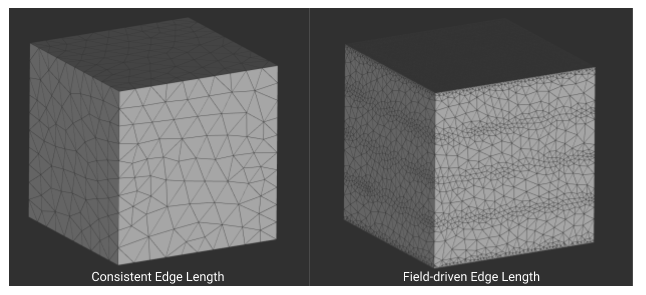
Edge length: Specifies the approximate edge length of the mesh elements. Can be a singular, consistent value, or a scalar field, meaning you can spatially vary the size of the mesh. Note: When using a Scalar field input for the Edge length, the Edge length input has priority over the other inputs.Edge length
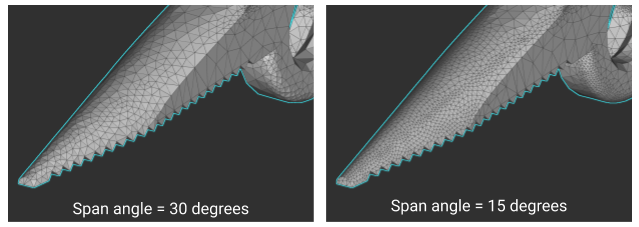
Span Angle: Refines elements that lie on curves. It signifies the maximum allowed angle that elements on curved surfaces are allowed to span. With a smaller span angle, elements on the curve are more refined to fit the span angle.Span Angle
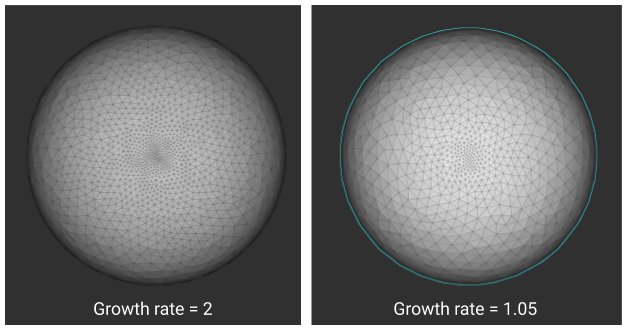
Growth Rate: Specifies the ratio of element size from one element to another. The number can be anything greater than 1. The smaller the number, the more uniform the mesh. In the image to the right, you can see how changing the growth rate from 2 to 1.05 creates a more uniform mesh.Growth Rate
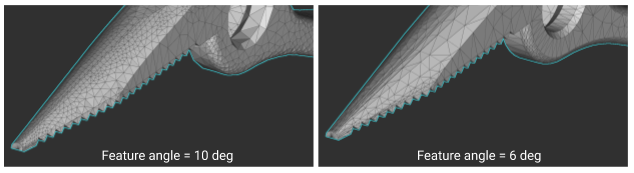
Feature Angle: Controls the degree to which curved surfaces are converted to flat edges in a mesh. The value represents the maximum allowed angle between two adjacent planes that define an edge. A lower value results in more planar regions of the mesh where an input surface is curved.Feature Angle

Example File

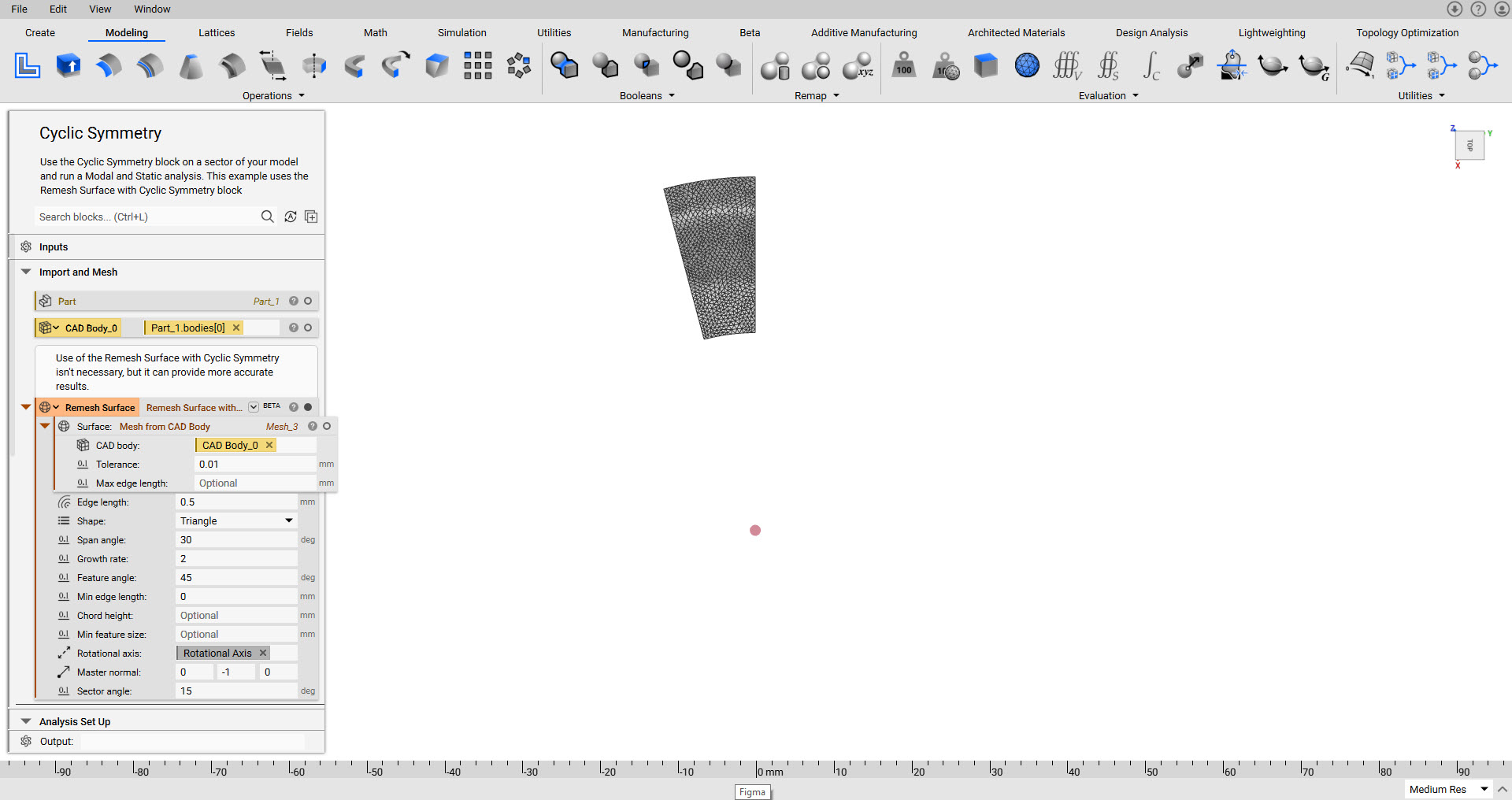
Download Example: Remesh Surface Remesh a surface mesh to edit the existing mesh. Remesh Surface
About this Block - Overload - Remesh Surface with Cyclic Symmetry (Beta)

What it does: Remeshes an existing surface mesh to optimize it for cyclic symmetry. Common uses:
  • Analysis involving Cyclic Symmetry.
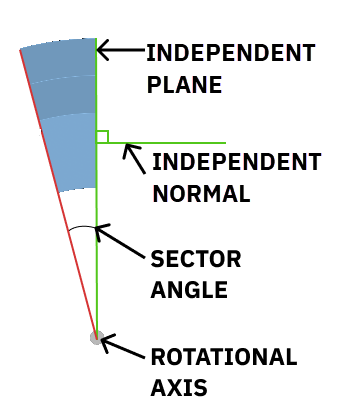
Tips: If you get the error, “Surface meshing errors occurred,” or “Cannot find matching pair of nodes in upper and lower layers,” the program is warning you that the closed edge of the lower boundary mesh is not consistent with the transformation of the independent normal. Either the sector angle or independent normal need to be adjusted. You may also try changing your input mesh to be a Remesh Surface or a Mesh from CAD Body block.
Below is a visualization of of the inputs: Remesh Cyclic Symmetry

Example File

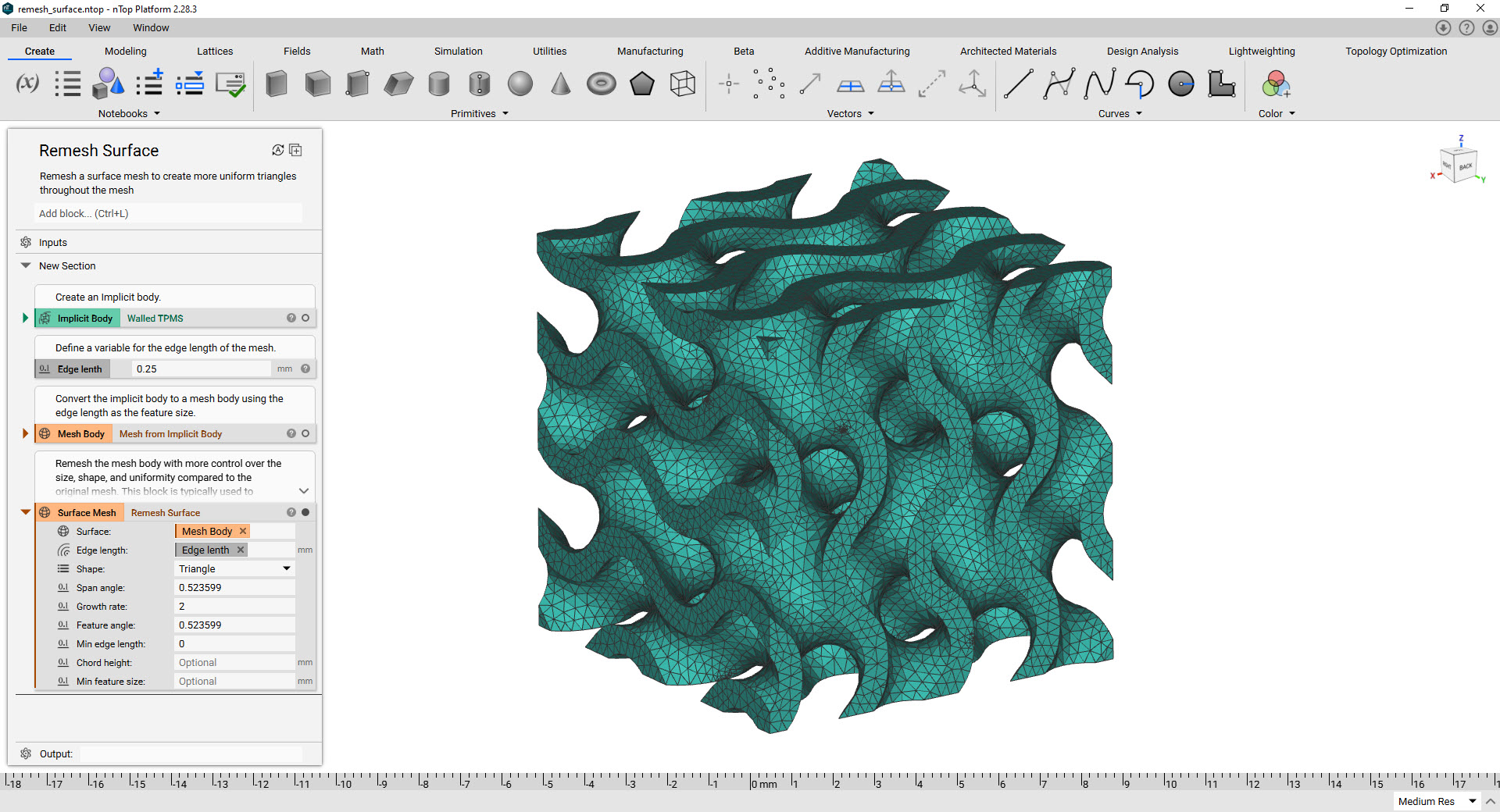
Download Example: Cyclic Symmetry Use the Cyclic Symmetry block on a sector of your model and run a Modal and Static analysis. This example meshes the sector using the Remesh Surface with Cyclic Symmetry block Cyclic Symmetry
Mesh, Scalar Field, Surface Mesh Shape Enum, Scalar, Scalar, Scalar, Scalar, Scalar, Scalar

Remesh an existing surface mesh.

Inputs

NameTypeDescription
SurfaceMeshSurface mesh to remesh.
Edge lengthScalar FieldThe target edge length of the generated elements.
ShapeSurface Mesh Shape EnumThe element shape of the output mesh.
Span angleScalarThe maximum spanning angle for elements generated on curved surfaces. decreasing the span angle will refine the mesh in areas of local curvature.
Growth rateScalarThe rate at which the size of adjacent elements can grow. this value must be greater than 1.001.
Feature angleScalarThe maximum angle used to automatically compute the preserved edges in the input surface. decreasing the feature angle will produce a mesh whose edges are better aligned with the input surface.
Min edge lengthScalarThe minimum allowed edge length of the generated elements in the output mesh.
Chord heightScalarThe maximum distance from the midpoint of an element edge to the input surface. a value of zero turns off chord height sizing.
Min feature sizeScalarThe minimum small feature size to control the deletion of small features. a recommended value is about five percent of the edge length. a value of zero turns off feature deletion.

Outputs

Type
Mesh

Mesh, Scalar Field, Surface Mesh Shape Enum, Scalar, Scalar, Scalar, Scalar, Scalar, Scalar, 1.1.0

Remesh an existing surface mesh.

Inputs

NameTypeDescription
SurfaceMeshSurface mesh to remesh.
Edge lengthScalar FieldThe target edge length of the generated elements.
ShapeSurface Mesh Shape EnumThe element shape of the output mesh.
Span angleScalarThe maximum spanning angle for elements generated on curved surfaces. decreasing the span angle will refine the mesh in areas of local curvature.
Growth rateScalarThe rate at which the size of adjacent elements can grow. this value must be greater than 1.001.
Feature angleScalarThe maximum angle used to automatically compute the preserved edges in the input surface. decreasing the feature angle will produce a mesh whose edges are better aligned with the input surface.
Min edge lengthScalarThe minimum allowed edge length of the generated elements in the output mesh.
Chord heightScalarThe maximum distance from the midpoint of an element edge to the input surface. a value of zero turns off chord height sizing.
Min feature sizeScalarThe minimum small feature size to control the deletion of small features. a recommended value is about five percent of the edge length. a value of zero turns off feature deletion.

Outputs

Type
Mesh

Mesh, Scalar Field, Surface Mesh Shape Enum, Scalar, Scalar, Scalar, Scalar, Scalar, Scalar, Preserved nodes, 1.2.0

Remesh an existing surface mesh.

Inputs

NameTypeDescription
SurfaceMeshSurface mesh to remesh.
Edge lengthScalar FieldThe target edge length of the generated elements.
ShapeSurface Mesh Shape EnumThe element shape of the output mesh.
Span angleScalarThe maximum spanning angle for elements generated on curved surfaces. decreasing the span angle will refine the mesh in areas of local curvature.
Growth rateScalarThe rate at which the size of adjacent elements can grow. this value must be greater than 1.001.
Feature angleScalarThe maximum angle used to automatically compute the preserved edges in the input surface. decreasing the feature angle will produce a mesh whose edges are better aligned with the input surface.
Min edge lengthScalarThe minimum allowed edge length of the generated elements in the output mesh.
Chord heightScalarThe maximum distance from the midpoint of an element edge to the input surface. a value of zero turns off chord height sizing.
Min feature sizeScalarThe minimum small feature size to control the deletion of small features. a recommended value is about five percent of the edge length. a value of zero turns off feature deletion.
Preserved nodesPoint ListPoints to preserve as nodes in the resulting fe mesh. if left empty, node preservation will be turned off.

Outputs

Type
Mesh