

Path, Bool, CAD Healing Enum, Bool
Path, Bool, CAD Healing Enum, Bool, 1.1.0
Path, Bool, CAD Healing Enum, Bool, 1.2.0
Path, Bool, CAD Healing Enum, Bool, 2.0.0
Path, Bool, CAD Healing Enum, Bool, 2.1.0
About this Block
What it does: The Import Part block allows you to import a CAD Part file by a designated path. The file types that can be imported are Parasolid (X_T, X_B), STEP, CREO, Solidworks, NX, and CATIA files. Assemblies can be imported with a full view of components in the properties panel in the 2.0.0 version of the block. Common uses: Importing a CAD Part Tips: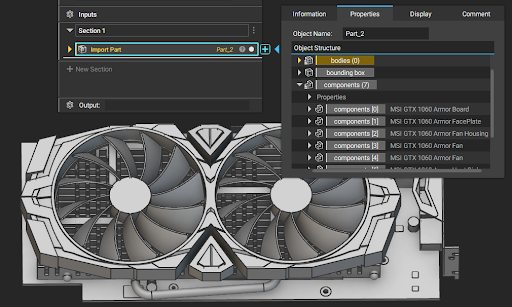 CAD assemblies are no longer flattened with our latest version of the Import Part block.
To preserve the assembly hierarchy on import, we had to implement a new type called Component that you will find under any Part objects.
Component contains Instance, Placement, and Template.
Instance is a Part type object representing the CAD component in the assembly structure. You will find all bodies and curves of each assembly component under this.
Placement is a Transform object required for transforming the Template into the Instance.
Template is a Part type object representing the original part level design. You can apply the design workflow to the Template and transform with Placement to locate the nTop design along with the rest of the components in the assembly.
All the instances can have multiple CAD bodies that are accessible by opening the properties of an instance.
Bodies and curves are now sorted by bounding box Xmin < Ymin < Zmin < Xmax < Ymax < Zmax. (i.e. the geometry with the least Xmin is first). Faces aren’t sorted based on the geometry.
Rotate Y to Z: This input should be checked for parts coming from a Y-up coordinate system (SolidWorks and Creo)
Heal CAD: This input heals the input CAD. This is not applicable to Parasolid files.
You can right click Embed the Import Part block or change the Caching: field in the info panel to Cache imported data. This will embed the CAD data so that your Import Part file is not affected by the file directory.
Check Model input checks for any self intersections and shows a warning if any and doesn’t heal the CAD part.
The file versions that are supported for import are here (https://support.ntopology.com/hc/articles/360048249514)
CAD assemblies are no longer flattened with our latest version of the Import Part block.
To preserve the assembly hierarchy on import, we had to implement a new type called Component that you will find under any Part objects.
Component contains Instance, Placement, and Template.
Instance is a Part type object representing the CAD component in the assembly structure. You will find all bodies and curves of each assembly component under this.
Placement is a Transform object required for transforming the Template into the Instance.
Template is a Part type object representing the original part level design. You can apply the design workflow to the Template and transform with Placement to locate the nTop design along with the rest of the components in the assembly.
All the instances can have multiple CAD bodies that are accessible by opening the properties of an instance.
Bodies and curves are now sorted by bounding box Xmin < Ymin < Zmin < Xmax < Ymax < Zmax. (i.e. the geometry with the least Xmin is first). Faces aren’t sorted based on the geometry.
Rotate Y to Z: This input should be checked for parts coming from a Y-up coordinate system (SolidWorks and Creo)
Heal CAD: This input heals the input CAD. This is not applicable to Parasolid files.
You can right click Embed the Import Part block or change the Caching: field in the info panel to Cache imported data. This will embed the CAD data so that your Import Part file is not affected by the file directory.
Check Model input checks for any self intersections and shows a warning if any and doesn’t heal the CAD part.
The file versions that are supported for import are here (https://support.ntopology.com/hc/articles/360048249514)