Blend Enum, Scalar Field, Implicit Body, Subtraction bodies
Blend Enum, Scalar Field, Implicit Body, Subtraction bodies, 1.1.0
Blend Enum, Scalar Field, Implicit Body, Subtraction bodies, 5.44.0
About this Block
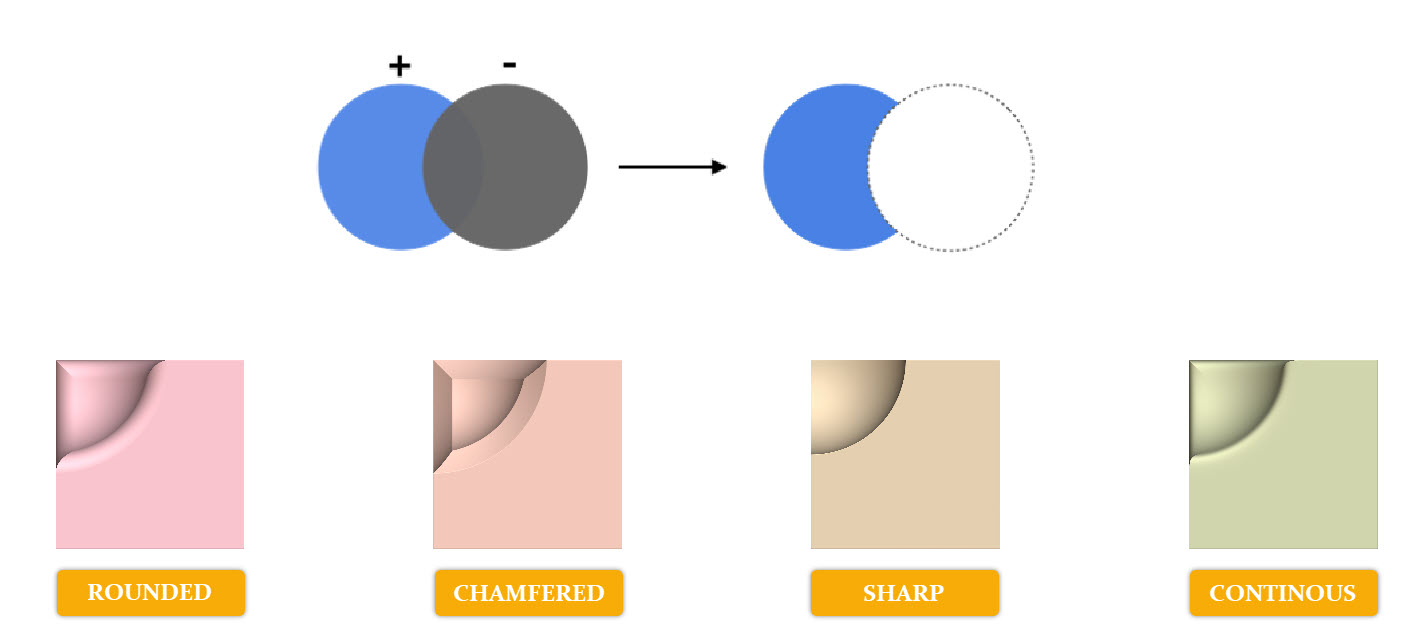
What it does: The Boolean Subtract block uses a list of Implicit Bodies to remove volume from another Body. A blend is applied at the intersection of each body to control the transition between each volume, and can be sharp, rounded, continuous, or chamfered. Tips:- Apply a fillet by using the ‘Rounded’ Blend Type.
- Apply a chamfer by using the ‘Chamfered’ Blend Type.
- To retain the shape features, use the ‘Sharp’ Blend Type.
- To achieve a smoothed appearance between edges, use the ‘Continuous’ Blend Type.
- To subtract more than 2 bodies by clicking on the + button in the upper right-hand corner of the Implicit Body List block.
- The angle of the Chamfered and Rounded blend types cannot be changed.
- We suggest keeping a small overlap between Implicit bodies and avoid face-on-face or line-on-line subtractions.
Example File
Download Example: File Name