Transformable, Vector
Transformable, Vector, Scalar, 5.52.0
About this Block
What it does: The Translate Object block moves an object from its current position to a new location in 3D space based on a defined translation vector. This block is universal and supports all nTop object types, including CAD Bodies, Implicit Bodies, Meshes, Lattices, Points, and Curves. Common uses:- Manually moving parts or assemblies to specific coordinates for build preparation or simulation setup.
- Centering a part at the world origin (0,0,0) before applying a Remap Constraint.
- Patterning: Manually creating custom layouts of parts by translating copies of an original body.
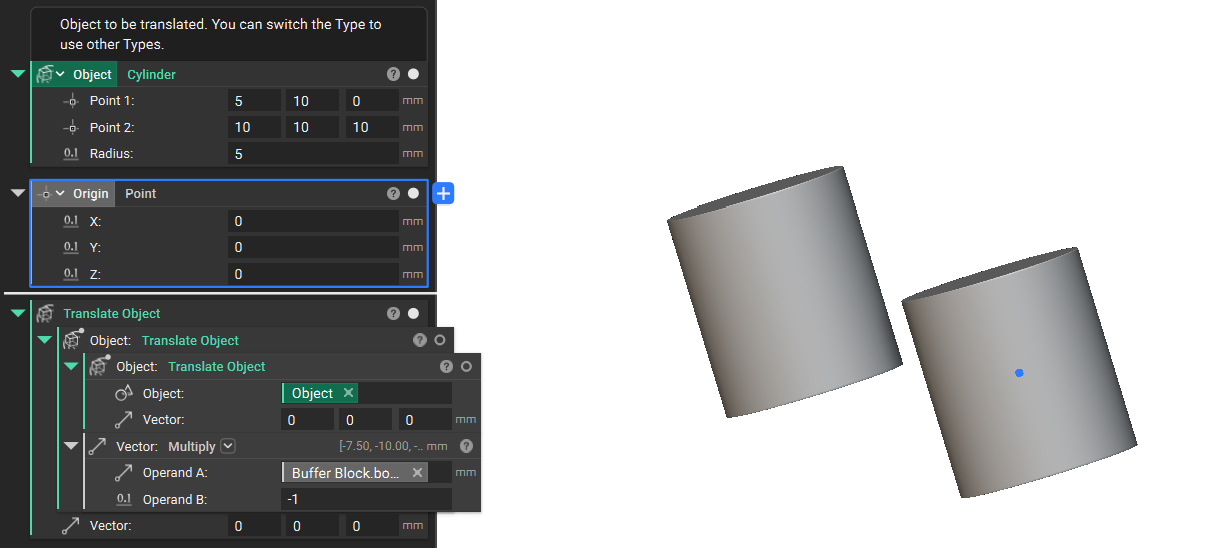
- Centering at Origin: To move a part exactly to the origin, use the negative value of the part’s centroid. You can extract the Centroid property from the object’s Bounding Box and multiply that vector by -1 to create the required translation vector.
- Chaining Transforms: You can use the output of a Translate Object block as the input for further transformations, such as Rotate Object or Mirror Body, to reach a final desired orientation.Example FileDownload Example: Translate Object to Origin
Example File
Download Example: Translate Object