
Implicit Body, Scalar, Integer, Integer, Bool, Frame
Implicit Body, Scalar, Integer, Integer, Bool, Frame, 1.1.0
Implicit Body, Scalar, Integer, Integer, Bool, Frame, 1.2.0
About this Block
What it does: Generates a Cell Map with a spherical coordinate system that covers the entire input Volume with cells using the specified Cell radius, Latitude count, and Longitude count. This map serves as a layout for the lattice Unit Cells. Common uses:- Used as an input for the Periodic Lattice block.
- The Cell radius, Latitude count, and Longitude count inputs follow the U, V, W guides displayed once the block has run.
- The default Cell Map’s starting point is the center point of the volume.
- A face of a cell will degenerate into an edge if it is incident on the Frame’s Z-axis. Degenerate cells may be removed with the Trim Cell Map block if desired.
- A face of a cell will degenerate into a point if it is incident on the Frame’s origin. Degenerate cells may be removed with the Trim Cell Map block if desired.
- The Frame input controls the orientation and position of the Cell Map.
- By default, the Cell Map edges will be curved to the spherical coordinate system. Check the Linear input to generate straight edges only. As a general rule, check the Linear input when using a Graph Unit Cell and uncheck the Linear input when using a TPMS Unit Cell in the Periodic Lattice block, although this will vary depending on your application and design goals.
- If the cells extend beyond the input Volume, you can try the following options to meet your design goals:
- Use the Cell Map in its too-large form to construct a lattice with the Periodic Lattice block, and then trim the lattice back down to the Volume using the Trim Lattice block.
- Use the Trim Cell Map block to reduce the cell count. Note that depending on the Fill type you select, some cells may still be outside the Volume.
- Adjust the Cell radius, Latitude count, or Longitude count inputs.
- Adjust the size of the Volume input.
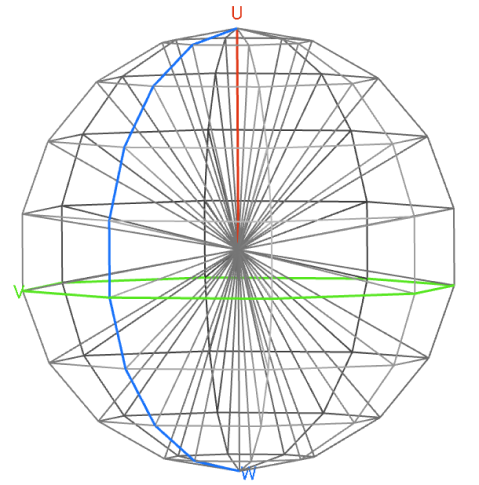
Implicit Body, Scalar, Integer, Integer, Bool, Frame
Creates a spherical Cell Map within an Implicit Body. By default, the Cell Map’s starting point is set to the centroid of the body’s bounding box. To customize the map’s orientation and position, use the optional Frame input.Inputs
| Name | Type | Description |
|---|---|---|
| Volume | Implicit Body | Implicit body volume to define the minimum extent of the cell map. The volume must be 3 dimensional and closed. |
| Cell radius | Scalar | Cell size in radial direction. |
| Latitude count | Integer | Number of unit cells in latitudinal direction. |
| Longitude count | Integer | Number of unit cells in longitudinal direction. |
| Linear | Bool | Option to create a linear or curved cell map. As a general rule, check this option to create a linear map when using a graph unit cell, and uncheck when using a TPMS unit cell, although this will vary depending on the application. |
| Frame | Frame | Frame that defines the starting point and orientation of the cell map. |
Outputs
| Type |
|---|
| Cell Map |
Implicit Body, Scalar, Integer, Integer, Bool, Frame, 1.1.0
Creates a spherical Cell Map within an Implicit Body. By default, the Cell Map’s starting point is set to the centroid of the body’s bounding box. To customize the map’s orientation and position, use the optional Frame input.Inputs
| Name | Type | Description |
|---|---|---|
| Volume | Implicit Body | Implicit body volume to define the minimum extent of the cell map. The volume must be 3 dimensional and closed. |
| Cell radius | Scalar | Cell size in radial direction. |
| Latitude count | Integer | Number of unit cells in latitudinal direction. |
| Longitude count | Integer | Number of unit cells in longitudinal direction. |
| Linear | Bool | Option to create a linear or curved cell map. As a general rule, check this option to create a linear map when using a graph unit cell, and uncheck when using a TPMS unit cell, although this will vary depending on the application. |
| Frame | Frame | Frame that defines the starting point and orientation of the cell map. |
Outputs
| Type |
|---|
| Cell Map |
Implicit Body, Scalar, Integer, Integer, Bool, Frame, 1.2.0
Creates a spherical Cell Map within an Implicit Body. By default, the Cell Map’s starting point is set to the centroid of the body’s bounding box. To customize the map’s orientation and position, use the optional Frame input.Inputs
| Name | Type | Description |
|---|---|---|
| Volume | Implicit Body | Implicit body volume to define the minimum extent of the cell map. The volume must be 3 dimensional and closed. |
| Cell radius | Scalar | Cell size in radial direction. |
| Latitude count | Integer | Number of unit cells in latitudinal direction. |
| Longitude count | Integer | Number of unit cells in longitudinal direction. |
| Linear | Bool | Option to create a linear or curved cell map. As a general rule, check this option to create a linear map when using a graph unit cell, and uncheck when using a TPMS unit cell, although this will vary depending on the application. |
| Frame | Frame | Frame that defines the starting point and orientation of the cell map. |
Outputs
| Type |
|---|
| Cell Map |

