
CAD Face, CAD Face, Vector, Bool

CAD Face, CAD Face, Vector, Bool, 1.1.0

CAD Face, CAD Face, Vector, Bool, 1.2.0

CAD Face, UV Position Enum, Bool, CAD Face, UV Position Enum, Bool, Vector, Bool

CAD Face, UV Position Enum, Bool, CAD Face, UV Position Enum, Bool, Vector, Bool, 1.1.0

CAD Face, UV Position Enum, Bool, CAD Face, UV Position Enum, Bool, Vector, Bool, 1.2.0


About this Block

What it does: Constructs a Cell Map between two CAD Faces. The UVW count input specifies the number of cells in the three coordinate directions. This map serves as a layout for the lattice Unit Cells. Common uses:
  • Used as an input for the Periodic Lattice block.
  • The UVW count input follows the UVW parameterization of the CAD Face. Once the block has run, UVW guides will appear on the Cell Map allowing you to visualize the CAD Face’s parameterization.
    • If you’re unsure of what U, V, and W represent on your particular CAD Face, try inputting sample values so that the block runs. Then the UVW guides will appear.
  • By default, this block tries to automatically pick the parameterizations of the input CAD Faces to achieve the best Cell Map between them. An overload is available to choose the input CAD Faces’ parameterizations manually.
  • By default, the Cell Map contains straight edges only. Uncheck the Linear input for edges that curve more conformally to the CAD Faces.
  • If the input CAD Face has an edge that degenerates to a point, then cells incident on that edge will be degenerate. Degenerate cells may be removed with the Trim Cell Map block if desired.
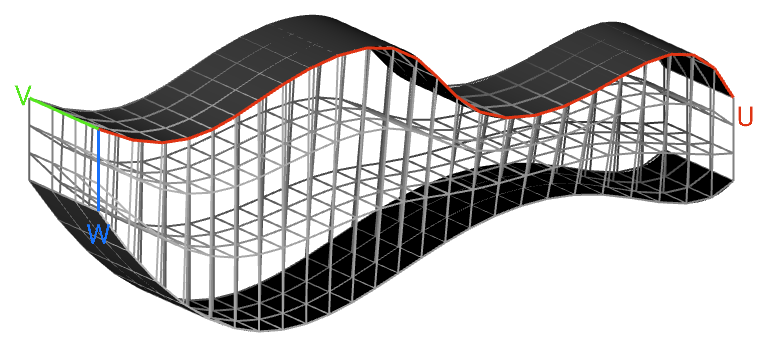
CAD Face

CAD Face, CAD Face, Vector, Bool

Constructs volumetric lattice cells between two CAD faces.

Inputs

NameTypeDescription
First faceCAD FaceFirst CAD surface to apply the cell map.
Second faceCAD FaceSecond CAD surface to apply the cell map.
Uvw countVectorNumber of cells in three directions.
LinearBoolOption to create a linear or curved cell map. As a general rule, check this option if your CAD faces are curved so that the cell map conforms more closely to the faces, although this will vary depending on the application.

Outputs


CAD Face, CAD Face, Vector, Bool, 1.1.0

Constructs volumetric lattice cells between two CAD faces.

Inputs

NameTypeDescription
First faceCAD FaceFirst CAD surface to apply the cell map.
Second faceCAD FaceSecond CAD surface to apply the cell map.
Uvw countVectorNumber of cells in three directions.
LinearBoolOption to create a linear or curved cell map. As a general rule, check this option if your CAD faces are curved so that the cell map conforms more closely to the faces, although this will vary depending on the application.

Outputs


CAD Face, CAD Face, Vector, Bool, 1.2.0

Constructs volumetric lattice cells between two CAD faces.

Inputs

NameTypeDescription
First faceCAD FaceFirst CAD surface to apply the cell map.
Second faceCAD FaceSecond CAD surface to apply the cell map.
Uvw countVectorNumber of cells in three directions.
LinearBoolOption to create a linear or curved cell map. As a general rule, check this option if your CAD faces are curved so that the cell map conforms more closely to the faces, although this will vary depending on the application.

Outputs


CAD Face, UV Position Enum, Bool, CAD Face, UV Position Enum, Bool, Vector, Bool

Constructs a Cell Map between two CAD faces.

Inputs

NameTypeDescription
First faceCAD FaceThe first CAD surface to apply the cell map.
First uv originUV Position EnumCorner parameter to set as origin for UV space of first face.
Flip first uvBoolSwap the direction of U and V for first face.
Second faceCAD FaceSecond CAD surface to apply the cell map.
Second uv originUV Position EnumCorner parameter to set as origin for UV space of second face.
Flip second uvBoolSwap the direction of U and V for second face.
Uvw countVectorNumber of cells in the U, V and W directions.
LinearBoolOption to create a linear or curved cell map. As a general rule, check this option if your CAD faces are curved so that the cell map conforms more closely to the faces, although this will vary depending on the application.

Outputs


CAD Face, UV Position Enum, Bool, CAD Face, UV Position Enum, Bool, Vector, Bool, 1.1.0

Constructs a Cell Map between two CAD faces.

Inputs

NameTypeDescription
First faceCAD FaceThe first CAD surface to apply the cell map.
First uv originUV Position EnumCorner parameter to set as origin for UV space of first face.
Flip first uvBoolSwap the direction of U and V for first face.
Second faceCAD FaceSecond CAD surface to apply the cell map.
Second uv originUV Position EnumCorner parameter to set as origin for UV space of second face.
Flip second uvBoolSwap the direction of U and V for second face.
Uvw countVectorNumber of cells in the U, V and W directions.
LinearBoolOption to create a linear or curved cell map. As a general rule, check this option if your CAD faces are curved so that the cell map conforms more closely to the faces, although this will vary depending on the application.

Outputs


CAD Face, UV Position Enum, Bool, CAD Face, UV Position Enum, Bool, Vector, Bool, 1.2.0

Constructs a Cell Map between two CAD faces.

Inputs

NameTypeDescription
First faceCAD FaceThe first CAD surface to apply the cell map.
First uv originUV Position EnumCorner parameter to set as origin for UV space of first face.
Flip first uvBoolSwap the direction of U and V for first face.
Second faceCAD FaceSecond CAD surface to apply the cell map.
Second uv originUV Position EnumCorner parameter to set as origin for UV space of second face.
Flip second uvBoolSwap the direction of U and V for second face.
Uvw countVectorNumber of cells in the U, V and W directions.
LinearBoolOption to create a linear or curved cell map. As a general rule, check this option if your CAD faces are curved so that the cell map conforms more closely to the faces, although this will vary depending on the application.

Outputs