

About this Block
What it does: Selects the FE Mesh boundary entities whose center of mass lies within the tolerance value of the implicit body. Commons uses:- Choosing elements for Boundary Conditions.
- This block selects elements that are present within the FE Mesh. These elements include nodes, edges, and faces.
-
How to decide which Entity type to choose:
- Choosing your entity depends on the Boundary Condition you are using. Does it make a difference if you apply the Boundary Condition on a face/edge/node? For example, all the restraints (Point, Displacement, Temperature, Initial Temperature, Applied Temperature) evaluate their value at the nodes. However, the Force block acts differently. If you select nodes, it divides the applied force evenly among them. If you choose edges, it divides the force evenly among the total length of the edges, and if you select faces, it divides the force over the entire area of your selection.
- For example, if you use nodes in the FE Boundary, regions with more nodes will generally see more force since, with this option, we are taking the force divided by the total number of nodes and applying that value to each node. Instead, if you use the Faces option, the force is divided by the total area, and this applies as a force per unit area to each element face which results in a more evenly spread force across the entire FE Boundary.
- Some boundary conditions have preferred boundary element types, like Heat Flux and Pressure only allow face entities.
Example File
Download Example: FE Boundary by Body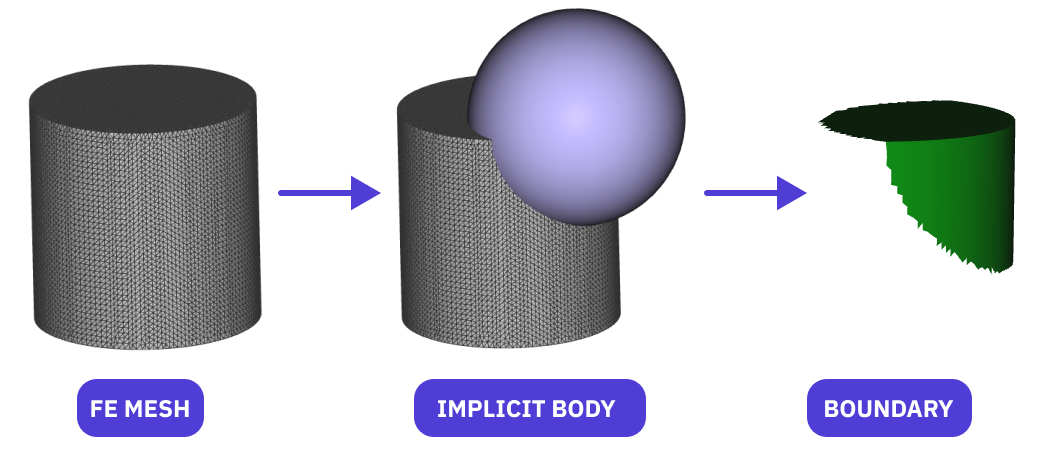
Select boundary entities of the FE Mesh (faces/edges/nodes) that lie within a desired tolerance of an Implicit Body.