

About this Block
What it does: Selects surface entities on an FE Mesh. The entities available to be selected are nodes, faces, or edges. When a direction is defined, the block shoots a ray at the mesh and finds the intersection. The first intersecting entity (entity) becomes the basis for the flood fill. The flood fill compares the normal of entity with all the neighboring entities. If the entities are below the tolerance angle provided, it selects it. With no direction, it finds the closest entity to the origin, which becomes the entity. Commons uses:- Defining boundaries in a Boundary Condition block type.
-
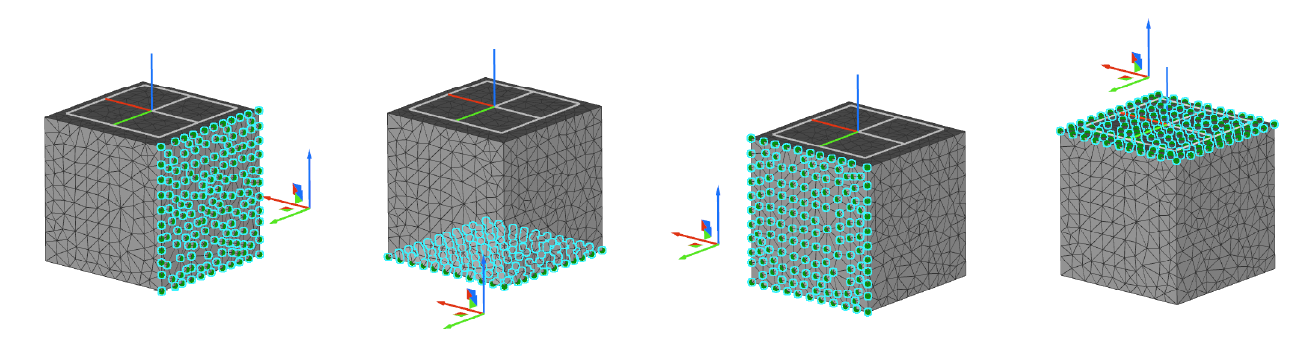
No Directional Input:
- Angle: Default
- Direction: Undefined (Optional input)
- Depending on the location of the origin point, the flood fill operation chooses the closest entity to the origin as the seed entity (entity0) on the surface when no direction is defined.
-
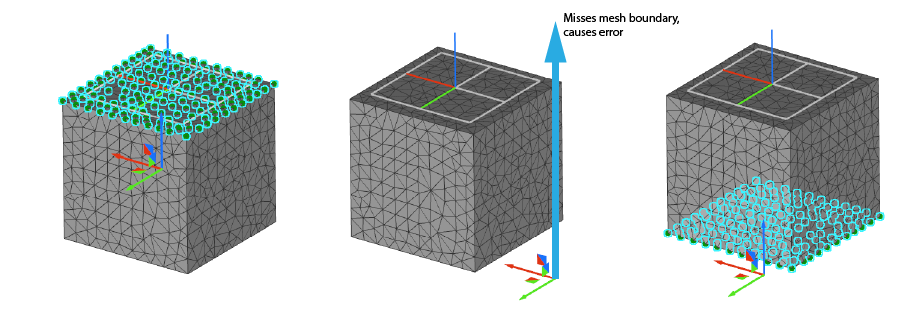
With Directional Input:
- Angle: Default
- Direction: Defined
- When you define the direction with a vector, the flood fill operation shoots a ray from the origin in that direction to choose the seed entity (entity0).
- For example, if you choose the vector as (0,0,1), then the closest intersecting surface mesh entity in the positive Z-direction is chosen.
- If the origin point doesn’t intersect with an entity in that direction, you will receive an error that says, “No mesh entities were found.”
-
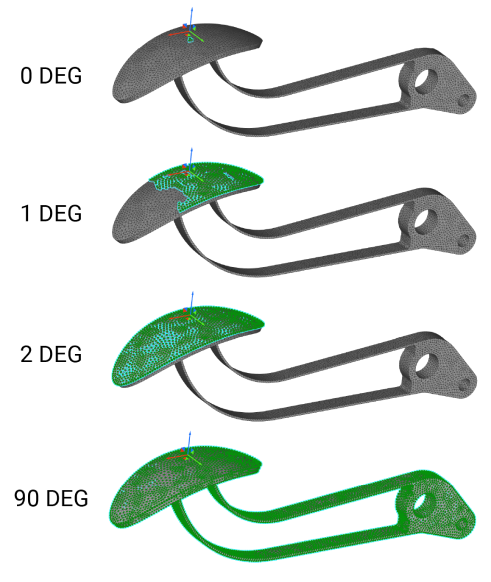
Angle:
- The angle defines how many entities to select by comparing the normal of seed entity (entity0) with all neighboring entities. It chooses entities if they are below the tolerance angle. This is beneficial for selecting entities on curved surfaces.
-
When the angle is x degrees, the flood fill chooses all entities with an angle up to but not including x degrees between them and the normal of entity0.
-
How to decide which Entity type to choose:
- Choosing your entity depends on the Boundary Condition you are using. Does it make a difference if you apply the Boundary Condition on a face/edge/node? For example, all the restraints (Point, Displacement, Temperature, Initial Temperature, Applied Temperature) evaluate their value at the nodes. However, the Force block acts differently. If you select nodes, it divides the applied force evenly among them. If you choose edges, it divides the force evenly among the total length of the edges, and if you select faces, it divides the force over the entire area of your selection.
- For example, if you use nodes in the FE Boundary, regions with more nodes will generally see more force since, with this option, we are taking the force divided by the total number of nodes and applying that value to each node. Instead, if you use the Faces option, the force is divided by the total area, and this applies as a force per unit area to each element face which results in a more evenly spread force across the entire FE Boundary.
- Some boundary conditions have preferred boundary element types, like Heat Flux and Pressure only allow face entities.
Example File
Download Example: FE Boundary by Flood FillSelect boundary entities of an FE Mesh (faces/edges/nodes) using a flood fill operation. The block chooses the closest mesh entities to the specified origin, and uses a flood fill operation to select all mesh entities that lie within a certain specified angle and direction of the originally selected entity.