
FE Mesh, Isotropic Material, Choice, Scalar, Scalar Field, Scalar Field, Scalar Field, Scalar Field, Scalar Field, Scalar Field, Scalar Field

FE Mesh, Isotropic Material, Choice, Scalar, Scalar Field, Scalar Field, Scalar Field, Scalar Field, Scalar Field, Scalar Field, Scalar Field, 1.1.0

FE Mesh, Isotropic Material, Choice, Scalar, Scalar Field, Scalar Field, Scalar Field, Scalar Field, Scalar Field, Scalar Field, Scalar Field, 1.2.0

About this Block

The Parametric Shell-Infill Domain This block creates a parametric FE Domain, which has been parameterized with design parameters for a variable shell and infill. The block uses a FE Volume Mesh as an input mesh to define the design space. You can select any current lattices as the infill for this block. The block utilizes the same data set used in the Parametric Lattice Domain to determine the homogenized properties of the lattice infill. It also uses the same approach for shell optimization as the Parametric Shell Domain block. After field optimization, it will apply the optimized values for the shell and lattice thickness to the design space. Common uses:
  • This block is an input to the Parametric FE Model block.
Once you generate the Parametric Shell-Infill Domain , a HUD appears in the Viewport with several options for visualizing the results.
  • Implicit View - allows you to view the resulting geometry.
  • Property Fields - allows a user to view the mechanical properties of the structure across the design space before performing field optimization.
  • State Fields - allows a user to view values of the design parameters across the design space before performing the field optimization.
  • Determining the proper mesh size can be difficult for the FE mesh provided to the Parametric Shell Domain.
    • The input mesh must be very fine from the surface through the maximum shell thickness.
    • However, to increase the speed/efficiency of the optimization algorithm, elements outside of the “shell boundary” should be much larger.
    • The goal is for the total possible design region to contain as many elements as possible (giving up time for accuracy) and for all other areas to contain fewer elements.
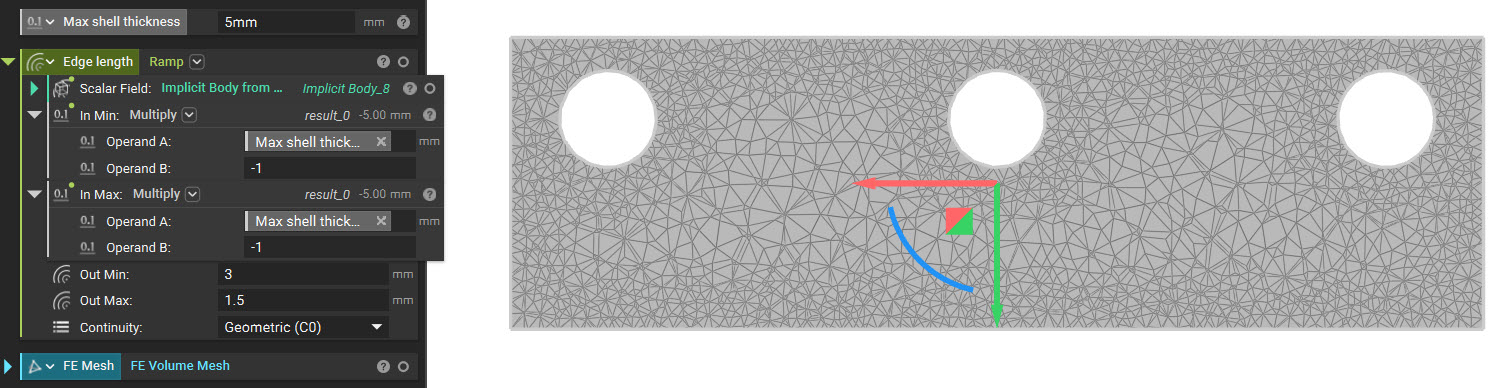
    • As such, you should use a Ramp block in the Edge Length input to generate the FE Mesh. An example of meshing for shell optimization is below:
    • Taking advantage of the SDF of an implicit, we can ramp our mesh edge length using our ramp function. Some hints for appropriate inputs are below:
      • Scalar field: Implicit body which we are meshing. The implicit body will allow us to use the signed distance field of the implicit in driving our mesh size.
      • In Min: Maximum shell thickness multiplied by -1. This input will create a divider between the maximum design space of the shell optimization and the void on the inside.
      • In Max: Maximum shell thickness multiplied by -1. Having the same input as “In Min,” we can set up the field as a step function.
      • Out Min: Mesh size of shell design space (should be smaller than “Out Max”). The edge size should capture all the detail of the object and be suitable for running simulation.
      • Out Max: Mesh size of the inner void (should be more significant than “Out Min”). Ramp
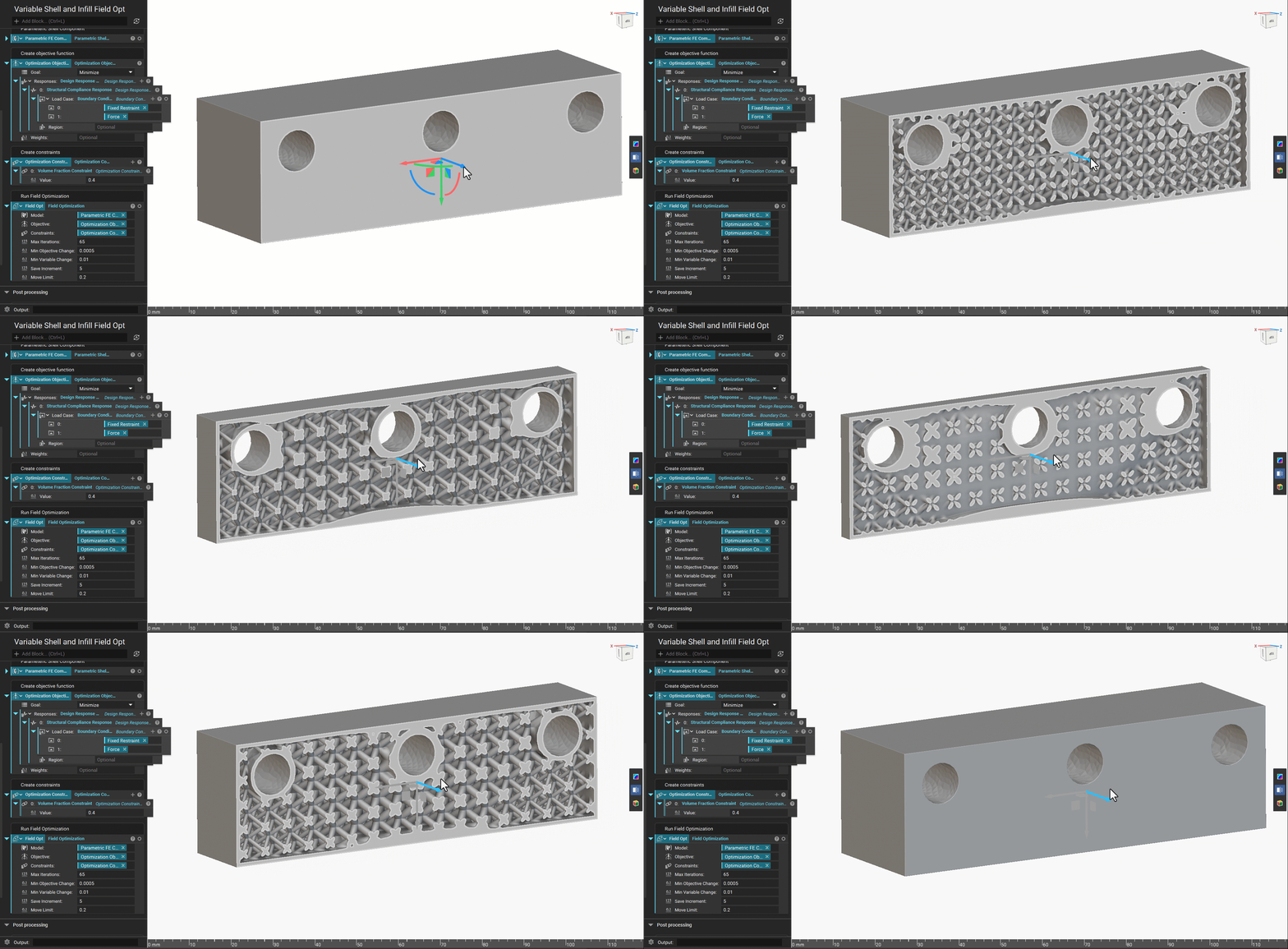
  • Adjust the Initial Shell Thickness and the Initial Infill Thickness to view the geometry generated for the upper/lower bounds to ensure printability before running a field optimization.

Example File

Download Example: Parametric Shell-Infill Domain Parametric Shell-Infill Domain
FE Mesh, Isotropic Material, Choice, Scalar, Scalar Field, Scalar Field, Scalar Field, Scalar Field, Scalar Field, Scalar Field, Scalar Field

Create a Parametric FE Domain for a variable shell structure with a periodic lattice infill with the following design parameters: shell thickness (inward direction), lattice thickness. The infill material model is homogenization-based so the model accuracy will improve as the cell size is reduced. Inputs
NameTypeDescription
MeshFE MeshThe finite element mesh that defines the design space.
MaterialIsotropic MaterialMaterial that the shell and lattice infill is comprised of.
Unit cellChoiceThe unit cell used to create the lattice infill.
Cell sizeScalarThe cell size for the lattice infill.
Min infill thicknessScalar FieldThe minimum allowable lattice infill thickness.
Max infill thicknessScalar FieldThe maximum allowable lattice infill thickness.
Initial infill thicknessScalar FieldThe initial lattice infill thickness. this defines the starting point of the optimization. values exceeding the min/max bounds will be clamped.
Min shell thicknessScalar FieldThe minimum allowable thickness for the shell.
Max shell thicknessScalar FieldThe maximum allowable thickness for the shell.
Initial shell thicknessScalar FieldThe initial shell thickness. this defines the starting point of the optimization. values exceeding the min/max bounds will be clamped.
Filter sizeScalar FieldA length measure that is used to control the smoothness of the design parameter field. a lower bound of 0 will be enforced. if not specified, a default will be estimated based on the model size.
Outputs

FE Mesh, Isotropic Material, Choice, Scalar, Scalar Field, Scalar Field, Scalar Field, Scalar Field, Scalar Field, Scalar Field, Scalar Field, 1.1.0

Create a Parametric FE Domain for a variable shell structure with a periodic lattice infill with the following design parameters: shell thickness (inward direction), lattice thickness. The infill material model is homogenization-based so the model accuracy will improve as the cell size is reduced. Inputs
NameTypeDescription
MeshFE MeshThe finite element mesh that defines the design space.
MaterialIsotropic MaterialMaterial that the shell and lattice infill is comprised of.
Unit cellChoiceThe unit cell used to create the lattice infill.
Cell sizeScalarThe cell size for the lattice infill.
Min infill thicknessScalar FieldThe minimum allowable lattice infill thickness.
Max infill thicknessScalar FieldThe maximum allowable lattice infill thickness.
Initial infill thicknessScalar FieldThe initial lattice infill thickness. this defines the starting point of the optimization. values exceeding the min/max bounds will be clamped.
Min shell thicknessScalar FieldThe minimum allowable thickness for the shell.
Max shell thicknessScalar FieldThe maximum allowable thickness for the shell.
Initial shell thicknessScalar FieldThe initial shell thickness. this defines the starting point of the optimization. values exceeding the min/max bounds will be clamped.
Filter sizeScalar FieldA length measure that is used to control the smoothness of the design parameter field. a lower bound of 0 will be enforced. if not specified, a default will be estimated based on the model size.
Outputs

FE Mesh, Isotropic Material, Choice, Scalar, Scalar Field, Scalar Field, Scalar Field, Scalar Field, Scalar Field, Scalar Field, Scalar Field, 1.2.0

Create a Parametric FE Domain for a variable shell structure with a periodic lattice infill with the following design parameters: shell thickness (inward direction), lattice thickness. The infill material model is homogenization-based so the model accuracy will improve as the cell size is reduced. Inputs
NameTypeDescription
MeshFE MeshThe finite element mesh that defines the design space.
MaterialIsotropic MaterialMaterial that the shell and lattice infill is comprised of.
Unit cellChoiceThe unit cell used to create the lattice infill.
Cell sizeScalarThe cell size for the lattice infill.
Min infill thicknessScalar FieldThe minimum allowable lattice infill thickness.
Max infill thicknessScalar FieldThe maximum allowable lattice infill thickness.
Initial infill thicknessScalar FieldThe initial lattice infill thickness. this defines the starting point of the optimization. values exceeding the min/max bounds will be clamped.
Min shell thicknessScalar FieldThe minimum allowable thickness for the shell.
Max shell thicknessScalar FieldThe maximum allowable thickness for the shell.
Initial shell thicknessScalar FieldThe initial shell thickness. this defines the starting point of the optimization. values exceeding the min/max bounds will be clamped.
Filter sizeScalar FieldA length measure that is used to control the smoothness of the design parameter field. a lower bound of 0 will be enforced. if not specified, a default will be estimated based on the model size.
Outputs