

Objective:
Learn what blocks are available for refining meshes and how to use them.Applies to:
- Exporting, Manufacturing, Analysis, Topology Optimization
Procedure:
Remesh Surface
Refine Mesh
Split Mesh
Filter Mesh List
Merge Mesh and Merge FE Mesh
Simplify Mesh By Amount
Simplify Mesh by Threshold
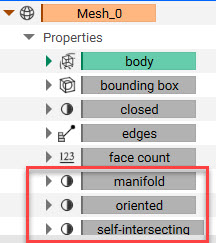
Meshes typically need further refinement (or cleaning) before they can be useful down the road. These blocks help reduce file size, reduce triangle count, and capture fine details. Try using these blocks in combinations to mesh complex parts. At the end of cleaning your meshes, you want to be sure that there are no self-intersections, that the mesh is manifold, and that all faces are oriented correctly. To check these properties, open up the Property panel on the mesh block and scroll down. You want to see:-
- Manifold: True
- Oriented: True
- Self-intersecting: False
Remesh Surface:
Cleans up defects in a mesh, consolidates meshes into fewer elements, and/or spatially varies the mesh density. Gives more control over the size, shape, and uniformity of the original mesh. Use this block to generate FEA quality meshes for downstream analysis.- Useful in converting a surface mesh to a solid mesh. When doing this, make sure the Edge Length is the same size for the Remesh Surface block and the Solid Mesh block to allow for the creation of tetrahedral elements.
- The Edge Length should be ≥ to the feature size of the input Mesh. Start high and reduce it until you are happy with how it looks.
- Minimum Feature Size: If you are setting a minimum Feature Size, it’s recommended to use 5% of the chosen Edge Length.
- Remesh Shape
- Triangular: is the most commonly used and most efficient
- Quad and Quad-dominated: Can’t be converted to a volume mesh in nTop but can be used in CAD Body from Mesh. It is preferred to use the Quadrangulate Mesh block instead.
- You want to balance fidelity and computing time
- Too many elements = long computing time and not enough elements = low fidelity
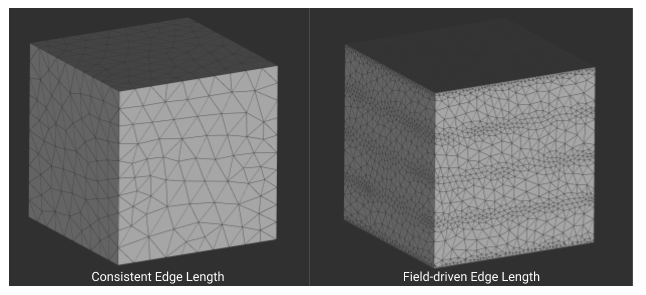 | Edge length: Specifies the approximate edge length of the mesh elements. Can be a singular, consistent value, or a scalar field, meaning you can spatially vary the size of the mesh. |
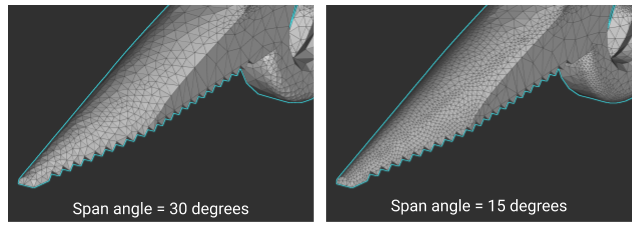 | Span Angle: Refines elements that lie on curves. It signifies the maximum allowed angle that elements on curved surfaces are allowed to span. With a smaller span angle, elements on the curve are more refined to fit the span angle. |
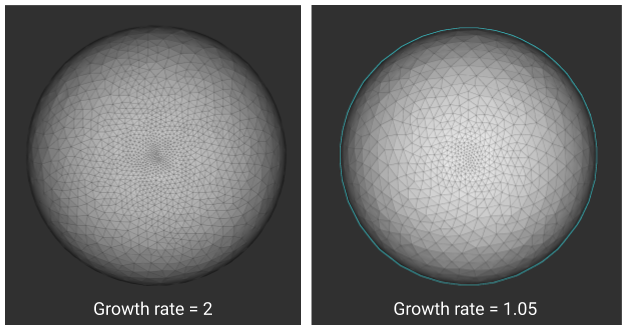 | Growth Rate: Specifies the ratio of element size from one element to another. The number can be anything greater than 1. The smaller the number, the more uniform the mesh. In the image to the right, you can see how changing the growth rate from 2 to 1.05 creates a more uniform mesh. |
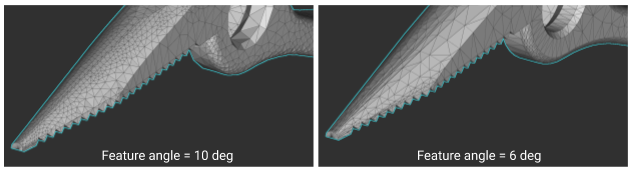 | Feature Angle: Controls the degree to which curved surfaces are converted to flat edges in a mesh. The value represents the maximum allowed angle between two adjacent planes that define an edge. A lower value results in more planar regions of the mesh where an input surface is curved. |
- When you have mesh elements clustering together:
- Increase the Growth Rate, add a Minimum Edge Length
- When high fidelity is needed on curved surfaces:
- Lower the Chord height, lower the Span angle
- If you have surface divots or self-intersections:
- Lower the Chord height
- For a more uniform mesh:
- Lower the Growth Rate, lower the Edge Length
- Why is the progress bar getting stuck?
- Need to adjust your inputs: Chord height, Span angle, and Growth rate
- Why is it taking so long?
- Try increasing mesh size
- Why isn’t my texture captured in the mesh?
- Check that the initial mesh is detailed enough and add a minimum feature size
Refine Mesh:
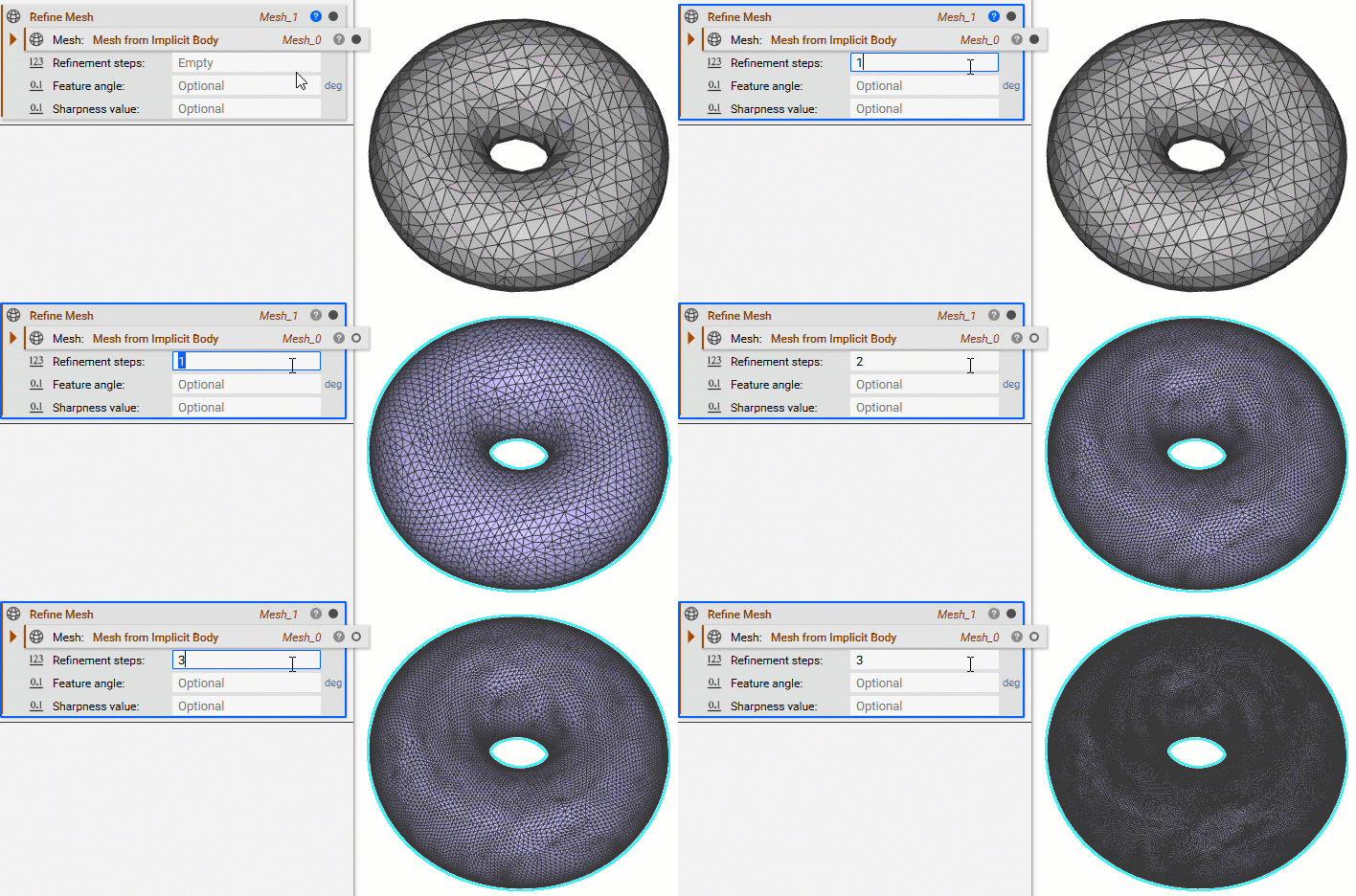
Refines a mesh using subdivision. Increases the size of any mesh to be exported, by increasing the triangle count.- Creates subdivided meshes that can be converted into lattices (Lattice Body from Surface Mesh).
- Useful for refining Quad meshes before converting to a CAD part.
Split Mesh:
Splits a mesh into multiple mesh objects. Learn how to use it here.- Used in separating disconnected parts.
- Used in separating fragmented mesh pieces from a larger mesh. Even if you can’t see the fragments they may be there when you use the Split Mesh block.
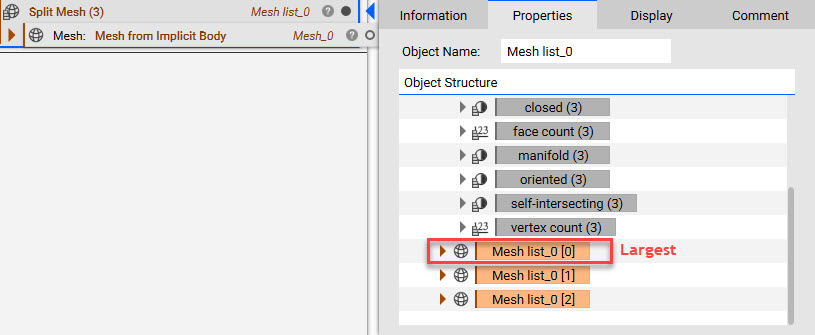
- Need to open the Properties panel to extract the meshes. The largest mesh is always at the top of the list.
Filter Mesh List:
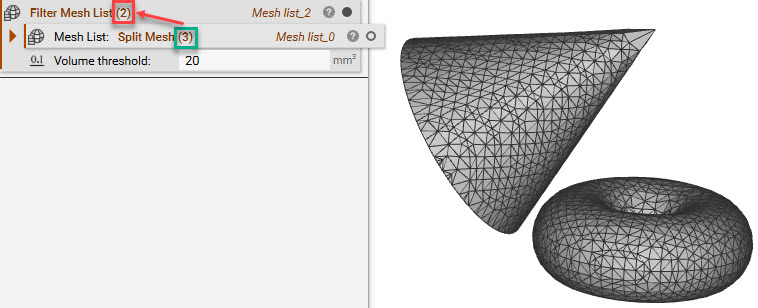
Filters the Split Mesh results, based on a volume, to remove small disconnected pieces from the mesh.- Commonly used for minor mesh fixing.
Merge Mesh and Merge FE Mesh:
Merges multiple mesh objects together. FE Meshes are merged by collapsing nodes within a given tolerance.- Commonly used to export one mesh object that may have disconnected pieces.
- Useful for merging a list of meshes together for downstream use.
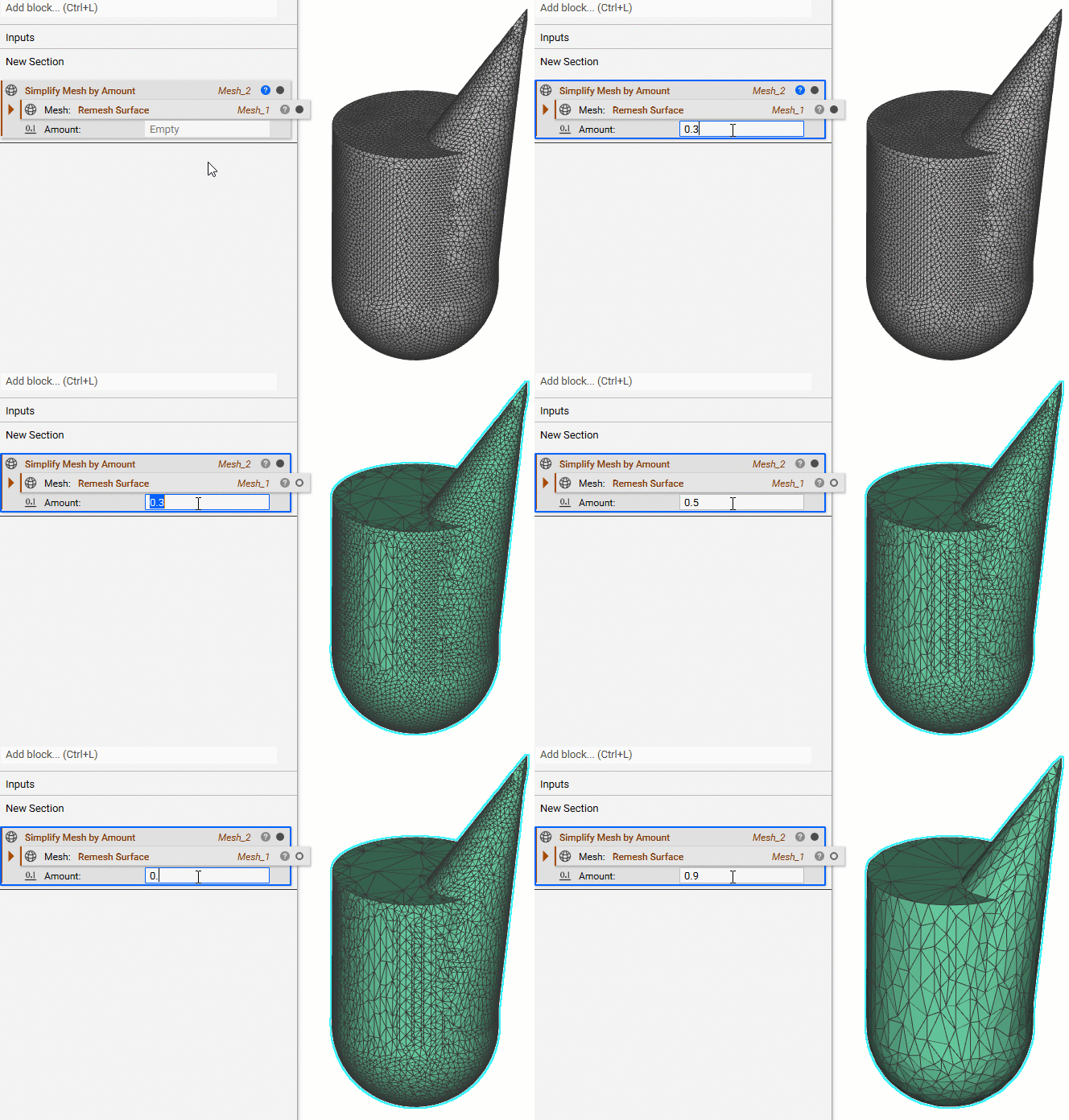
Simplify Mesh By Amount:
Reduces the number of triangles on the surface mesh depending on the amount entered (in a range from 0-1, but not including 0 or 1).- Amount input of 0.5 removes half of the mesh elements.
- Doesn’t take surface tolerance into account (the distance between the original input mesh surface and the new surface).
- Helps shrink the size of the file.
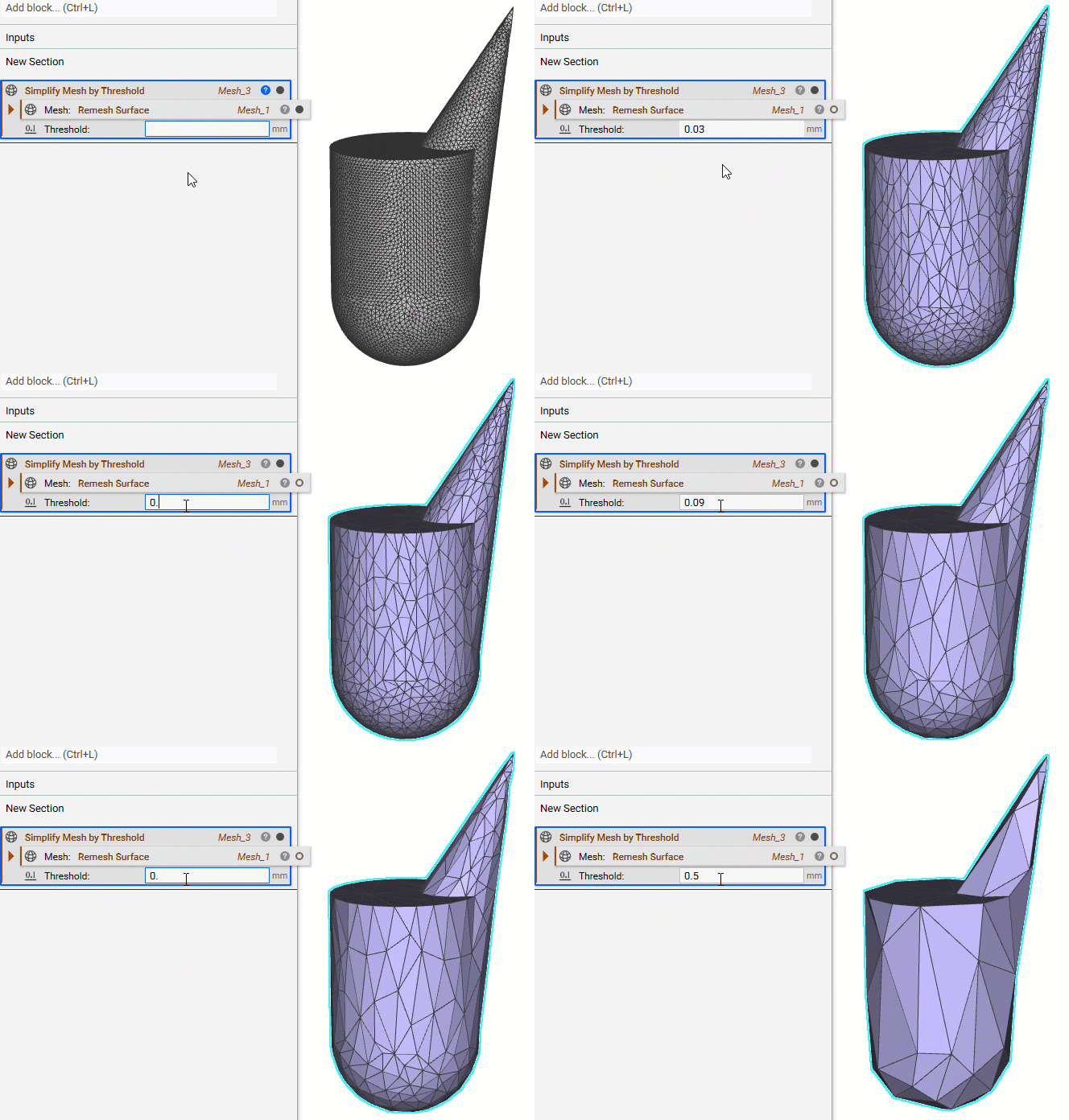
Simplify Mesh by Threshold:
Reduces the number of triangles on the surface mesh. The block ensures that the distances between the surface input mesh and the surface of the new mesh are below the defined threshold amount.- The Threshold amount has to be larger than 0.
- Helps shrink the size of the file.
 Are you still having issues? Contact the support team, and we’ll be happy to help!