Objective:
Learn what a mesh is and how they work in nTop.Applies to:
- Additive manufacturing
- Rendering
- Simulation
- Exporting
Procedure:
What is a mesh?
It is a discretization of surface geometry using vertices, edges, and faces. Meshes are saved as their own file types (STL, OBJ, PLY, 3MF…) and used for analysis, manufacturing preparation, and exporting to other programs.Meshes in nTop
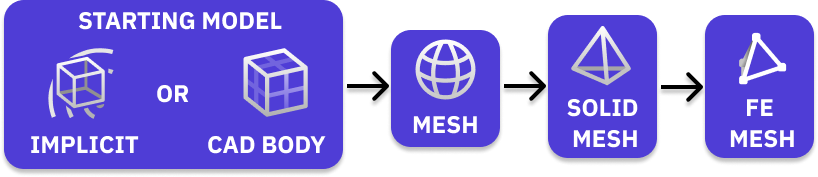 There are three kinds of meshing blocks in nTop. Surface meshes, solid meshes, and Finite Element (FE) volume meshes. In nTop we refer to surface meshes as simply ‘meshes’, while volume meshes are specified as volume or solid meshes.
Typically meshes start as a surface mesh, get refined, and can be converted to solid and FE meshes depending on your goal. If you want to export your mesh, you can keep it as a surface mesh, but if you want to analyze it in nTop or another program, you will need to create a volume mesh and then an FE volume mesh.
There are three kinds of meshing blocks in nTop. Surface meshes, solid meshes, and Finite Element (FE) volume meshes. In nTop we refer to surface meshes as simply ‘meshes’, while volume meshes are specified as volume or solid meshes.
Typically meshes start as a surface mesh, get refined, and can be converted to solid and FE meshes depending on your goal. If you want to export your mesh, you can keep it as a surface mesh, but if you want to analyze it in nTop or another program, you will need to create a volume mesh and then an FE volume mesh.
Surface Meshes
Implicits and CAD bodies can both be converted into surface meshes. The two articles below teach you how to build a surface mesh in nTop and the various methods for creating them.What is a clean mesh?
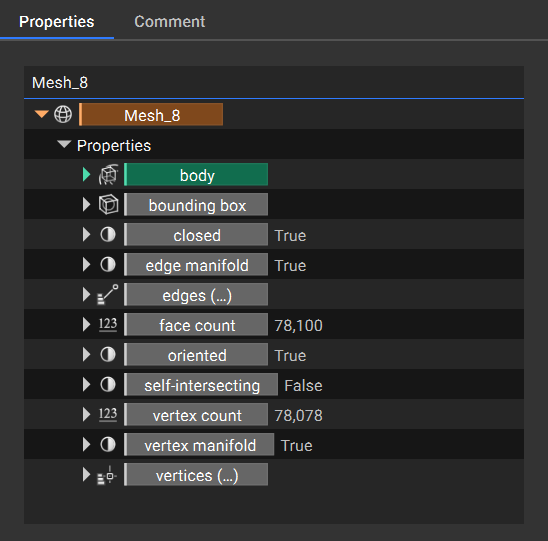
A clean mesh means that it is closed, oriented, manifold, and not self-intersecting. All of these properties can be checked in the Property Panel of a mesh block. A clean mesh is necessary to ensure there are no errors with further operations.- Closed: Has no boundary edges.
- Oriented: Normal vectors of all mesh faces are consistently facing outward or inward.
- Manifold: A continuous surface that resembles Euclidean space up close.
- Self-Intersecting: A part of a surface mesh collides with another part of itself.