

Objective:
Apply a bitmap onto a CAD face.Applies to:
- Texturing
- Debossing
Procedure:
- Import the image using the Import Bitmap block. (What are beta blocks?)
- Import the CAD Part using the Import Part block.
- Use the Cell Map on CAD Face block to prepare the CAD Face you wish to apply the bitmap on.
- Import the custom block (Place Image using Cell Map) attached below:
- Use the Place Image using Cell Map block.
- Drag and drop the bitmap from the Import Bitmap block.
- Cell Map input is the one prepared in the third step.
- Choose the appropriate Scale, Angle, Aspect Adjustment, and Interpolation type.
- Set up the CAD body using the Implicit Body from CAD Body block.
- Use a combination of Offset Body and Multiply block to deboss the image.
- Use Set Body Bounding Box to view your final implicit.
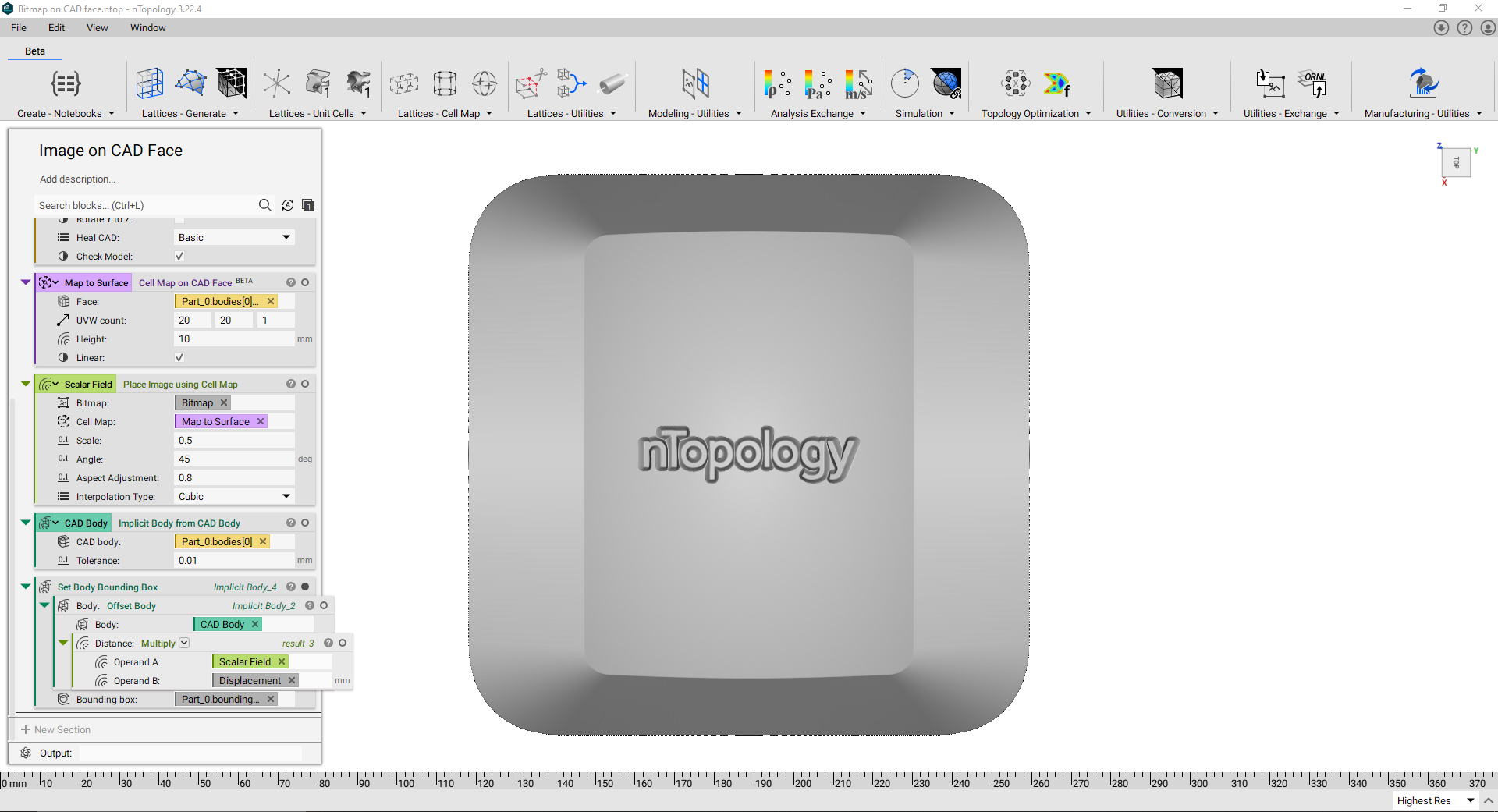 And that’s it! You’ve successfully debossed an image onto a CAD face.
Are you still having issues? Contact the support team, and we’ll be happy to help!
And that’s it! You’ve successfully debossed an image onto a CAD face.
Are you still having issues? Contact the support team, and we’ll be happy to help!