Question:
What are beta blocks? Can I use beta blocks for production workflows? How do I enable beta blocks? How do I use beta blocks? How long is a block in beta for? What if I find a bug while using a beta block?Applies to:
- nTop
Answer:
What are beta blocks?
Beta features include blocks and other features that are in development and may be subject to change before transitioning to general availability. These are meant to enable early access to upcoming features to collect user feedback. They have not undergone rigorous testing, are not fully documented, and may result in unexpected behavior. They will undergo additional testing, documentation, and refinement and their behavior may change when they reach general availability. If you have feedback about beta features, especially desired improvements or unexpected behavior, please report it to nTop support so we can consider it for inclusion for general availability.Can I use beta blocks for production workflows?
We do not recommend Beta blocks for production workflows. Beta blocks are subject to increased updates and changes, which may cause issues in productions workflows.How do I enable beta blocks?
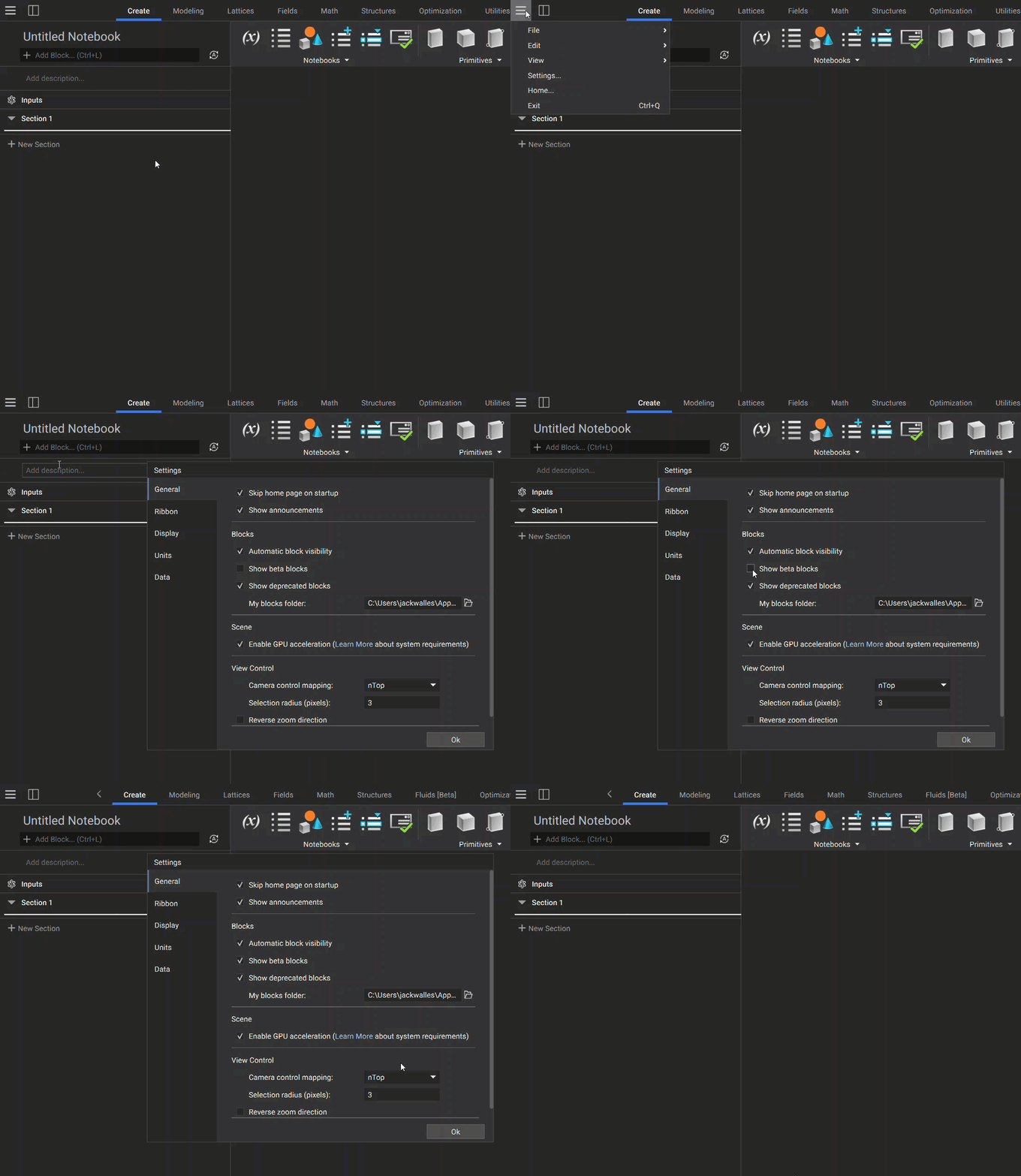
To enable Beta blocks, go to the top left menu of your nTop window. Select Settings and a new window will appear. On the General tab, check the Show Beta Blocks box.