

FE Mesh, Bool
Mesh, Bool
Volume Mesh, Bool
The Mesh Quality block assesses the quality of a mesh specifically for simulation purposes. The numerical algorithms employed with FEA or CFD require highly regular elements, which may not be necessary for simply creating an STL or other discretizations for CAD or manufacturing. The Mesh Quality block computes various mesh metrics and allows you to visualize them on the mesh itself. The block accepts the following mesh types: Mesh (i.e. surface mesh), Volume Mesh, and FE Mesh. For simulation workflows, it is useful to check the surface mesh quality before proceeding to volume meshing. To follow is a description of the supported mesh metrics. The min, max, and average values of these metrics are available in the properties panel of the Mesh Quality block. They can also be visualized in the Heads-Up-Display (HUD) by toggling the visibility icon on the block and selecting the desired metric in the HUD dropdown. The threshold slider can hide elements above or below a specific value, leaving only the poorer quality elements in the 3D scene.

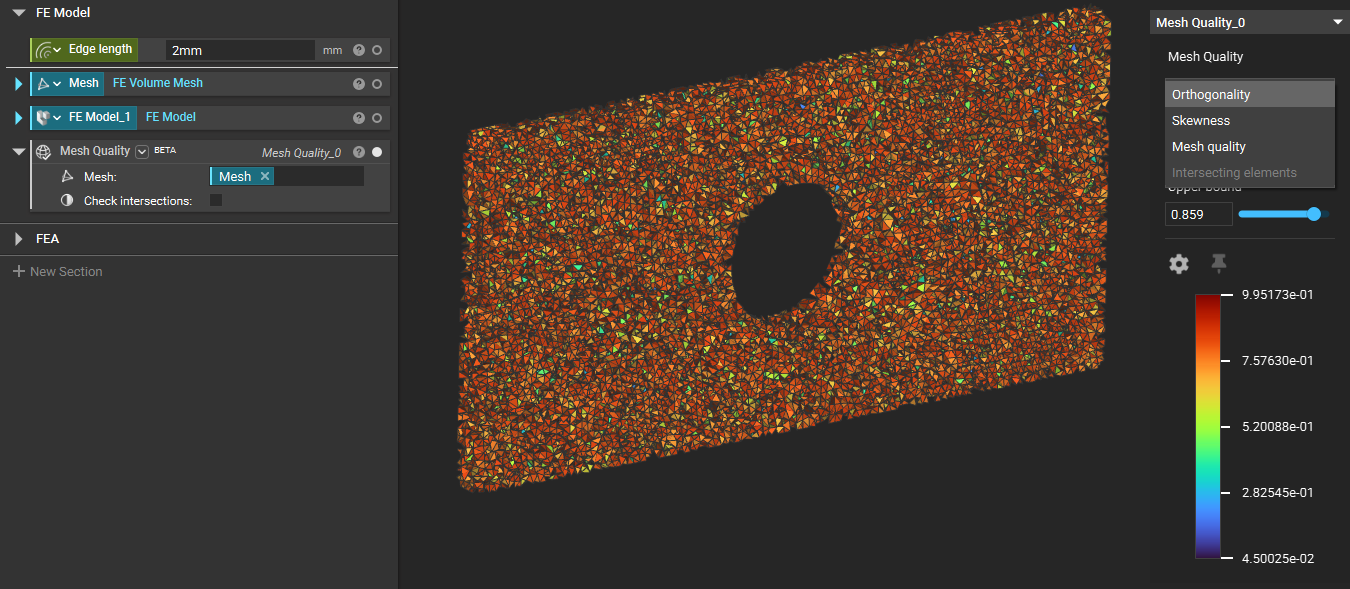 The Mesh Quality metric provides a composite quality metric between 0 and 1. This metric is based on the ratio of the volume to the sum of the square of the edge lengths for 2D elements or the square root of the cube of the sum of the square of the edge lengths for 3D elements. A value of 1 indicates a perfect cube or square, while a value of 0 indicates that the element has a zero or negative volume.
This can also be expressed as follows:
The Mesh Quality metric provides a composite quality metric between 0 and 1. This metric is based on the ratio of the volume to the sum of the square of the edge lengths for 2D elements or the square root of the cube of the sum of the square of the edge lengths for 3D elements. A value of 1 indicates a perfect cube or square, while a value of 0 indicates that the element has a zero or negative volume.
This can also be expressed as follows:
-
For 2D elements:
Quality = C * Element Area / SUM(Edge Length^2) -
For 3D elements:
Quality = C * Volume / SQRT(SUM(Edge Length^2)^3)
The Skewness metric indicates how close to ideal (or equiangular) a 2D or 3D element is. The following table provides a range of skewness values and corresponding mesh quality.
The Orthogonality metric is a measure of the face normal vectors and ranges from 0.0 to 1.0. A value of 0.0 is worst, and a value of 1.0 is best.
The intersecting triangles metric will tell you how many triangles in the mesh are intersecting each other. A common source of volume meshing failures is intersecting triangles in the surface mesh. A quality surface mesh should not have any intersecting triangles.
Note that computing intersecting triangles is an option on the Mesh Quality block and is turned off by default because computing intersecting triangles can be computationally intensive, particularly for volume meshes. When the intersecting triangle option has been turned off, the metric will be grayed out in the HUD dropdown menu.