

Objective
This article explains how to export curve and point data from nTop to rebuild surface geometry inside Siemens NX.Applies to
- nTop
- Siemens NX
- CAD Interop and Geometry Reconstruction Workflows
Supported File Formats
When transferring curve and point data from nTop to Siemens NX, select the file format that best suits your downstream workflow:- Curves: nTop supports STEP (.stp), Parasolid (.x_t), and IGES (.iges) formats via the Export Part block.
- Points: Siemens NX supports point cloud and coordinate imports in ASCII text format via the Export Points custom block.
Procedure
Step 1: Export Curves and Points from nTop
- Open your workflow in nTop and locate your wing and duct curve lists.
- Add an Export Part block to export your wing and engine curves. Specify a file path ending in .stp, .x_t, or .iges.
- Add an Export Points block to export point data. Set the destination file path to export in ASCII text format (.txt or .csv).
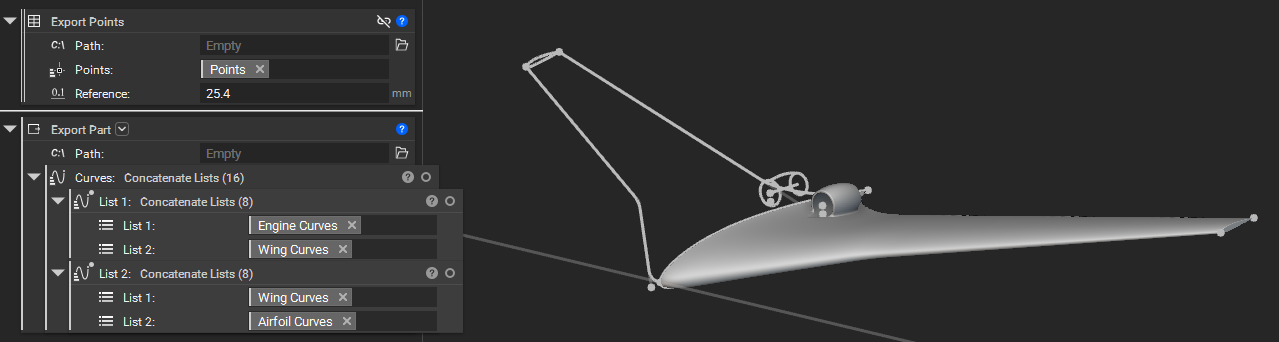
Step 2: Import Files into Siemens NX
- Launch Siemens NX and open your working part file.
- Navigate to Home > Import > IGES (or select STEP / Parasolid depending on the format exported from nTop).
- Select your exported nTop curve file to import the geometry into your NX workspace.
- Import your ASCII point file using the NX Point Constructor or Point import tool.
Step 3: Reconstruct the Surfaces
In Siemens NX, utilize the imported geometry for surface and body construction.- Imported curves can be used as Section and Guide curves in Sweeps, Extrusions, Revolutions, and other solid and surface features.
- Linear curves can be used as axes and vectors.
- Imported points can be used for constructing curves and datums.