

Objective:
Learn how to import Topology Optimization results from Altair Optistruct into nToplogy.Applies to:
- Simulation
- Analysis
- Altair Optistruct
Procedure:
Importing topology optimization results into nTop requires setting a few parameters before your analysis in Altair Optistruct®. To make the required changes and import the results into nTop do the following: 1. Open your Altair Optistruct® analysis. 2. In the panel on the bottom right of the screen, select Analysis. 3. Select Control Card. 4. Find and enable the OUTPUT card. 5. In the OUTPUT card in your tree set OUTPUT1 to SHRES, and OUTPUT2 to OP2.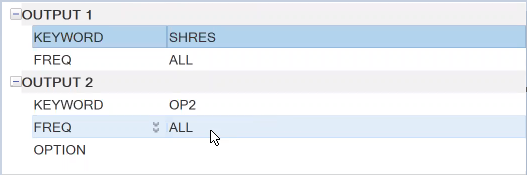 6. With these changes made, you can now run the analysis in Altair Optistruct® and it will result in an OP2 file.
Inside nTop use the Import Topology Optimization Results block.
7. Add an Import Topology Optimization Results (if you don’t have beta blocks turned on, go here).
8. In the first input specify the path to the OP2 file that was generated by Altair Optistruct®.
9. In the second input specify the unit system used within Altair Optistruct®.
10. After loading you can now use the results just like nTop native topology optimization results.
And that’s it! You’ve successfully imported your results into nTop.
Optistruct® is the trademark of Altair Engineering, Inc.
Are you still having issues? Contact the support team, and we’ll be happy to help!
6. With these changes made, you can now run the analysis in Altair Optistruct® and it will result in an OP2 file.
Inside nTop use the Import Topology Optimization Results block.
7. Add an Import Topology Optimization Results (if you don’t have beta blocks turned on, go here).
8. In the first input specify the path to the OP2 file that was generated by Altair Optistruct®.
9. In the second input specify the unit system used within Altair Optistruct®.
10. After loading you can now use the results just like nTop native topology optimization results.
And that’s it! You’ve successfully imported your results into nTop.
Optistruct® is the trademark of Altair Engineering, Inc.
Are you still having issues? Contact the support team, and we’ll be happy to help!