Objective:
How to export the shelled part as a single CAD fileProcedure:
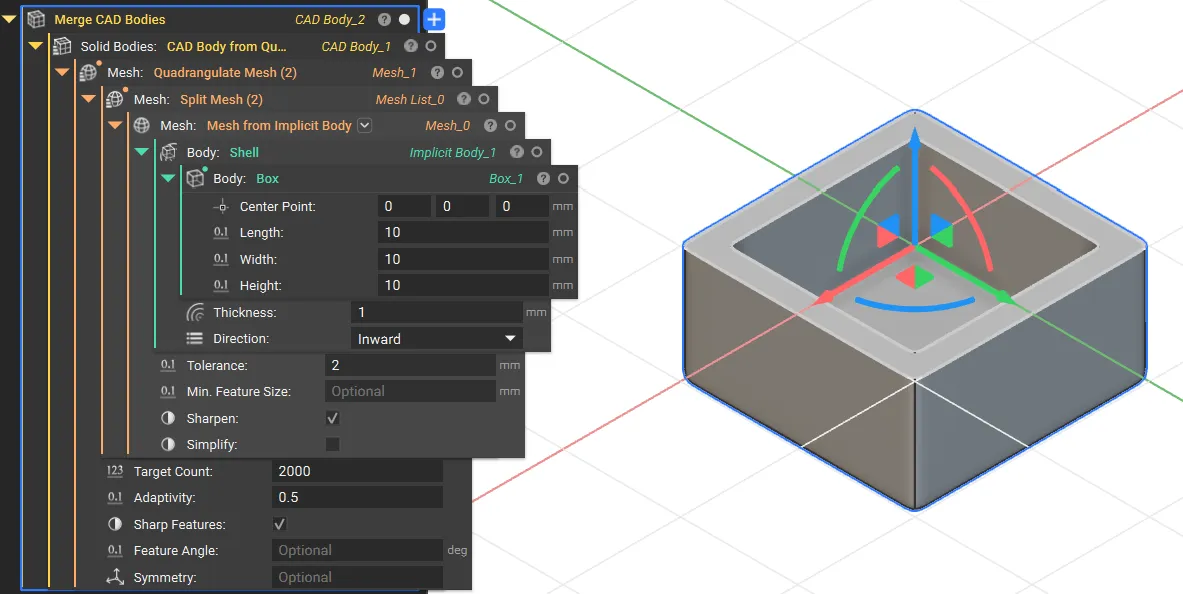
- First, create a hollow part by shelling a body using a Shell block or other methods (nTop Learn Course).
- Use the Mesh from Implicit Body block to convert your shelled body into a mesh.
- Next, use the Split Mesh block to separate the mesh into inner and outer layers.
- Use the Quadrangulate Mesh block to convert the separated triangular meshes into quad meshes.
- Use the CAD Body from Quad Mesh block to transform the quad mesh layers into solid CAD bodies.
- Combine the inner and outer CAD bodies into a single part with the Merge CAD Bodies block.
- Export your completed part using the Export Part block.