

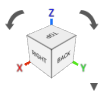
 The View Cube is located at the top right of the screen and is used to change the orientation of the Viewport.
To use the View Cube:
The View Cube is located at the top right of the screen and is used to change the orientation of the Viewport.
To use the View Cube:
- Select a face, edge, or corner of the View Cube to orient the viewport.
- When you hover over the View Cube, rotational arrows and a down arrow appear.
- Select the rotational arrows to rotate the viewport.
- Select the down arrow to open the View Cube settings
- View Settings:
- Perspective (no Ruler available in this view)
- Orthographic
- Rotation Settings:
- Turntable
- Tumbler
- Display Grid: Read more about this setting here.
- Display Ruler: Read more about this setting here.
- Named Views: Read more about this setting here.
- Capture Image: Read more about this setting here.