

About this Block
What it does: Trims Unit Cells from a Cell Map by using an Implicit Body as the filter. The Unit Cells are chosen based on the Fill type and the Cells to remain. Common uses:- Custom Cell Map shapes.
- Trims a Cell Map by removing entire Unit Cells. The Unit Cells maintain their size and aren’t able to be partially trimmed.
- The Unit Cells to be trimmed are chosen based on the Fill type. The following Fill types are available:
- Centroid Inside: If the Unit Cell’s centroid is within the Body.
- All inside: The entire Unit Cell is within the Body.
- All touching: If any part of the Unit Cell is within the Body. The tolerance for this option is 10^-5 m.
- Depending on the Fill type you select, some cells may still be outside the Body.
- The block keeps the Unit Cells based on the Cells to remain input. There are two options:
- Inside: Keeps all the Unit Cells that satisfy to the selected Fill type.
- Outside: Keeps all the Unit Cells that don’t satisfy to the selected Fill type.
- If Trim Cell Map doesn’t create the results you are looking for, try using the Trim Lattice block.
- The Trim Cell Map block doesn’t trim Unit Cells. All Unit Cells are kept whole.
- The Trim Lattice block trims the Lattice, allowing Unit Cells to be trimmed to the specified Body.
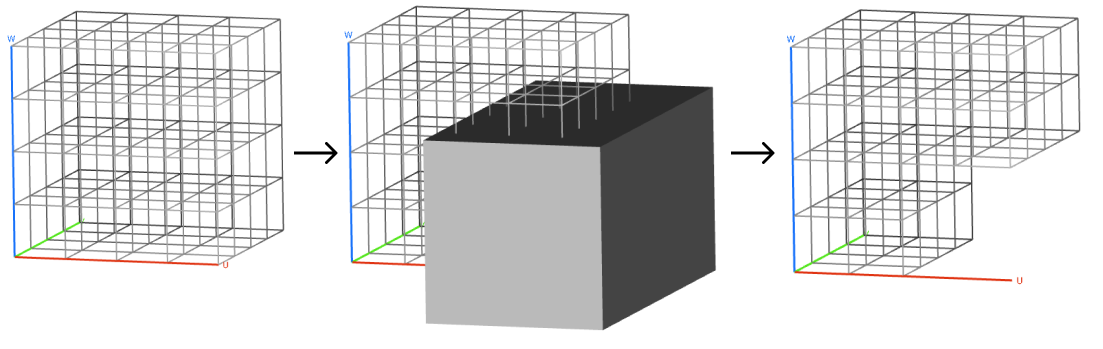
Trims a Cell Map with an Implicit Body.
Inputs
Centroid inside: Unit Cells whose centroid is inside the Body will remain.
All inside: Unit Cells with all eight corners inside the Body will remain.
All touching: Unit Cells that touch or contain any part of the Body will remain. |
| Cells to remain | Inside or Outside Enum | Option to keep the cells that are inside or outside of the trimming tool. |