

Objective:
Learn how to remove or deactivate a FlexNet Publisher (FNP) licensesApplies to:
- FlexNet Publisher (FNP) License System
Procedure:
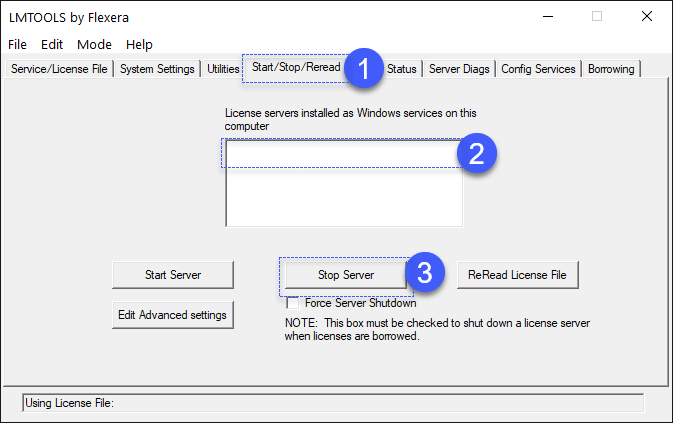
First, let’s open LMTOOLS.- Navigate to the ‘Start/Stop/Reread’ tab.
- Select the service associated with the nTop license.
- Click ‘Stop Server’ and select the Force Server Shutdown checkbox.
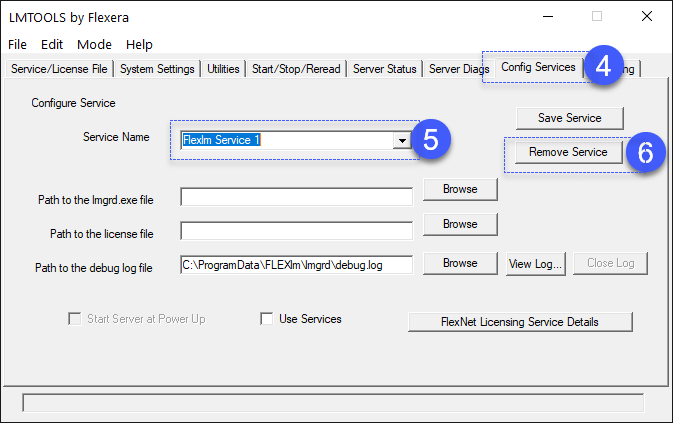
- Navigate to the ‘Config Services’ tab.
- Select the Service for nTop software under the ‘Service Name’ dropdown (the suggested name was “nTopLM”)
- Click on ‘Remove Service’.
 And that’s it! You have successfully removed the FNP license file.
Do you still need help? Contact the support team, and we’ll be happy to help!
And that’s it! You have successfully removed the FNP license file.
Do you still need help? Contact the support team, and we’ll be happy to help!