Mesh, Integer, Scalar, Scalar

Mesh, Integer, Scalar, Scalar, 1.1.0

About this Block

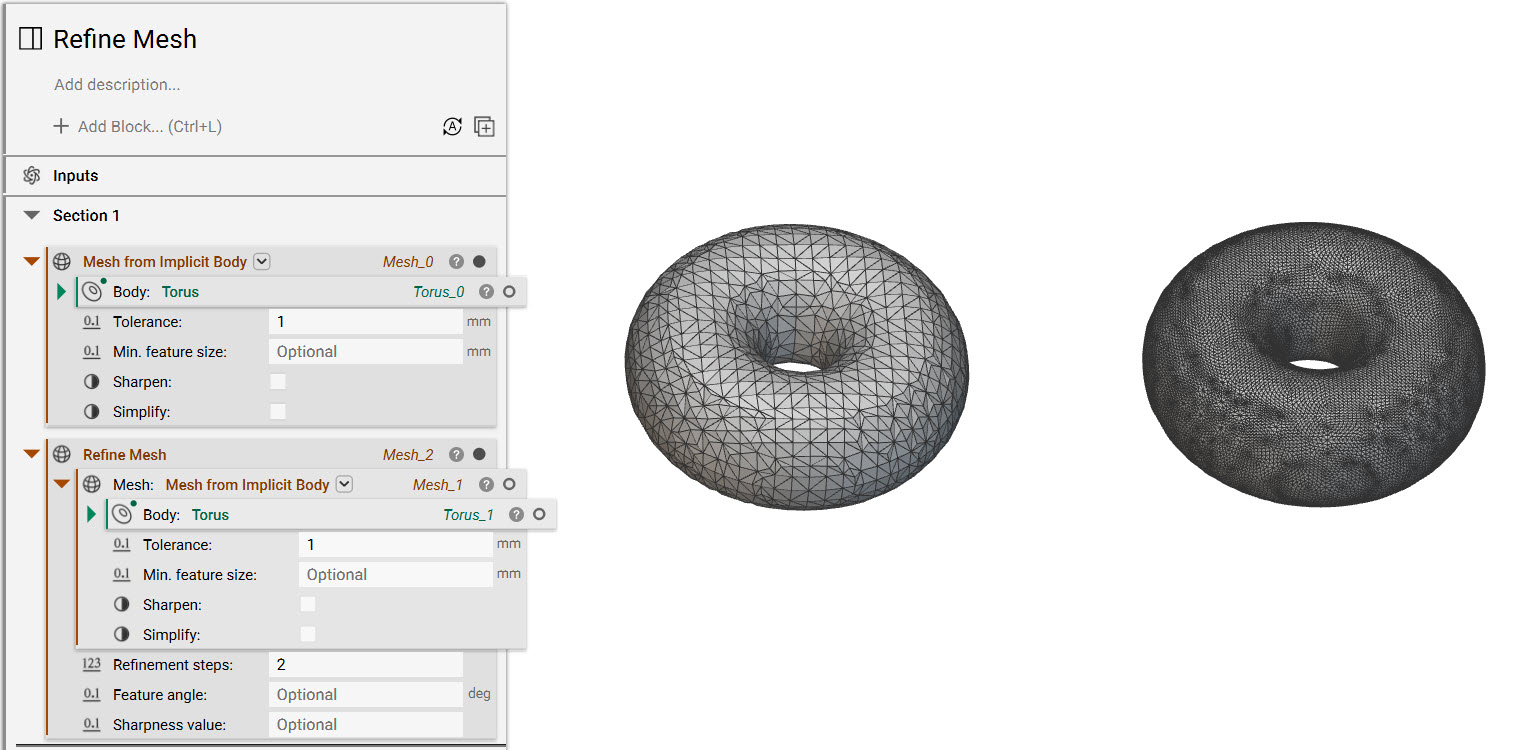
What it does: The Refine Mesh block refines a mesh using subdivision. Subdivision is the process of dividing up the polygons that make up the mesh into smaller polygons. The smaller polygons can better capture details and surface curvature of the body. Common uses:
  • Refining quad meshes before converting to CAD parts or cell maps.
  • Refining a mesh before creating a volume mesh
Tips
  • The refinement steps input defines the number of iterations for refinement between 1 and 5.
  • The Feature angle input retains sharp edges during refinement. The angle value is a lower bound and any edge angle above that value will be preserved.
  • The Sharpness value input indicates the degree of sharpness to be applied to an edge during refinement. This value can be between 0 and 1, where 1 represents an infinitely sharp edge. If a feature angle is provided, the default sharpness value is 1.
  • Refine Mesh increases the triangle count.
  • Creates subdivided meshes that can be converted into lattices with the Lattice Body from Surface Mesh block.
  • Different methods for refining meshes: https://support.ntopology.com/hc/articles/360061372374
  • How to export an STL: https://support.ntopology.com/hc/articles/360040510953

Example File

Refine Mesh

Mesh, Integer, Scalar, Scalar

Refine a mesh with subdivision. Catmull-Clark subdivision is applied for quad dominant meshes. Loop subdivision is used for triangle meshes.

Inputs

NameTypeDescription
MeshMeshThe mesh to refine.
Refinement stepsIntegerThe number of refinement iterations to apply [1, 5].
Feature angleScalarThe minimum angle that defines a sharp edge, [0, pi]. this is an optional value that identifies edges to preserve as sharp edges during global refinement. the value represents a lower bound, when the dihedral angle between two faces is greater than the criteria, the edge will be tagged as sharp.
Sharpness valueScalarThe degree of sharpness [0, 1] applied to an edge during global refinement. a value of 1 indicates an infinitely sharp edge. when a feature angle is given the default sharpness value is 1.

Outputs

Type
Mesh

Mesh, Integer, Scalar, Scalar, 1.1.0

Refine a mesh with subdivision. Catmull-Clark subdivision is applied for quad dominant meshes. Loop subdivision is used for triangle meshes.

Inputs

NameTypeDescription
MeshMeshThe mesh to refine.
Refinement stepsIntegerThe number of refinement iterations to apply [1, 5].
Feature angleScalarThe minimum angle that defines a sharp edge, [0, pi]. this is an optional value that identifies edges to preserve as sharp edges during global refinement. the value represents a lower bound, when the dihedral angle between two faces is greater than the criteria, the edge will be tagged as sharp.
Sharpness valueScalarThe degree of sharpness [0, 1] applied to an edge during global refinement. a value of 1 indicates an infinitely sharp edge. when a feature angle is given the default sharpness value is 1.

Outputs

Type
Mesh