
Mesh, Scalar

Mesh, Scalar, 1.1.0

Mesh, Scalar, 1.2.0

Mesh, Scalar, 1.3.0

About this Block

What it does: The Simplify Mesh by Amount block simplifies an input mesh by removing elements of the mesh, until a specified percentage of triangles have been removed. The Amount input must be a number greater than 0 and less than 1. An input of 0.3 reduces the face count of the mesh by 30%. Common uses:
  • Reducing the face count and file size for export
Tips
  • The decimation algorithm does not take into account a surface tolerance (the distance between any original input mesh surface and the simplified new surface).
  • To simplify a mesh while maintaining a specified surface tolerance, use the Simplify Mesh by Threshold block.

Example File
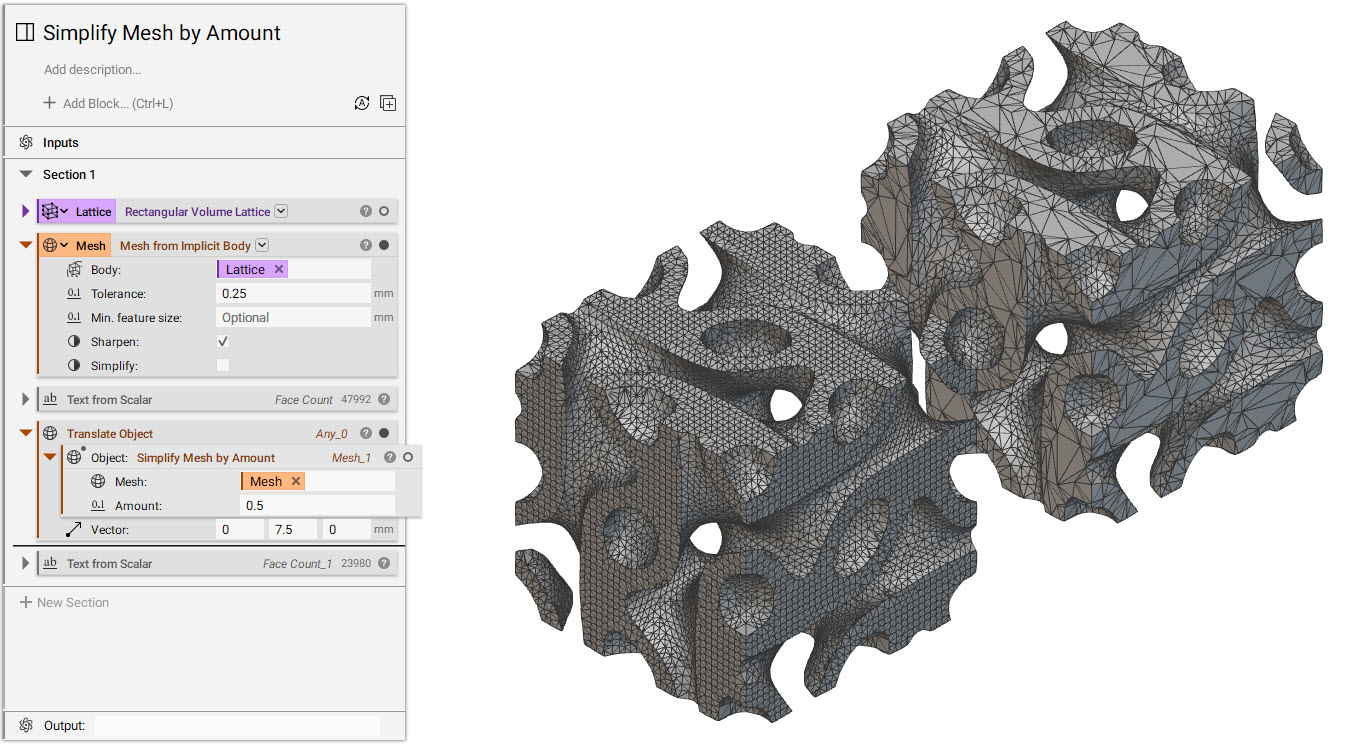
Simplify Mesh by Amount

Mesh, Scalar

Simplifies a Mesh by a specified target percentage, represented as a value from 0 to 1. An input of 0.1 will remove approximately 10 percent of the faces. A value of 1 will attempt to remove as many faces as possible, while still trying to preserve the general shape of the Mesh.

Inputs

NameTypeDescription
MeshMeshMesh to simplify.
AmountScalarTarget percentage for simplification represented as a value between 0 and 1. a value of 1 will attempt to remove as many faces as possible, while still trying to preserve the general shape of the mesh.

Outputs

Type
Mesh

Mesh, Scalar, 1.1.0

Simplifies a Mesh by a specified target percentage, represented as a value from 0 to 1. An input of 0.1 will remove approximately 10 percent of the faces. A value of 1 will attempt to remove as many faces as possible, while still trying to preserve the general shape of the Mesh.

Inputs

NameTypeDescription
MeshMeshMesh to simplify.
AmountScalarTarget percentage for simplification represented as a value between 0 and 1. a value of 1 will attempt to remove as many faces as possible, while still trying to preserve the general shape of the mesh.

Outputs

Type
Mesh

Mesh, Scalar, 1.2.0

Simplifies a Mesh by a specified target percentage, represented as a value from 0 to 1. An input of 0.1 will remove approximately 10 percent of the faces. A value of 1 will attempt to remove as many faces as possible, while still trying to preserve the general shape of the Mesh.

Inputs

NameTypeDescription
MeshMeshMesh to simplify.
AmountScalarTarget percentage for simplification represented as a value between 0 and 1. a value of 1 will attempt to remove as many faces as possible, while still trying to preserve the general shape of the mesh.

Outputs

Type
Mesh

Mesh, Scalar, 1.3.0

Simplifies a Mesh by a specified target percentage, represented as a value from 0 to 1. An input of 0.1 will remove approximately 10 percent of the faces. A value of 1 will attempt to remove as many faces as possible, while still trying to preserve the general shape of the Mesh.

Inputs

NameTypeDescription
MeshMeshMesh to simplify.
AmountScalarTarget percentage for simplification represented as a value between 0 and 1. a value of 1 will attempt to remove as many faces as possible, while still trying to preserve the general shape of the mesh.

Outputs

Type
Mesh