Issue:
My block won’t accept an input block, even though it is the correct type.Applies to:
Any workflow that can create a ListCause:
The most likely issue is that a List was created somewhere in your workflow and you are trying to insert a List into a List. nTop doesn’t allow this, which would cause the block input not to be accepted.Solution:
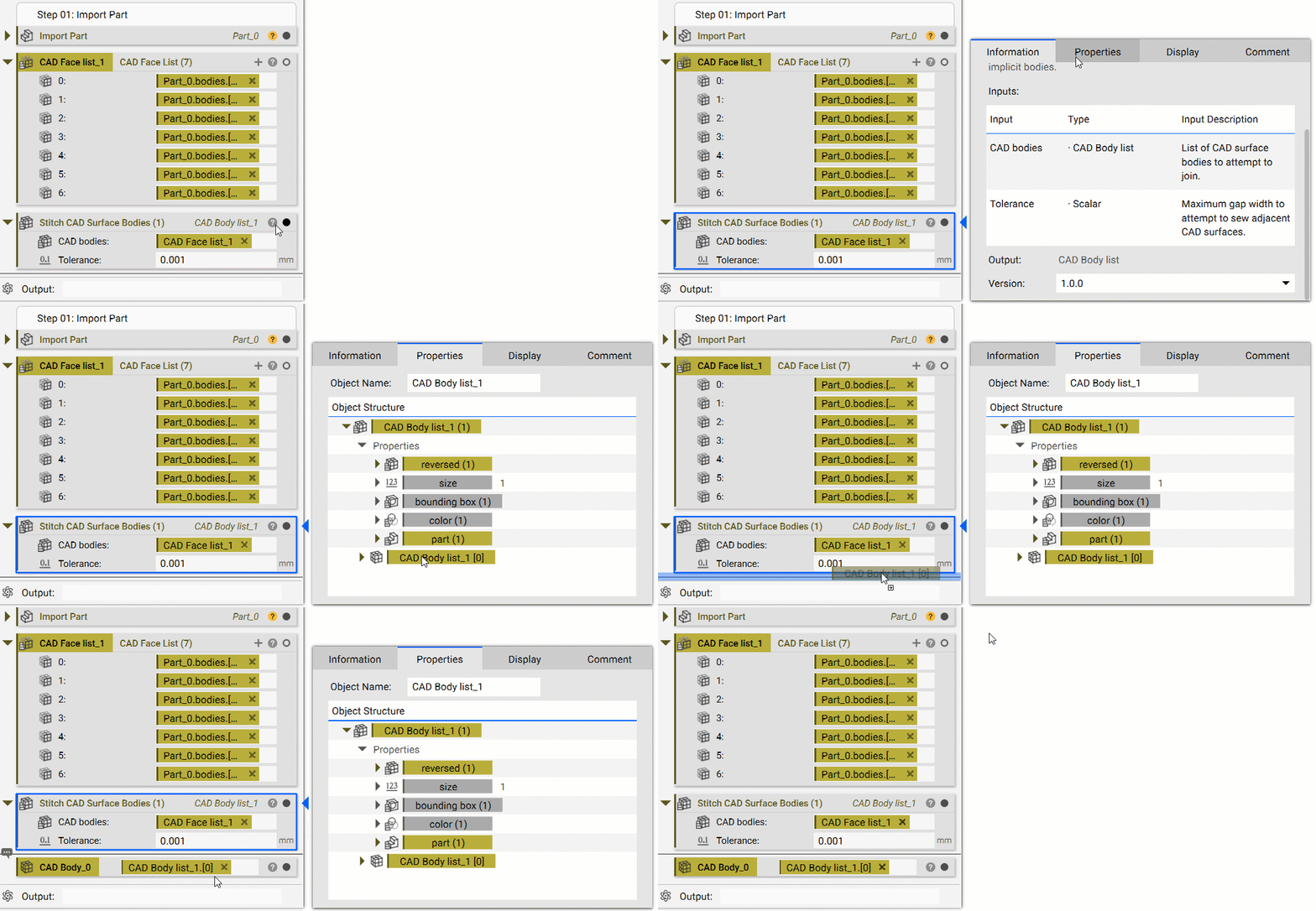
Scroll through your Notebook to see where the List began. You can tell something is a List because it will show the block type name with a (#) behind it. If you weren’t expecting a List, it most likely will show (1). There are several options on how to get rid of a List:- Use a Block to get rid of the List by joining bodies together
-
- If your List is Mesh, use Merge Meshes
- If your List is an Implicit, use Boolean Union
- If your List is CAD, use Stitch Adjacent CAD Faces (only works if Adjacent). If you use Stitch CAD Surface Bodies, you may end up with a List of 1.
- Open up the Properties of the List block and select the Chip at the bottom, of the same type, with [0] behind its name. Drag this Chip into the Notebook or directly into an input.