

Basic Implicit Operations
At the heart of nTop’s modeling capabilities are the fundamental geometric operations that enable the creation and combination of shapes. Many operations in nTop reflect those you might see in a B-rep CAD system.Primitives
Primitives
Primitives, found in the Create tab, are simple shapes that are generated as implicit bodies.
Transformations
Transformations
In the Utilities tab, you can find object Transformations such as: scaling, rotating, translating, and orienting. You can perform these operations on any type of geometry and in combination with each other. The block will output your transformed geometry while the original geometry remains as a prior block.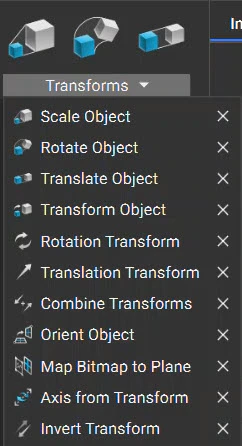
Modeling Operations
Modeling Operations
In the Modeling tab, you can find common operations such as: offsetting, extruding, shelling, thickening, and revolving. These operations may perform differently than expected on Implicit Bodies compared to traditional CAD.
Import & Conversion
Import & Conversion
The typical first steps of building a workflow are importing a part, then converting it into an implicit body to be able to work with it. Blocks for importing and conversion can be found in the Utilities tab.


If the part is not visible after importing, it may be because it is not at the location of the viewport. Use the hotkey ‘Z’ to bring the part into view.
Importing Parts
There are three main methods for importing parts, data, and more. See the full list of files types that can be imported into and exported out of nTop here.Method 1: Drag and Drop
Open the folder on your computer that contains the part file. Drag and drop it into nTop. This will import your part and automatically create a block.Method 2: File > Import
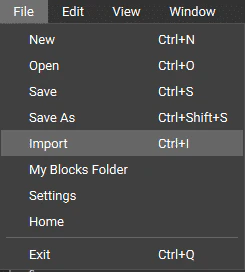
Go up to File > Import (or use hot-key Ctrl + I) to open the Import Window. From there, choose your file and it will import your part.Method 3: Import Block
Use the search bar and type in ‘Import’. All of the import options will pop up, allowing you to choose the block you need. These blocks can also be found in the Utilities tab in the Ribbon.If the part is not visible after importing, it may be because it is not at the location of the viewport. Use the hotkey ‘Z’ to bring the part into view.
Converting to an Implicit Body
Depending on your imported file type, different blocks are available for converting parts to an implicit body. Use the search bar to explore the possible block options. You can find these conversion blocks in the Utilities tab.Boolean Operations
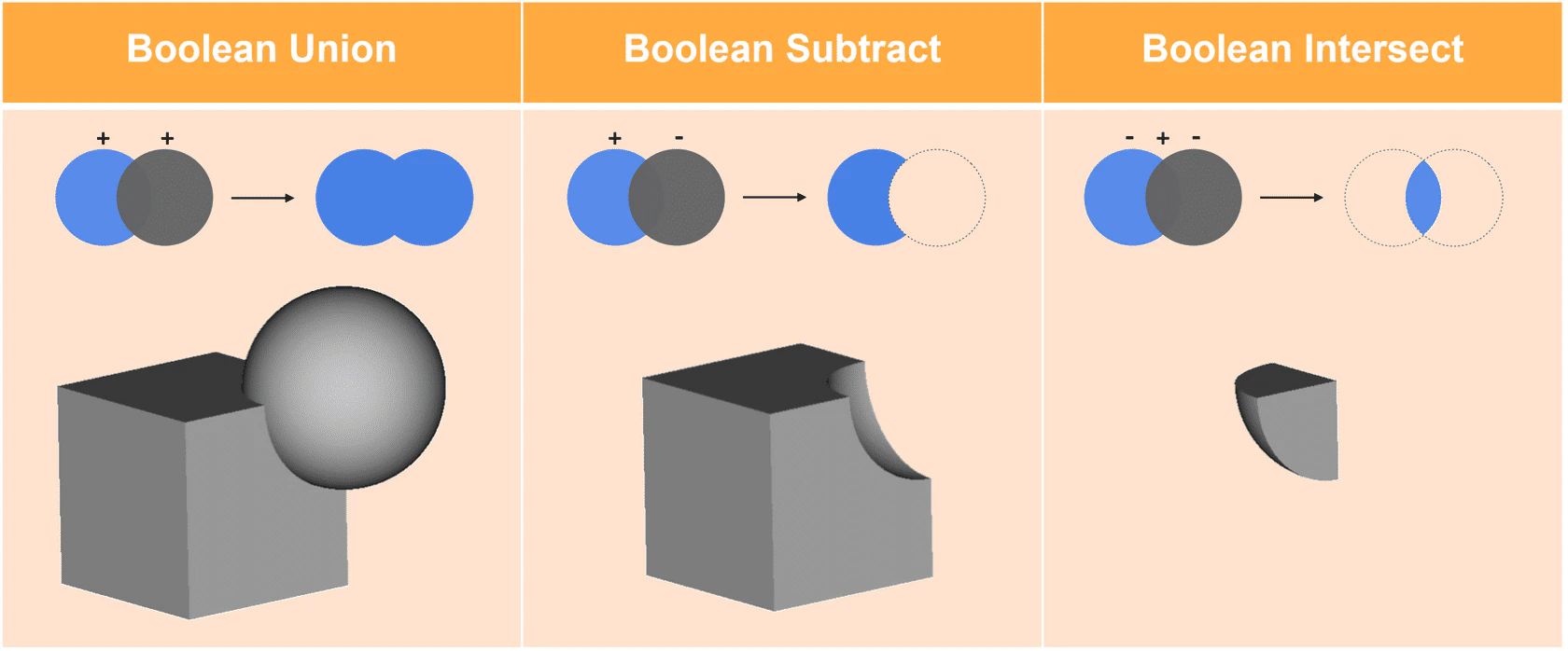
The Boolean operations – union, intersection, and subtraction – form the foundation of most modeling workflows. However, nTop’s implementation of these operations goes beyond simple geometric combination to include advanced blending and transition capabilities.
Boolean Union
Boolean Union
The Boolean Union function can create smooth blends between intersecting objects, eliminating the sharp edges that would result from simple geometric addition. This capability is controlled through blend radius parameters that can be constant or variable, enabling the creation of organic, flowing shapes that maintain the underlying geometric logic of the design.
Boolean Subtract
Boolean Subtract
The Boolean Subtract function, perhaps the most commonly used boolean operation, enables the creation of holes, pockets, and complex internal geometries. nTop’s implementation includes advanced options for draft angles, blend radii, and custom cutting directions, making it possible to create manufacturing-ready features directly within the modeling environment.The field associated with a plane has a value of 0 at the plane. The normal direction of the plane has a positive value, while the opposite direction is negative. Boolean subtracting keeps the part in the direction of the normal where field values are positive.
Boolean Intersect
Boolean Intersect
Boolean Intersect operations enable the creation of complex shapes by finding the common volume between multiple objects. This capability is particularly useful for creating components that must fit within specific envelopes or for generating complex internal structures through the intersection of multiple lattice or texture patterns.
Field-driven Operations
One of nTop’s most powerful capabilities is its ability to modify geometry using mathematical fields.- Ramp block system enables the creation of gradients and transitions that can control various geometric properties across the extent of a part. These ramps can be linear, exponential, or follow custom mathematical functions, providing precise control over how properties vary throughout the design.
- Remap Field blocks provide even more sophisticated control over field-based modifications. These blocks enable the transformation of existing fields through mathematical operations, allowing engineers to create complex spatial variations that respond to multiple input criteria. For example, a remap field might combine stress analysis results with manufacturing constraints to create a geometry that is both structurally optimized and manufacturable.
- Offset operations can be used create uniform or variable wall thicknesses
- Shell operations can hollow out solid geometries with precise control over wall thickness variations
Surface and Volume Operations
nTop provides sophisticated capabilities for creating and modifying complex surfaces and volumes.- Lofting operations enable the creation of smooth transitions between different profile shapes, with control over the transition path and cross-sectional variation. This capability is essential for creating aerodynamic shapes, ergonomic surfaces, or any geometry that must transition smoothly between different cross-sections.
- Sweeping operations extend the lofting concept by allowing profiles to follow complex 3D paths while potentially varying in size, orientation, or shape along the sweep path. This capability enables the creation of complex ducting, piping, or structural elements that follow non-linear paths while maintaining specific cross-sectional requirements.
- The surface area calculation and mass property analysis capabilities built into nTop, enable engineers to evaluate their designs quantitatively throughout the modeling process. These tools provide real-time feedback on how geometric modifications affect important design metrics, enabling optimization workflows that balance multiple competing objectives.
Optional Test Problem
Estimated Time to Complete: 15 minutesTest Problem Statement
Test Problem Statement
Now that you have learned the basics of nTop, feel free to try this optional test problem with a review of the answer in the following lesson.Create a torus with a radius of 10mm, and a torus radius of 4mm with the center at (0,10,0) mm. Then, translate the object 40mm along the positive y-direction and change the color of the object. Lastly, export as a 3MF with a mesh tolerance of 1mm.
Test Problem Solution
Test Problem Solution
0:25 Creating The Torus
0:44 Translating and Coloring the Torus
1:06 Meshing and Exporting the TorusThis video reviews the answer to the nTop Modeling test problem to create a torus, translate it and change the display color, and export it as a 3MF file. Example File:101_21_Completed — nTop Core Optional Test Problem.ntopReport File IssueThis file was last updated in nTop 5.15.2