

Question:
How can I build a custom unit cell with a line segment’s start and end points? How do you build a custom unit cell from CSV?Applies to:
- Custom Unit Cell
- Lattices
Answer:
- Create your input CSV file. In this example, I will use a CSV file with the following Header where (x1,y1,z1) are the start points and (x2,y2,z2) are the endpoints of the line segments.
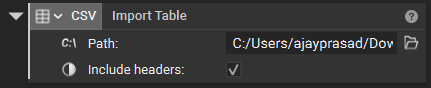
- Open nTop, and add an Import Table block to import your CSV file into nTop
- Now, use a combination of Extract Column as Text and Scalar from Text blocks to get the values in CSV as Scalars and Multiply with units of your choice.
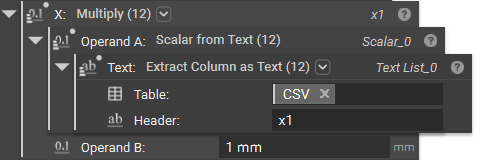
- Repeat the above step by copy-pasting the above block and changing the Header to the respective ones for all six columns, and you will have x1, y1, z1, and x2, y2, z2.
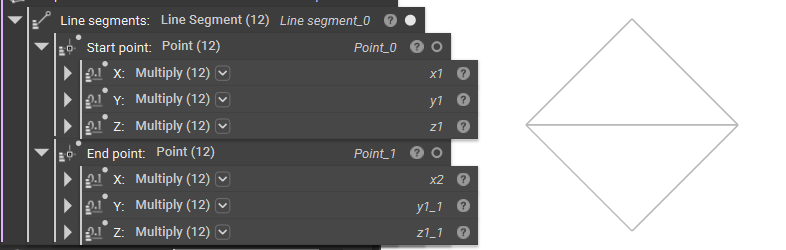
- We now have to convert the Line Segments into graphs to use them as input to the Custom Unit Cell block.
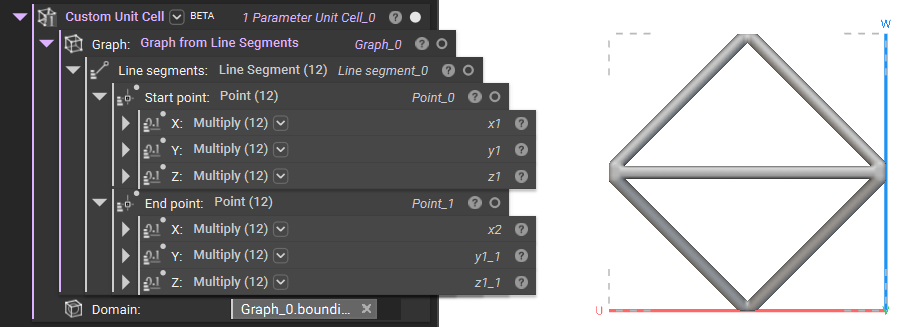 And that’s it; you have successfully made your Custom Unit Cell from a CSV file.