

Objective:
Learn how to create a valency (number of beams per node) point map from a lattice and export the data.Applies to:
- Exporting valency data
Procedure:
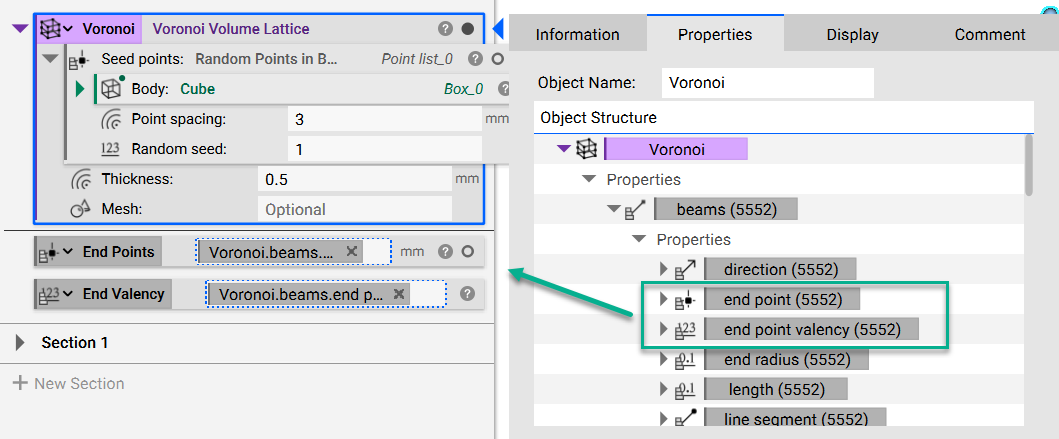
1. Start with your lattice To calculate this, you need to use one of the new lattice blocks. In this example, we are starting with a Voronoi Volume Lattice block. 2. Extract the Property chips- Open up the Properties of the Voronoi Volume Lattice block
- Expand the “beams” property
- Expand the ”> Properties” underneath the “beams”
- Drag out the “end point valency” chip and the “end point” chip into the Notebook
 3. Create the Point Map
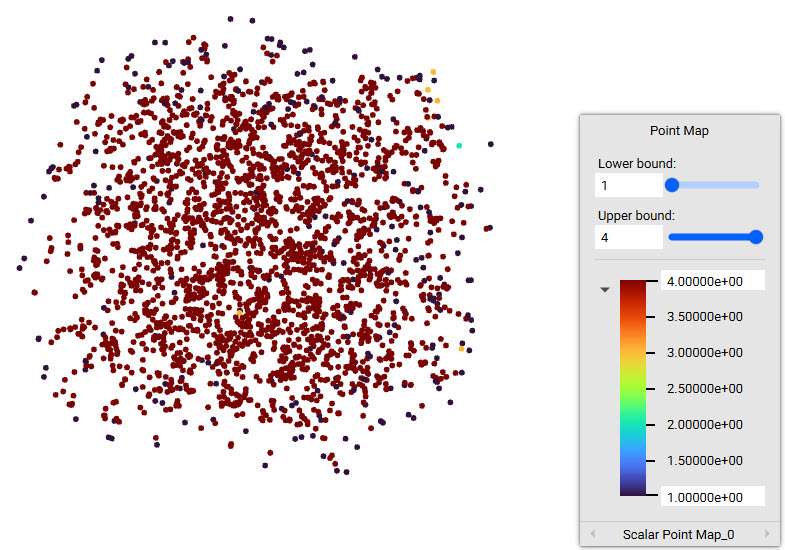
- Add a Point Map block
- Points: Insert the “End Points” chip
- Values: Insert the “End Valency” chip
 4. Export the Point Map
To use this data in Excel or another program, add an Export Point Map block.
And that’s it! You’ve successfully created a valency point map.
Are you still having issues? Contact the support team, and we’ll be happy to help!
4. Export the Point Map
To use this data in Excel or another program, add an Export Point Map block.
And that’s it! You’ve successfully created a valency point map.
Are you still having issues? Contact the support team, and we’ll be happy to help!