Gyroids are Triply Periodic Minimal Surfaces (TPMS). They are frequently used in engineering applications because they possess a high surface area relative to their volume, which significantly increases heat transfer efficiency.
Define the Design Space: Start with any Implicit Body to serve as the volume you wish to fill with the lattice. In this example, we will use a Cylinder block as the design space.
In this example, we will use a simple Cylinder block as the design space.
2. Select the Unit Cell:
Add a Walled TPMS Unit Cell block to the Unit Cell input of the Periodic Lattice block.
Set the Unit Cell type to Gyroid.
Enter an Approx. Thickness of 1 mm.
3. Define the Cell Map:
Add a Rectangular Cell Map block to the Cell Map input.
Set the Cell Size to 5, 5, 5 mm (or your desired periodicity).
Note: You can drag your initial Design Space (Cylinder) into the Volume input of the Cell Map to ensure the map covers the part geometry.
4. Trim the Lattice:
Add a Trim Lattice block.
Drag and drop your Periodic Lattice block into the Lattice input.
Drag and drop your Design Space (Cylinder) into the Body input.
Tip: If you require a solid body for Boolean operations (like a union with a solid shell), you can use a Boolean Intersect block instead of Trim Lattice, but note that this converts the lattice immediately to an Implicit Body.
And that’s it! You’ve successfully created a gyroid infill. If you want to build a complete Heat Exchanger, follow this course.Are you still having issues? Contact the support team, and we’ll be happy to help!


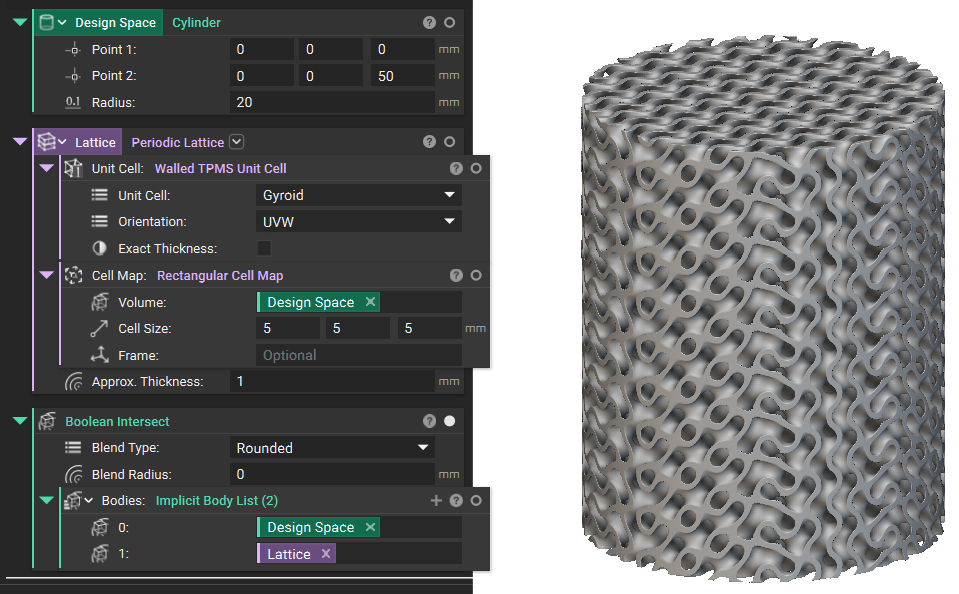 And that’s it! You’ve successfully created a gyroid infill. If you want to build a complete Heat Exchanger, follow this course.
Are you still having issues? Contact the support team, and we’ll be happy to help!
And that’s it! You’ve successfully created a gyroid infill. If you want to build a complete Heat Exchanger, follow this course.
Are you still having issues? Contact the support team, and we’ll be happy to help!