

Objective:
Learn how to use the Mix and Ramp block to blend two different types of TPMS together.Procedure:
The Mix block is what we use to blend the bodies together. To get a nice blend we need the bodies to be overlapping each other (so the block can use geometry from both to mix them). You decide the mixing factor, 0-1, where 0 is Scalar Field A and 1 is Scalar Field B. Using a Ramp block with the Mix block allows you to vary the mix factor along the part. 1. Set up the part and variables- Import your CAD body and then convert it to an Implicit Body.
- Create a variable of the Implicit Body and name it “Body Shape”.
- Open the Properties of the Implicit Body, and drag the Bounding Box chip into the Notebook to create a Variable of this parameter (this will be used in the final step).
- Add a Periodic Lattice block.
- Unit cell: Walled TPMS Unit Cell.
- Unit cell: Gyroid.
- Cell map: Rectangular Cell Map.
- Approx. thickness 1 mm.
- Duplicate the variable and change the Unit cell: Schwarz.
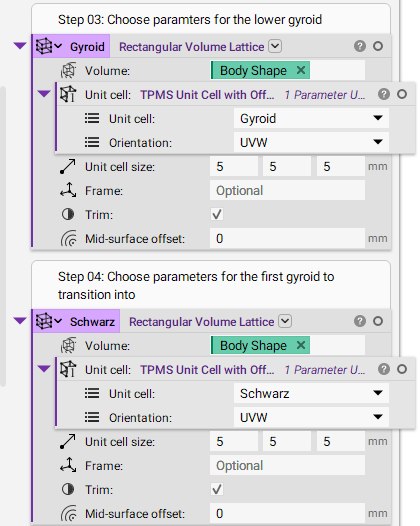 3. Set up the mixing parameters
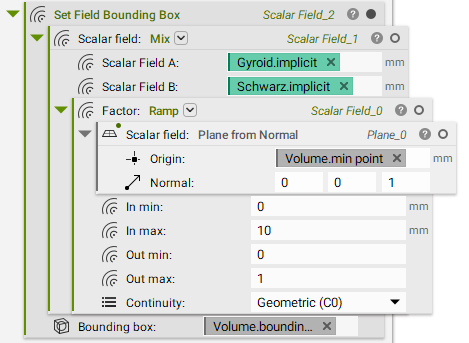
- Add a Ramp.
- Create a Plane from Normal for the Real Field input.
- Use the Min Point property from the Implicit Body “Body Shape” for the plane origin to place it at the bottom of the part.
- Set In min: 0 mm, In max: 10 mm, Out min: 0, Out max: 1.
- Check the Plane from Normal and set the In and Out values based on the location of the plane.
-
- Add a Mix.
- Real Field A: Drag and drop the Implicit chip from the Gyroid Lattice.
- Real Field B: Drag and drop the Implicit chip from the Schwarz Lattice.
- Set the Factor to the Ramp.
- Add a Set Field Bounding Box.
- Set the Real Field to the Mix block.
- Set the Bounding Box to the bounding box variable made at the beginning.
 And that’s it! You’ve successfully mixed two TPMS types together.
Are you still having issues? Contact the support team, and we’ll be happy to help!
And that’s it! You’ve successfully mixed two TPMS types together.
Are you still having issues? Contact the support team, and we’ll be happy to help!