

Objective:
Calculate the surface area of a cross-section.Procedure:
1. Section the Implicit Body First, create the cross-section of your part.- Add a Section Body block.
- In the Body input, insert the geometry you want to measure.
- In the Plane input, define the sectioning plane. A Plane from Normal block is a common way to do this. You can use a list of Point inputs to create multiple planes.
- Add a Surface Area block.
- Insert the Section Body block from the previous step into the Body input.
- You can see the calculated surface area value in the header of the Surface Area block’s information panel.
- If you select a list of planes, open the block’s Properties panel to view a list of all the calculated surface area values.
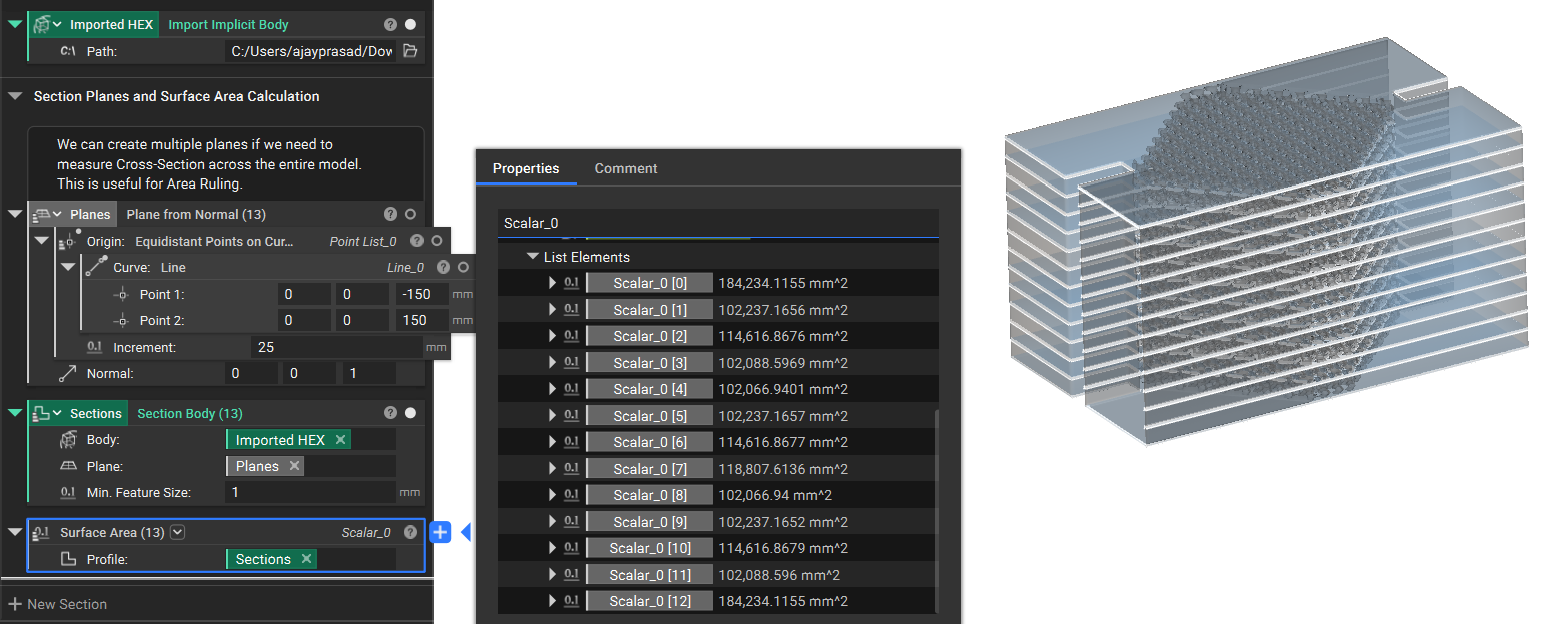 And that’s it! You’ve successfully calculated the surface area of a cross-section in three simple steps.
Are you still having issues? Reach out to the support team, and we’ll be happy to help!
And that’s it! You’ve successfully calculated the surface area of a cross-section in three simple steps.
Are you still having issues? Reach out to the support team, and we’ll be happy to help!