

Question:
How do I scale a model by different factors in X, Y, Z? The Scale Object block only allows for uniform scaling. How do I scale my part using a Ramp?Answer:
Non-uniformly:
Instead of using the Scale Object block, use the Remap Scale Body block. This block allows you to scale the object differently in each direction.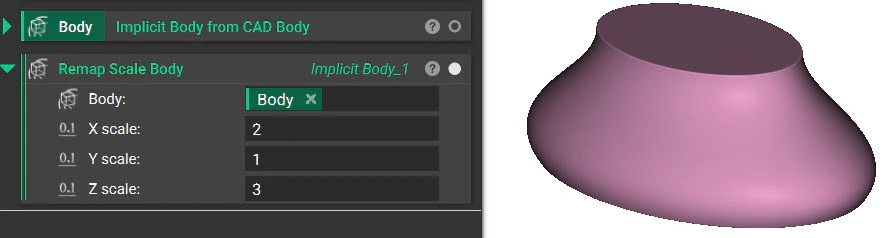
With a Ramp:
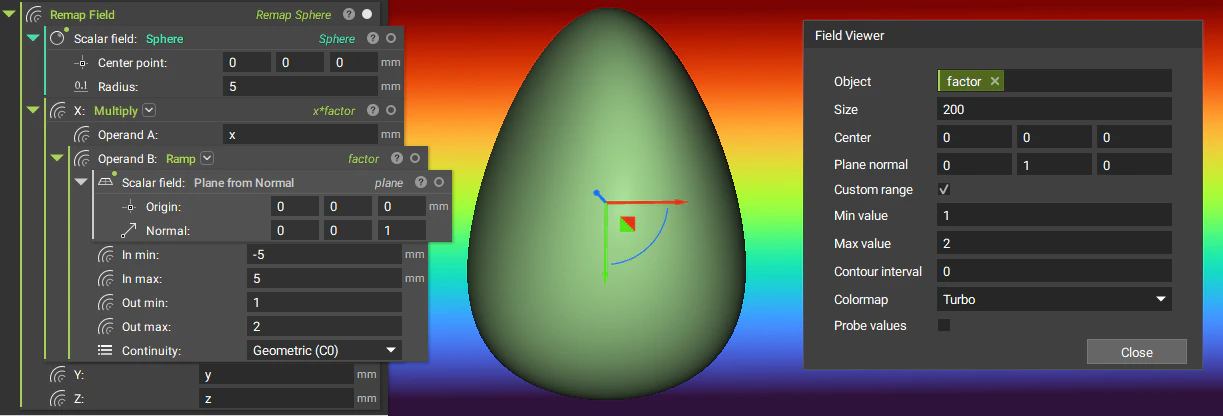
Use the Remap Field block. You can read more on using that block here: Introduction to the Remap Field block Use this setup for each direction you want to scale in:- Multiply (to shrink) or Divide (to expand)
- Operand A: X, Y, or Z
- Operand B: Ramp
- Out min and Out max are the scale values.
- How to Model a Gyroid
- Using Boolean Operations
- How to use Remap Field to scale or translate an object