

Objective:
Learn how to create a material with specific properties.Applies to:
- Simulation
- Topology Optimization
- Creating Simulation Models
Procedure:
There are three options for materials in nTop: Isotropic, Orthotropic, or Anisotropic material.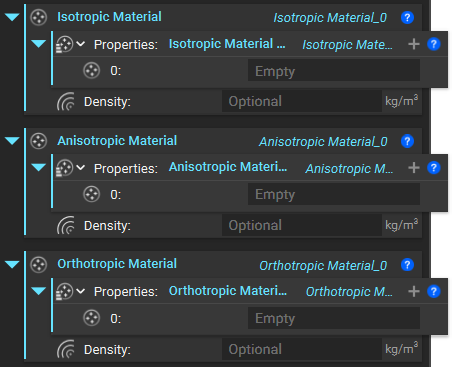 Isotropic materials have the same properties in every direction, whereas orthotropic materials have properties that vary in three directions, and Anisotropic materials have different properties in different directions.
Steel and most metals are examples of isotropic materials. Carbon fiber-reinforced polymers are an example of an orthotropic material. Wood is an example of an anisotropic material with different strengths along its grain than across its grain.
nTop also has a selection of sample materials under the Design Analysis section in the Ribbon.
Isotropic materials have the same properties in every direction, whereas orthotropic materials have properties that vary in three directions, and Anisotropic materials have different properties in different directions.
Steel and most metals are examples of isotropic materials. Carbon fiber-reinforced polymers are an example of an orthotropic material. Wood is an example of an anisotropic material with different strengths along its grain than across its grain.
nTop also has a selection of sample materials under the Design Analysis section in the Ribbon.
- Determine whether your material is isotropic, orthotopic, or anisotropic, and add the respective block. In this example, we are going to build Inconel 625, an isotropic material.
-
- Add an Isotropic Material block.
- Determine which properties you want to use:
-
- Linear Elastic Property
- Young’s modulus
- Poisson’s Ratio
- Thermal Expansion Property
- Alpha
- Thermal Property
- Conductivity
- Specific heat
- Add the Property blocks to the Isotropic Material Property List. Use the ’+’ to add more inputs to the list.
-
- Add the Isotropic Linear Elastic Property
- Add the Isotropic Thermal Property
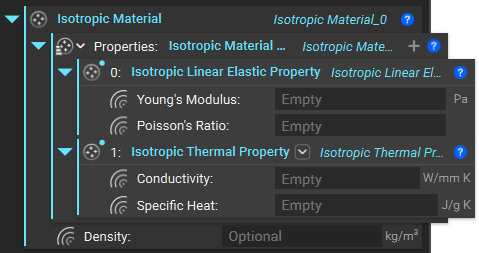
- Add the values for each input to create the material.
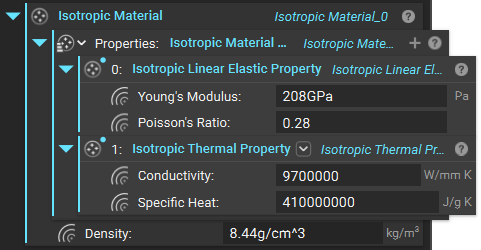 If you are using a material frequently, we recommend creating it in a standalone Notebook and saving it as a Custom block with no inputs to be made as Custom block.
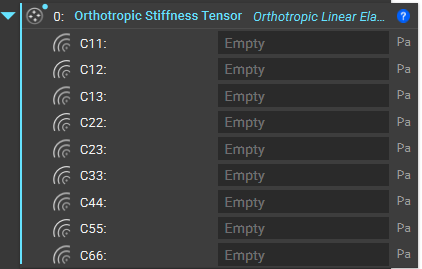
You should use an Orthotropic Stiffness Tensor block if your material is Orthotropic.
This block defines an Orthotropic Linear Elastic Property by specifying a positive definite, second order, symmetric stiffness tensor in Voigt notation for the constitutive relationship sigma_i = C_ij * epsilon_j (i,j=1,6), where sigma = (sigma_xx, sigma_yy, sigma_zz, sigma_yz, sigma_zx, sigma_xy) and epsilon = (epsilon_xx, epsilon_yy, epsilon_zz, gamma_yz, gamma_zx, gamma_xy).
If you are using a material frequently, we recommend creating it in a standalone Notebook and saving it as a Custom block with no inputs to be made as Custom block.
You should use an Orthotropic Stiffness Tensor block if your material is Orthotropic.
This block defines an Orthotropic Linear Elastic Property by specifying a positive definite, second order, symmetric stiffness tensor in Voigt notation for the constitutive relationship sigma_i = C_ij * epsilon_j (i,j=1,6), where sigma = (sigma_xx, sigma_yy, sigma_zz, sigma_yz, sigma_zx, sigma_xy) and epsilon = (epsilon_xx, epsilon_yy, epsilon_zz, gamma_yz, gamma_zx, gamma_xy).
Note: Providing scalar fields as inputs will result in spatially varying material properties.
 If you want to create an Anisotropic Material, you need to input an Anisotropic Stiffness Tensor.
Defines an Anisotropic Linear Elastic Property by specifying a positive definite, second order, symmetric stiffness tensor in Voigt notation for the constitutive relationship
If you want to create an Anisotropic Material, you need to input an Anisotropic Stiffness Tensor.
Defines an Anisotropic Linear Elastic Property by specifying a positive definite, second order, symmetric stiffness tensor in Voigt notation for the constitutive relationship
 Cij: Material Stiffness Component i,j
Note: The block has a total of 21 material stiffness component inputs, as indicated in the following image
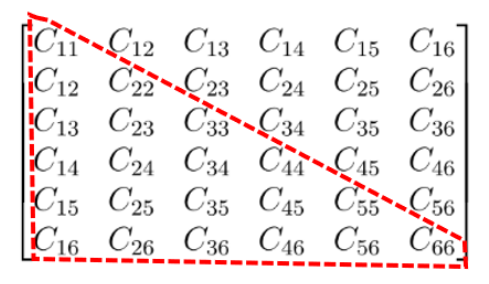
Note: Providing scalar fields as inputs will result in spatially varying material properties.
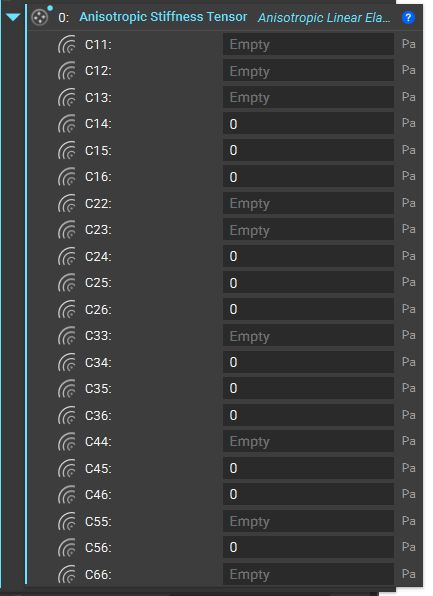 Similarly, we have Anisotropic Thermal Property and Anisotropic Thermal Expansion Property blocks to define an anisotropic material’s thermal properties, such as conductivity, specific heat, and thermal expansion properties.
Fluid Material
If you are creating a material for a Fluid Domain, fluids are isotropic materials. You will then need to input an Isotropic Fluid Property (BETA) block to properly define the fluid.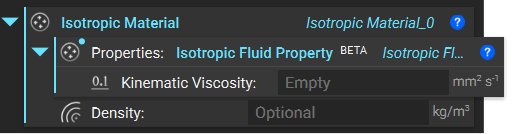 And that’s it! You’ve successfully created a material.
Are you still having issues? Contact the support team, and we’ll be happy to help!
And that’s it! You’ve successfully created a material.
Are you still having issues? Contact the support team, and we’ll be happy to help!