

Question:
What are the steps involved in running a simulation (or analysis) in nTop?Answer:
Simulations are a powerful tool, enabling you to use the results directly in your design by utilizing fields. From simple to complex, simulations follow a basic format. The image below represents the minimum setup for a simulation to run.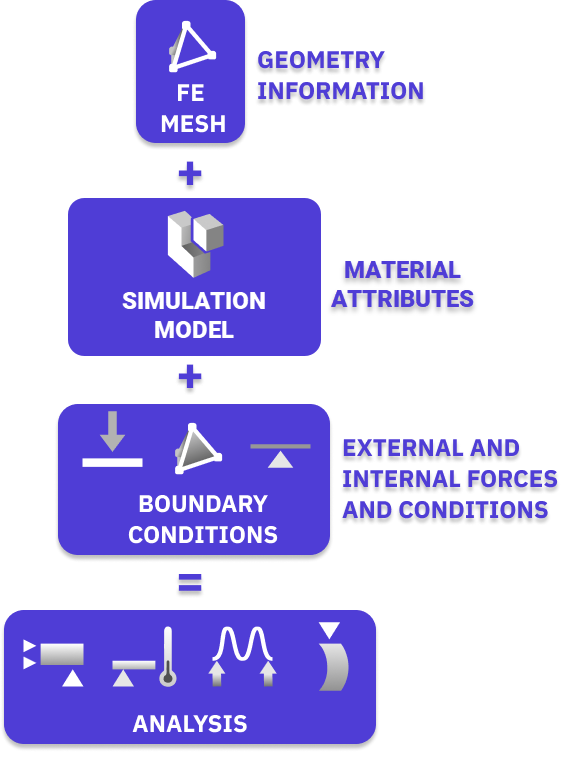 The Finite Element (FE) Mesh is a volume mesh that adds integration points to each element within the mesh (either linearly or quadratically). A simulation needs at least one FE Mesh.
The Simulation Model adds Material information by adding Domains and Connectors. The most simple Simulation Model will have a Domain that has an FE Mesh or Implicit Body, a Material Attribute, and has no Connectors.
Boundary Conditions (BCs) can be thought of as the environment your part is in. They include Forces, Displacement Restraints, Heat Generation, Pressure, and more. You will typically need a minimum of two BCs to run a simulation. To use a BC, you need to be able to select the area it is acting upon by using the boundary selection tools.
The Finite Element (FE) Mesh is a volume mesh that adds integration points to each element within the mesh (either linearly or quadratically). A simulation needs at least one FE Mesh.
The Simulation Model adds Material information by adding Domains and Connectors. The most simple Simulation Model will have a Domain that has an FE Mesh or Implicit Body, a Material Attribute, and has no Connectors.
Boundary Conditions (BCs) can be thought of as the environment your part is in. They include Forces, Displacement Restraints, Heat Generation, Pressure, and more. You will typically need a minimum of two BCs to run a simulation. To use a BC, you need to be able to select the area it is acting upon by using the boundary selection tools.
- How to Select Boundaries of an FE Mesh - FE Boundary by Body
- How to Select Boundaries of an FE Mesh - FE Boundary by Flood Fill
- How to use Boundary Conditions
- How to use a CAD Face in a boundary condition
- How to run a buckling analysis
- How to run a Flow Analysis
- Thermal and Thermal Stress Analysis
- How to run a nonlinear thermal analysis
- How to use Simulation Results to Create a Point Map or Field
- How can I Export the Displacement Results from a Simulation?