

Objective:
Create an FE Mesh for a Trimmed Shell Lattice.Applies to:
- Simulating lattices
- Shell Lattice is too complex to use the FE Lattice Mesh block (Invalid Mesh Topology error appears)
Procedure:
- Start with a Trim Lattice block to create a lattice.
- Open the Properties of the Trim Lattice block and extract the ‘faces as mesh’ chip into the Notebook.
-
- To get to this property, expand thick lattice > lattice > faces as mesh.
- Add a Simplify Mesh by Amount block.
-
- Set the Amount to 0.00001.
- Add an FE Surface Mesh block.
-
- Set the Geometric order to Quadratic.
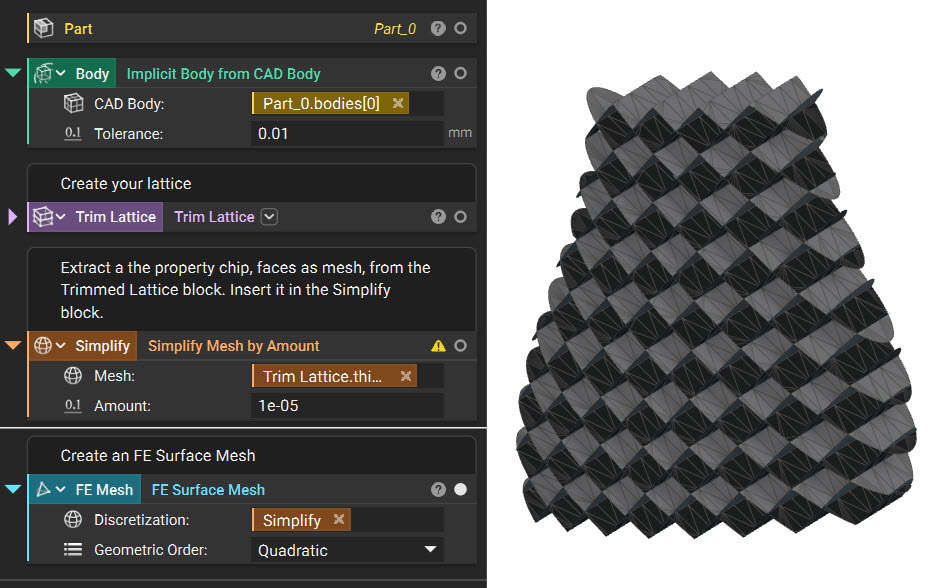 And that’s it! You’ve successfully created the FE Mesh for a complex shell lattice.
Are you still having issues? Contact the support team, and we’ll be happy to help!
And that’s it! You’ve successfully created the FE Mesh for a complex shell lattice.
Are you still having issues? Contact the support team, and we’ll be happy to help!