

- Build and prepare the workflow in the graphical user interface (GUI). Create and validate the model, then define the Inputs and Outputs needed for automation.
- Run the workflow headlessly**.** Supply new input values, execute the Notebook without the GUI, and collect the resulting outputs.
nTop CLI
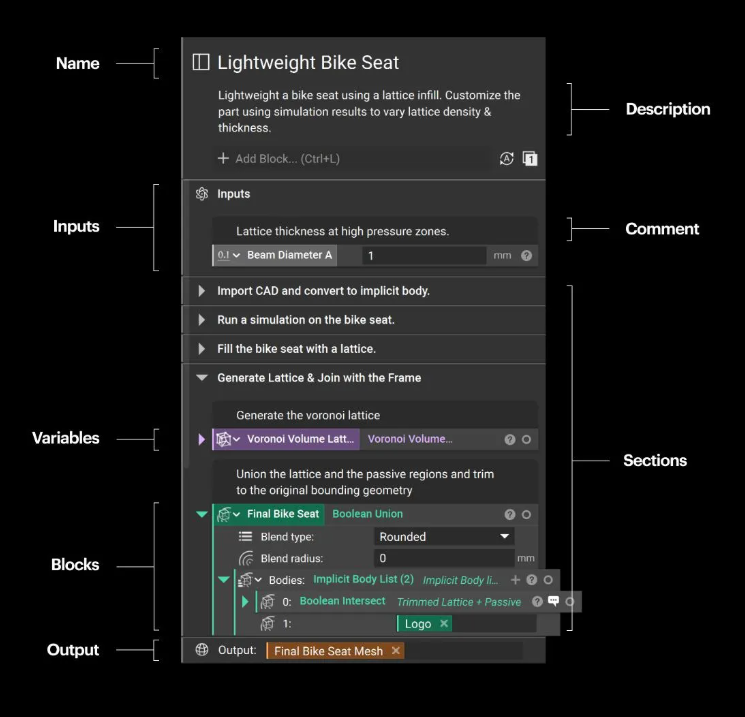
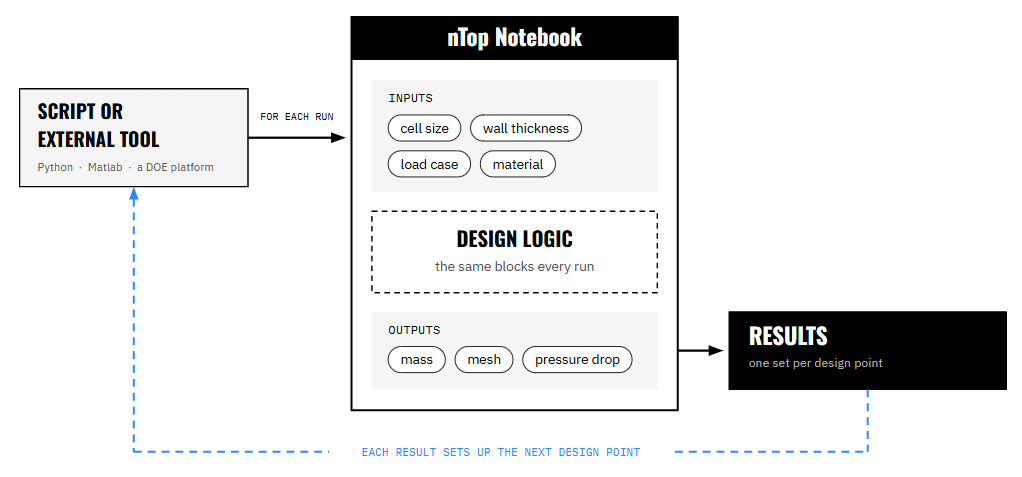
The nTop CLI interface runs an nTop Notebook without the graphical user interface. It uses the same modeling engine as the nTop application but executes the workflow through a command-line interface. Notebooks can be launched from a terminal or scripting language such as Python, enabling workflows to run unattended, in parallel, and at scale across available compute resources. Headless execution communicates with the Notebook through JSON files—plain-text files that store named values in a format programs can read and write. Think of the JSON file as an order form: the Notebook’s Inputs section defines the fields, and the JSON file supplies the value for each input. nTop Automate can generate this input template directly from the Notebook, so you do not have to build it from scratch. Results are returned the same way. The Notebook’s Outputs—such as mass, pressure drop, or the path to an exported mesh—are written to an output JSON file. This “JSON in, JSON out” structure makes the workflow easy to scale: a 200-variant design study is essentially 200 sets of inputs passed through the same Notebook. Three things become possible once a script supplies the inputs:- Repetition stops costing time. Two hundred design variants take the same amount of your attention as one. Engineering effort shifts entirely to building the workflow well.
- nTop becomes one node in a larger pipeline. Any tool that can write a file and start a process can drive a Notebook — Python, Matlab, a shell script, a commercial Design of Experiments (DOE), or Multidisciplinary Design Optimization (MDO) platform. nTop Automate is as much an integration mechanism as an automation one.
- The workflow becomes callable by something other than a person. A script is the simplest example, but the same interface can also be driven by a design study, a cloud simulation service, or an AI agent — all of which you’ll see later in this lesson.
Running the other direction: Run Command
Automation does not only run from outside nTop. The Run Command block, found in the Utilities tab under System, allows a Notebook to execute an external command and use the returned output. This means a workflow can call a solver, a sampling script, or a cloud API partway through a build, then use those results to drive the subsequent geometry. These two directions can work together. A script can drive nTop from the outside while Run Command connects to external tools from within the Notebook. This two-way exchange is the foundation of the pipelines you’ll see later in this lesson — allowing an nTop Notebook to sit within a larger design loop, rather than simply at the beginning of one.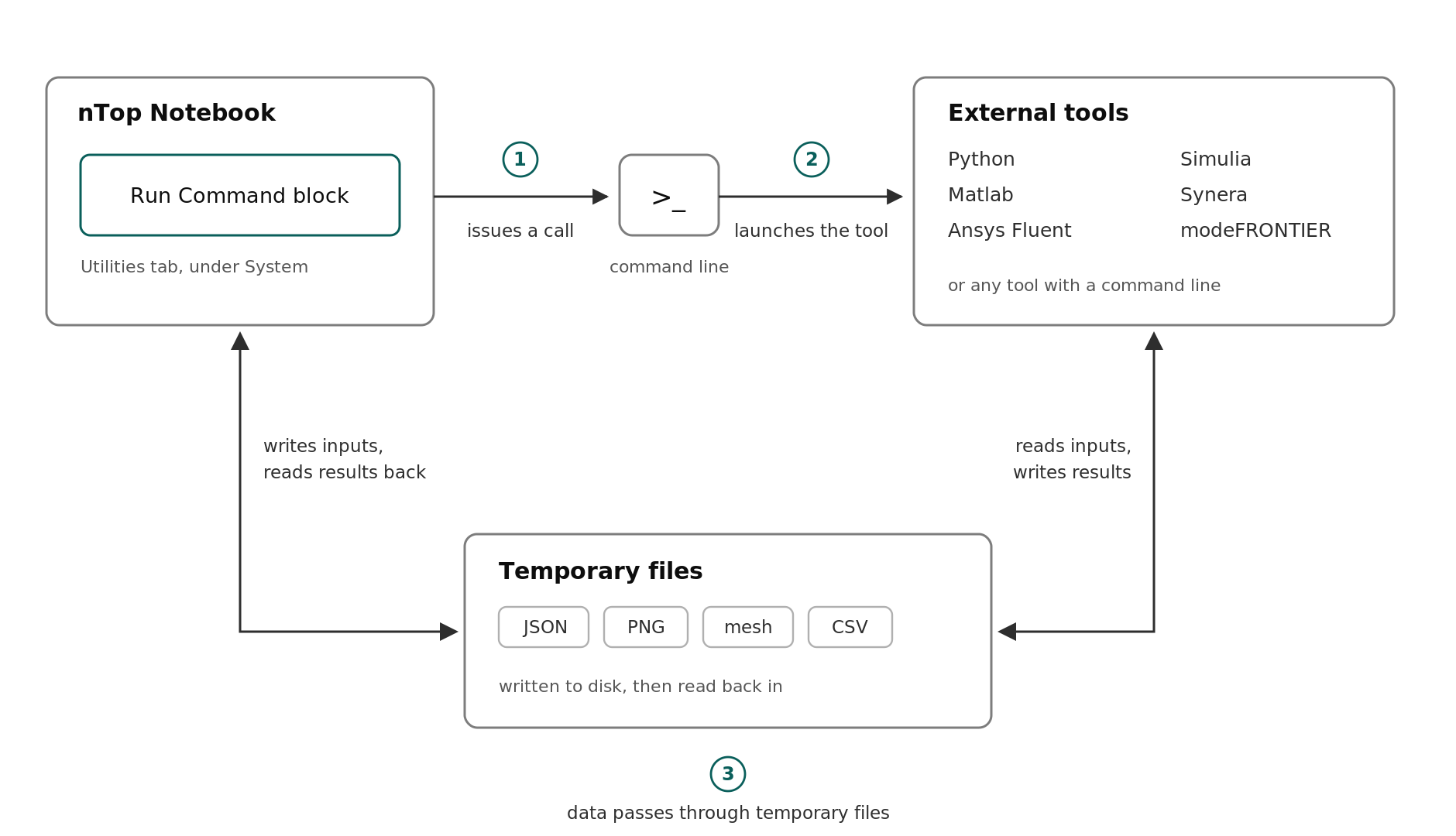
Scaling Out: Distributed Compute
Automating a workflow removes the person from the loop. It does not, on its own, speed up the loop. Consider the arithmetic: if each design variant takes ten minutes to generate and simulate, a 500-point design study run sequentially takes about three and a half days. The workflow is not the problem—the wall-clock time comes from running each variant one after another. Distributed compute changes what that number depends on. Run 100 variants simultaneously, and the same study finishes in under an hour. The relevant question shifts from “how fast is one run?” to “how many can run at once?” Because nTop Automate is headless, it distributes cleanly. A few things make this practical:- nTop Distributed Computing Framework provides ready-to-use orchestration tooling that connects your laptop to scaled and distributed on-prem compute.
- nTop Automate for Linux ships as a container image, so you can spin up an identical environment on any machine that runs Docker or Podman—a cluster node, a cloud VM, or a CI pipeline. Each running container requires its own nTop Automate for Linux license while it’s active.
- GPU-accelerated blocks work in the container, including Flow Analysis (LBM), given an NVIDIA GPU and the NVIDIA Container Toolkit.
- Cloud hosting is available through Rescale, either as a virtual desktop or as batch cloud computing.
nTop and AI
Two distinct things get called “AI in engineering,” and they place very different demands on your geometry. It is worth separating them.1. Generating data to train AI models
A surrogate model is trained on data from a more expensive process — often simulation results — to predict performance without running that process from scratch. Once trained, it can make predictions in milliseconds that might otherwise take a solver hours. For simulation-trained surrogates, the challenge is generating those examples: thousands of designs may need to run successfully without human intervention. Traditional CAD can introduce geometry failures that interrupt automated sweeps. Implicit modeling changes that equation, making it possible to generate large numbers of valid design variants and the simulation data needed to train a surrogate model. Three examples of what this looks like in practice: Luminary Cloud — automated design space exploration. An nTop pipeline sampled five wing parameters (NACA airfoil series, sweep angle, taper ratio, winglet bend angle, and root chord to wingspan ratio) using Latin Hypercube Sampling. For each design point, nTop Automate generated the geometry and a CGNS volume mesh with boundary conditions applied, and Run Command dispatched the CFD to Luminary Cloud through its Python SDK. A 200-design sweep produced 3,400 individual CFD runs in under six hours — a dataset built specifically to be usable as surrogate training data. PhysicsX — a single pipeline from geometry to prediction. nTop and PhysicsX connect into a single pipeline that runs from parametric geometry through surrogate training to real-time prediction back inside nTop. Uncertainty quantification and active learning keep the trained models trustworthy as they are applied — a reminder that a surrogate is a prediction with error bars, not an oracle. Physics AI shifts the optimization bottleneck from simulation to geometry, which is why the robustness point above matters so much. Lockheed Martin — heat exchanger optimization. Lockheed Martin set out to optimize a dual-fluid heat exchanger with a gyroid-based TPMS core: to maximize heat transfer and minimize pressure drop across varied inlet flow conditions and within additive manufacturing constraints. TPMS geometry is notoriously difficult to mesh, so the team used a parameterized implicit model with voxel-based CFD, skipping meshing entirely. A Latin Hypercube sampling strategy covered the design space, and the team simulated over 400 design points in eight hours with zero failures. That dataset was used to train two models: a neural network that predicts scalar quantities such as pressure drop and heat transfer, and a Fourier Neural Operator (FNO) that predicts full fields. Inference took about one second, compared with simulation times of 430 to 3,600 seconds — fast enough to demonstrate inverse design in seconds, compared with a starting point where setting up a single TPMS analysis could take weeks. All three examples follow the same pattern: robust parametric model → automated sweep → parallel simulation → trained surrogate. Executing nTop headlessly enables the automated sweep, while distributed compute makes it possible to run those simulations in parallel at scale.Bringing the model back into nTop
A trained surrogate is not only useful outside nTop. The Import Neural Network block, in the Parameter Optimization [Beta] tab under Surrogates, imports a neural network from an ONNX file for direct evaluation in the Notebook. Paired with the Dependent Parameter block under Composition, which evaluates a surrogate and updates whenever its inputs change, you can drive geometry from a model’s prediction in real time rather than waiting on a solver. A later course will cover more on Parameter Optimization in nTop.
2. AI agents running the workflow
The second application is not a model that predicts physics. It is an agent that operates the tools — deciding what to change, running workflows, and routing results without a person managing every handoff. The distinction from automation is important. Automation follows a predefined process: a DOE sweep might run the same workflow 200 times with different inputs. An agent can respond to the results, decide what needs to change, and continue. JetZero provides an example. Its blended wing body (BWB) aircraft has deeply interconnected parameters, so one change can affect geometry and downstream analyses. A parametric nTop Notebook allows that geometry to regenerate reliably as parameters change. The nTop geometry engine can also operate as a native skill within agentic AI frameworks, as demonstrated with NVIDIA NemoClaw. In this type of workflow, an agent can:- Read the nTop Notebook schema to discover available parameters
- Populate or modify those parameters
- Dispatch geometry jobs across available cloud compute
- Route the outputs to the appropriate analysis tools
What to Take Away
- An nTop Notebook is a function: inputs in → geometry and numbers out. The nTop CLI interface is how something other than a person supplies the inputs.
- Automating removes the person from the loop; distributed compute removes the serial execution bottleneck. Both are needed before scale means anything.
- AI training data is a geometry problem first. Thousands of valid variants are required, and this is where traditional CAD fails.
- Physics AI predicts performance. Agentic engineering operates the tools. They are different capabilities that happen to share a foundation.
- That shared foundation is a robust, structured, parametric Notebook — the same thing that makes a workflow reusable by a colleague makes it usable by a machine.